
 Share
Share
 Print
Print
|
|
|
|
|



The T/C (Task Card) Tab allows the user to view all T/Cs related to the Work Orders in the Display By Area.
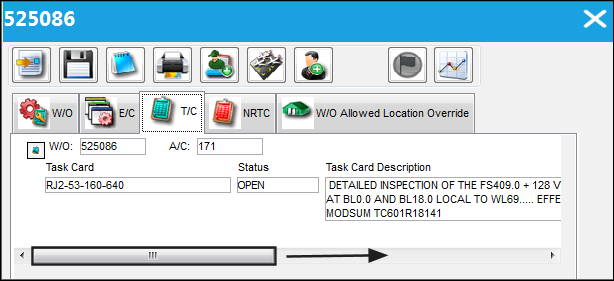
The following information/options are available in this window:
_____________________________________________________________________________________
W/O
The Work Order used to categorize, manage, and schedule work requirements for aircraft maintenance.
A/C
The individual aircraft tail number.
Task Card
The Task Card / Job Card that details the scheduled maintenance work.
Status
The status of the Task Card.
Task Card Description
Task Card Description.
P/N
The Part Number reference for the aircraft part.
P/N S/N
The Serial Number for the specific serialized part.
Corrosion checkbox
This checkbox is selected if this is a Corrosion Card. If this box is checked, the appropriately related field will appear on the Work Order.
SEQ
The Sequence Number. This number is generated from the number of times the Work Order Pack Print is printed (i.e. If there are ten Task Cards on a Work Order, and the Work Order has been printed twice from the Work Order Pack Print, for the first occurrence of the Work Order Pack Print, the Task Card would have a SEQ of one. For the second occurrence, the Task Card would have a SEQ number of 11.
_____________________________________________________________________________________
Share
Print
|
©1997-2026 Trax USA Corp. All rights reserved. This manual may not be copied, photocopied, reproduced, translated, or converted to any electronic or machine-readable form, in whole or in part, without prior written approval from Trax USA Corp. |
 |