 Download Online Help
 Print
|
|
|
|
|


Parts Tab
The Parts tab lists all parts that are required for the Work Order's Task Cards and Non-Routine Task Cards. This listing includes the part's basic information along with the required Quantity, linked Task Cards and Requisitions, and the part's availability. Users can also add notes regarding the part for the next Shift Turnover.
 This tab is security controlled via Line Control/ Update/ Parts. For additional information, refer to the Security Explorer.
When selected, the Parts tab is displayed as follows. The list can be sorted and filtered by column and keywords. Notes can also be added for specific parts from this tab (see below).
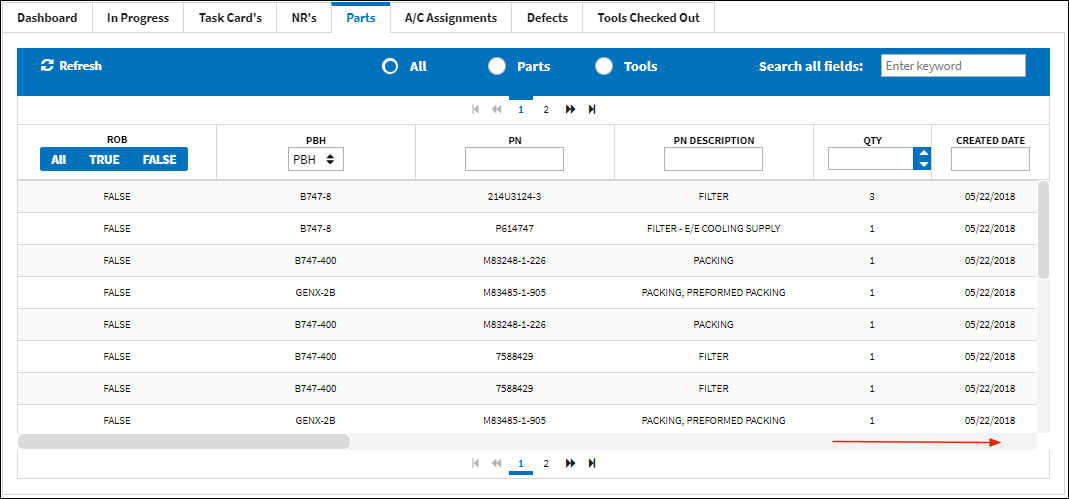
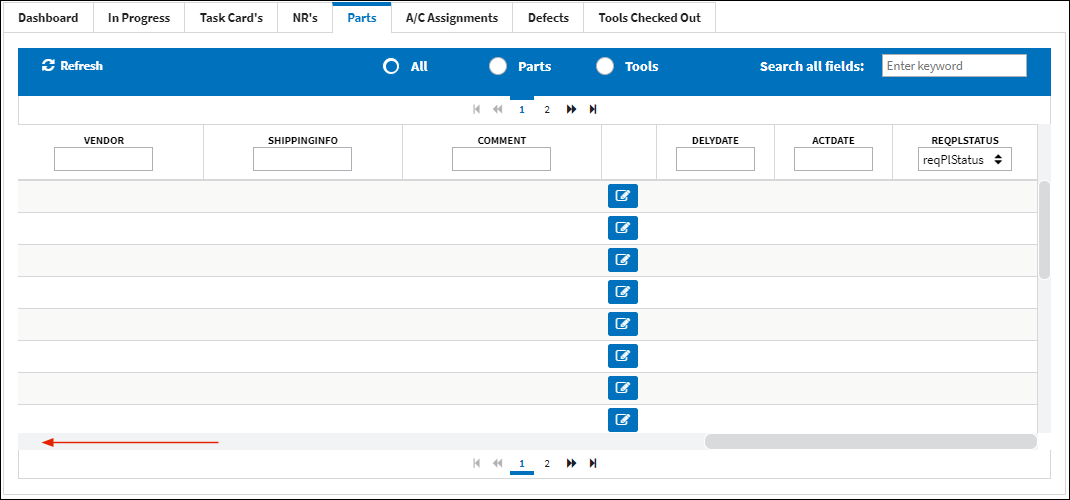
The following Part information is listed:
_________________________________________________________________________
Refresh  button
Select the Refresh button to refresh any of the Task Card information in this window.
Search all fields
The Search all fields option allows the user to enter any key word(s) to filter for a specific Task Card.
Part Selection Radio buttons
Select on the above radio buttons to filter for parts bases on the radio button selected.
All radio button - Select the All radio button to filter for all parts and tools required for the Work Orders Task Cards and Non-Routine Task Cards.
Parts radio button - Select the Parts radio button to filter for all parts required for the Work Orders Task Cards and Non-Routine Task Cards.
Tools radio button - Select the Tools radio button to filter for all tools required for the Work Orders Task Cards and Non-Routine Task Cards.
ROB
Indicates if the part was 'robbed' from another aircraft in order to fulfill this W/O's part requirement.
PBH
The Power By the Hour number associated to the required part (if applicable).
PN
The Part Number reference for the aircraft part. This is the part required for the W/O T/C or N/R T/C.
PN DESCRIPTION
The description of the part.
QTY
The amount of the part required for the W/O's task.
CREATED DATE
The date that the part requirement was linked to the W/O Task Card.
CREATED BY
The user who created the part requirement via the W/O Task Card window in TRAX.
TASK NUMBER
The Task Card or Non-Routine Task Card that requires the part.
TASK STATUS
The current status of the W/O Task Card.
REQPL
The Picklist number or Requisition number currently linked to the part requirement.
ACTIONEDBY
The user who ordered the part to fulfill the W/O T/C's requirement (if the part was ordered to fulfill the part requirement).
VENDOR
The Vendor that supplied the part (if the part had to be ordered to fulfill the part requirement).
SHIPPINGINFO
This is the Airway Bill (AWB) of the ordered part (if the part had to be ordered to fulfill the requirement).
COMMENT
These are notes added to the W/O T/C through the Edit Note button. These notes are included in the Shift Turnover and applicable reports. These notes are included in the Shift Turnover and applicable reports. See below.
Edit Note  button
Users can edit existing notes and add new notes to the part by selecting the Edit Note button. Once added these notes appear in the Comment column (above), and in the Site Notes section with the applicable part's information.
When selected, the following window pops up. Notes can be edited and saved by selecting the Update button or new notes can be created by selecting the New Note button. Select the Report checkbox to include this note in reports. Users can scroll through multiple notes by clicking on the buttons to the top right of this window.
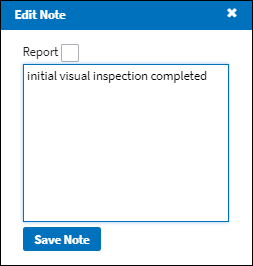
This button is security-controlled via Line Control/ Update/ Parts Add Note. For more information refer to the Security Explorer.
DELYDATE
The date that the part order is scheduled to be delivered (if the part had to be ordered to fulfill the requirement).
ACTDATE
The date that the ordered part was actually received by the company (if the part had to be ordered to fulfill the requirement).
REQPLSTATUS
The current status of the Picklist or Requisition currently linked to the part requirement.
_________________________________________________________________________
Download Online Help
Print
|
©1997-2018 Trax USA Corp. All rights reserved. This manual may not be copied, photocopied, reproduced, translated, or converted to any electronic or machine-readable form, in whole or in part, without prior written approval from Trax USA Corp. |
 |