 Download Online Help
 Print
|
|
|
|
|


Tools Checked Out Tab
The Tools Checked Out tab displays a list of all tools checked out for a specific Work Order. The information in this window is view only. Tools cannot be checkout out via this tab. Tool Check-Out transactions can be completed from the Inventory module in the main application.
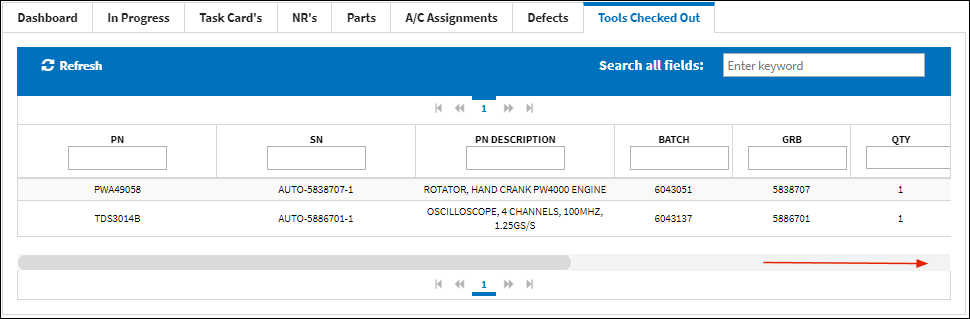
The following options/information is available in this window:
_________________________________________________________________________
P/N
The Part Number reference for the aircraft part.
S/N
The Serial Number for the specific serialized part.
P/N Description
The description of the part.
Batch
The batch number that is associated with a part when introduced/received into the system.
GRB
The original batch number when the part was initially introduced/received into inventory.
QTY
The quantity of parts for the transaction.
Issued To
The employee that the part is issued to. The Issue To may be configured to be mandatory and validate the employee’s status for issue.
Issued Date
The date the part or tool was issued to the Work Order.
Task Number
The Task Card or Non-Routine Task Card that requires the part.
Order
The type of order and the order number for the transaction.
_________________________________________________________________________
Download Online Help
Print
|
©1997-2018 Trax USA Corp. All rights reserved. This manual may not be copied, photocopied, reproduced, translated, or converted to any electronic or machine-readable form, in whole or in part, without prior written approval from Trax USA Corp. |
 |