
 Share
Share
 Print
Print
|
|
|
|
|



The CDRM (Cabin Defects Reporting Manual) Fault tab allows users to link Defects Reports with CDRM Fault information for specific aircraft types. These CDRM Fault records are related to aircraft cabin areas. CDRM Fault records are created in the CDRM Fault Configuration window of the Settings module.
Note: The CDRM Fault functionality, windows, and transaction codes do not share or obstruct the functionality of the general Fault Code functionality found throughout the system.
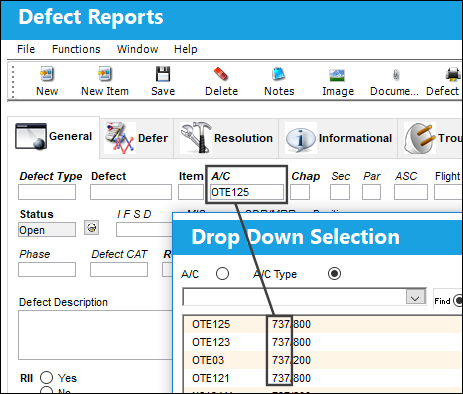
Once a Defect Report is created for an aircraft, any Fault Codes for the defect's A/C Type can be linked through the CDRM Fault Tab.
For this example, notice a 737 type aircraft was entered for the defect.
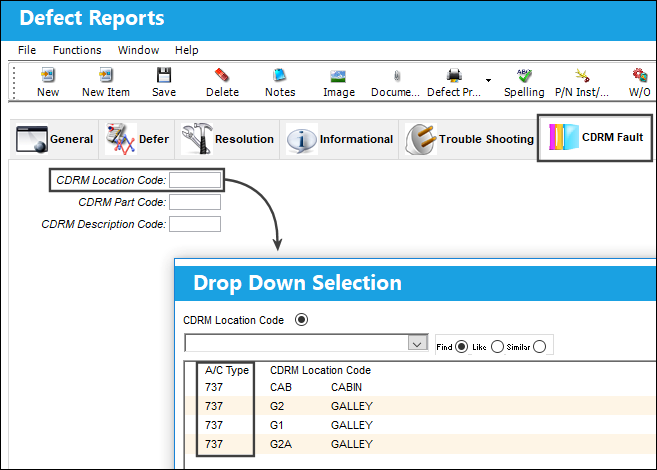
From the CDRM Fault tab, users can link a CDRM Fault for the A/C Type.
First, right-click in the CDRM Location Code field to choose a record. Only those CDRM Fault configuration records that are relevant for the defect's aircraft type will be available for selection from the CDRM Fault tab.
Then choose a CDRM Part Code, followed by the CDRM Description Code (in that order). Once a CDRM Fault record is selected, all of the record's information appears in the tab.
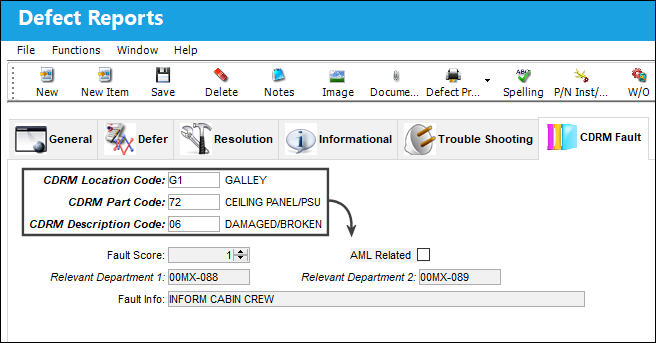
The following information/options are available in this window:
_____________________________________________________________________________________
CDRM Location Code
The code that corresponds to the location of the fault.
CDRM Part Code
The code that corresponds to the fault description.
CDRM Description Code
The code that corresponds to the fault description.
Fault Score
The severity of the fault that is being analyzed.
AML Related checkbox
Indicates that the fault is related to the Aircraft Maintenance Log.
Relevant Department 1
The departments responsible for resolving the fault.
Relevant Department 2
The departments responsible for resolving the fault.
Fault Info
Optional notes about the fault in question.
_____________________________________________________________________________________
Share
Print
|
©1997-2026 Trax USA Corp. All rights reserved. This manual may not be copied, photocopied, reproduced, translated, or converted to any electronic or machine-readable form, in whole or in part, without prior written approval from Trax USA Corp. |
 |