
 Share
Share
 Print
Print
|
|
|
|
|


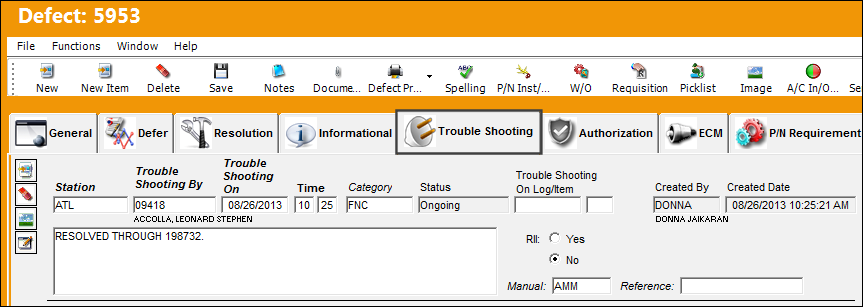
Within the Troubleshooting tab, any unsuccessful rectification action will be entered. The user may enter any unsuccessful Defect resolution attempts directly against the Defect Troubleshooting tab. Each time that this defect is associated with a Non-Routine Task Card which does not close the Defect, the Defect will be automatically populated with the work accomplished for that Non-Routine Task Card.
For additional information, refer to the configuration Switch  TCDFTOPN via the Production Switches manual.
If the Defect is repetitive (e.g., Watch Item), each individual repeat action from the Work Order, Non-Routine Task Cards that is associated with the Defect will be saved on the Troubleshooting tab and the Resolution tab as individual records. Once the Completed Number matches the required Repeat Number, the final completion information will be saved only on the Resolution tab.
 When attempting to close a defect that has been deferred via MEL/ CDL/ or GMM, the system will generate the following hard warning if the user does not have security access to this radio button. This functionality applies throughout the system where a defect can be closed.
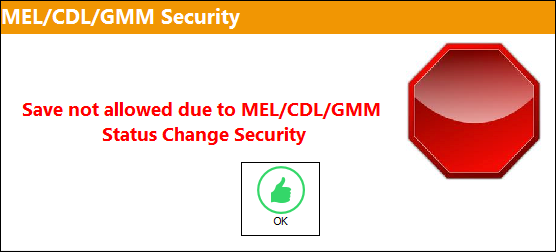
 This functionality is security controlled via Technical Records/ Update/ Defect Report/ MEL/CDL/GMM Status Update. For additional information, refer to the Security Explorer via the System Administration Training Manual. Switch TCDFTOPN must be set to No for this security feature to function correctly.
The following information/options are available in this window:
_____________________________________________________________________________________
Station
The Station where the troubleshooting was performed.
 With Switch DEFSTATIONWARN set to Yes, an invalid Station Location that does not exist in the system can be entered and saved with only a soft warning appearing notifying the user.
Troubleshooting By
The employee code of the user who performed the troubleshooting.
Troubleshooting On
The date the troubleshooting was performed.
Time
The time of day that the trouble shooting was performed.
- MANDTSTM - (Make Trouble Shooting Time Mandatory) - If this switch is set to Yes, the Time field in the Defect Reports Trouble Shooting Tab becomes mandatory.
Category
Troubleshooting classification.
Status
The current condition of the trouble shooting Item.
On-Going - This status will not close the Defect. The On-Going Status can be elected from the Non-Routine Task Card.
Closed - This status will copy the trouble shooting action to the Resolution tab and close the defect. In Watch Item cases, the Completed Number must match the Repeat Number to resolve the defect.
- STATUSTROUBLE - (Default Status Equals Ongoing and must not be changed) - If set to Yes, TRAX defaults the Status field in the Trouble Shooting Tab of the Defect Report to Ongoing as displayed below. If set to No, TRAX removes the grey-out from the Status field and it becomes accessible.
Trouble Shooting On Log/Item
The aircraft log in which the troubleshooting item is copied from. This field would be used if the company doesn't employ the MDDR function.
The Log/Item information will be transfered to the W/O Non-Routine Task Card, Work Accomplished tab when the Defect Report is attached to a W/O. This will only take place when the specific Defect Type Transaction Code has the Link Logpage and Item in N/R to Troubleshooting checkbox selected. For more information refer to the Defect Type via the Technical Records Transaction Code Manual.
Created By
The user who created the record.
Created Date
The date the record was created.
Trouble Shooting Description
The action taken to trouble shoot and/or resolve the Open Defect.
- DEFECTRT - (Only Add Work Accomplished to Defect Resolution when Repeat is Complete) - If set to Yes, once the defect number of ‘Complete’ is equal to the number of ‘Repeat’ (i.e. the defect is closed), only the work accomplished from the last/final related Non-Routine task card will be entered in the Resolution Description Field in the Defect Resolution Tab. If set to No, once the defect number of ‘Complete’ is equal to the number of ‘Repeat’ (i.e. the defect is closed), all the work accomplished from the all the related Non-Routine task cards will be entered in the Resolution Description Field in the Defect Resolution Tab.
- DERTCTSH - (Deferred T/C Items to Defect Trouble Shooting) - If set to Yes, if a Task Card is deferred (transferred to a Defect Report) and the Task Card contains individual Task Card Items, those items will become individual troubleshooting items on the Defect Report/Troubleshooting Tab.
- DEFECTTC - (Load Defect Text Into Task Card) If set to Yes, Non-Routine Task Cards created from a Defect Report will bring appropriate information (i.e. Defect Description, Skill, Man Hours, Man Required) onto the Task Card.
- DEFECTTS - (Add Troubleshooting To Non-Routine Task Card As Items) This switch was created so that all of the troubleshooting steps of the defect go into one item of the Non-Routine.
Buy Back or RII Yes/No radio buttons
Select to indicate that further inspection is required (i.e., a Required Inspection Item). When Yes is selected, the user must select either the Buy Back or RII radio button.
Buy Back radio button - Buy Back inspection typically requires the inspector to have the same skill required to resolve the defect. (For example, if 'A&P' skill is required to resolve the Defect, another employee with the same A&P skill will be allowed to perform the Buy Back inspection.)
RII radio button - RII typically requires the inspector to have a unique skill. (For example, if A&P skill is required to resolve the Defect, only another employee with a specific RII skill will be allowed to perform the RII inspection.)
When either Buy Back or RI' is selected, the Inspected By user must be specified (below).
This Buy Back or RII section is only available when Technical Records switch MANBBRIIRES is set to Yes. When set to No, the only the RII radio button (below) will be available.
RII checkbox
This checkbox indicates that the trouble shooting is a Required Inspection Item. When the RII checkbox is selected, the RII By field will appear.
RII By - The user who performed the Required Inspection against the Item.
This RII radio button is only available when Technical Records switch MANBBRIIRES is set to No. When set to Yes, the 'Buy Back or RII' section (above) will be available.
Manual
Enter the manual which was used for the trouble shooting action.
Edit Trouble Shooting  button
Security restrictions to this button will prevent users for modified trouble shooting actions entered by other users.
A Wall Password must be set for this option to work.
_____________________________________________________________________________________
The Troubleshooting tab works with the Production Non-Routine Task Card feature. For additional information, refer to the Ongoing Trouble Shooting checkbox/Task Card Work button via the Production Training manual.
Additional information regarding the effects of the utilization of the Defect Report Detail, Trouble Shooting Tab can be found in the Complying with Repeat Number via Troubleshooting Items topic.
Share
Print
|
©1997-2026 Trax USA Corp. All rights reserved. This manual may not be copied, photocopied, reproduced, translated, or converted to any electronic or machine-readable form, in whole or in part, without prior written approval from Trax USA Corp. |
 |