
 Share
Share
 Print
Print
|
|
|
|
|


If parts are required to rectify a deferred item and those parts are out of stock, the Requisition  button can be selected via the Defect Report Detail, P/N requirement List tab to create a requisition. Once a requisition has been created, the user may view any requisitions associated to a defect via the Defect Report Detail, Requisition tab.
The Requisition tab will only appear in the Defect Report window if a requisition for the defect has been created.
This is a view only window.
The user may select the underlined requisition number to view additional details pertaining to the requisition.
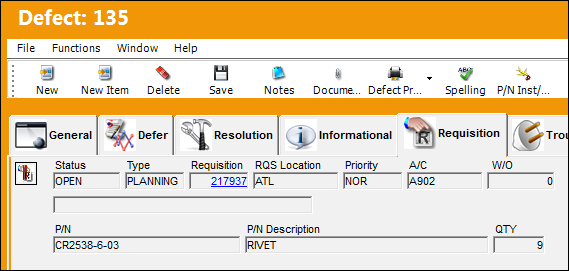
The following information/options are available in this window:
_____________________________________________________________________________________
Status
The status of the Requisition.
Type
The type of Requisition used to identify the purpose of the request.
Requisition
List of required parts for either a maintenance item or for restocking. Select the number to access the Requisition Header window.
 When using the Material Request functionality, the attached Requisition can be edited by selecting into the Requisition Detail window.
RQS Location
The required delivery location.
Priority
Priority of the part request.
A/C
The individual aircraft tail number.
W/O
The Work Order used to categorize, manage, and schedule work requirements for aircraft maintenance.
Description
Optional description about the requisition.
P/N
The Part Number reference for the aircraft part.
P/N Description
The description of the part.
Quantity
The quantity of items/parts required.
LHT (supplier) Reference
The part supplier's reference number for the status.
This field is part of the Material Integration functionality which allows an airline to use its suppliers' inventoried parts through a seamless integration system based on multiple interfaces. For more information refer to the TRAX Material Integration Functionality documentation excerpt and consult a TRAX interface administrator.
LHT State
The part supplier's status position.
This field is part of the Material Integration functionality.
Material Request Status  button
Displays the current status of the requisition during the Material Request process. For more information refer to the Material Request Status Button via the Requisition Training Manual.
This field is part of the Material Integration functionality.
_____________________________________________________________________________________
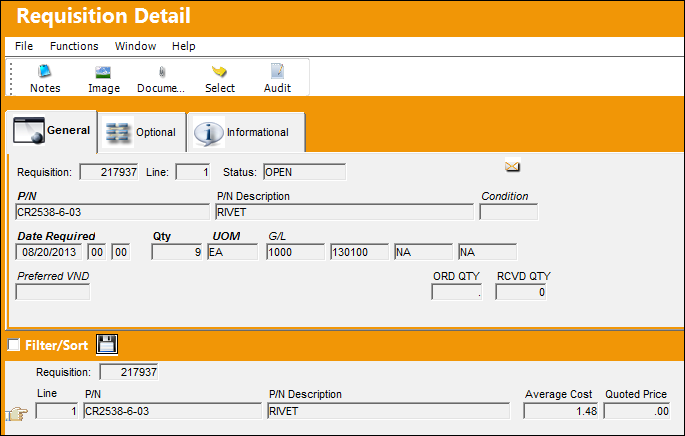
The user will be taken to the Requisition Detail :as shown below:
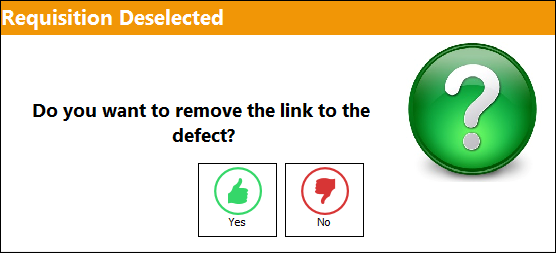
To cancel the Requisition after it has been associated to a defect, select on the Requisition to be removed then select the Requisition De-Link  button. The Requisition Deselected window will appear. Select 'Yes' to remove the link, or 'No' to exit the pop up.
Share
Print
|
©1997-2026 Trax USA Corp. All rights reserved. This manual may not be copied, photocopied, reproduced, translated, or converted to any electronic or machine-readable form, in whole or in part, without prior written approval from Trax USA Corp. |
 |