
 Share
Share
 Print
Print
|
|
|
|
|


The Warranty Information tab allows users to view the P/Ns current warranty status and schedule. Once the warranty actual time has surpassed the warranty scheduled time, the warranty status will change to close.
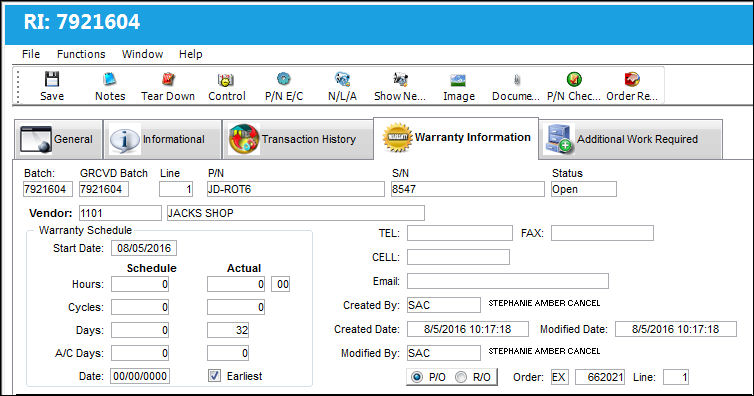
The following information/options are available in this window:
_____________________________________________________________________________________
Batch
The inventory number that is currently associated with a part or group of parts. A part's Batch number can change after various types of transactions take place.
GRCVD Batch
The original inventory number assigned to the part or group of parts when initially introduced/received into inventory. This number will remain the same for a part even if/when the part's Batch number changes.
Batch Line Number
The goods received batch line number of the component under warranty.
P/N
The Part Number reference for the aircraft part.
S/N
The Serial Number for the specific serialized part.
Status
The warranty status.
Vendor
The system code for the service/part provider.
Phone
Contact's telephone number.
Fax
Contact's facsimile number.
CELL
Contact electronic mail address.
Warranty Schedule Start Date
The start date of the warranty schedule.
Warranty Schedule Hours/Cycles/Days
The scheduled number of installed hours/cycles or calendar days for warranty to be applied to a part.
Warranty Schedule A/C Days
The scheduled number of installed days for warranty to be applied to a part.
Warranty Schedule Date
The warranty expiration date for the part.
Warranty Actual Hours/Cycles/Days
The actual number of flight hours/cycles or calendar days the component has accumulated.
Warranty Actual A/C Days
The actual number of installed days the part has accumulated.
Earliest checkbox
When selected, the warranty for a component will expire once one of the following (hours/cycles/days/A/C days) reaches the warranty limit first. When the checkbox is de-selected, the warranty will only expire once ALL warranty limits are met.
Created By
The user who created the record.
Created Date
The date the record was created.
Modified By
The user who last modified the record.
Modified Date
The date the record was last modified.
P/O radio button
The P/O order type of the attached order.
R/O radio button
The R/O type of the attached order.
Order
The order number attached to the respective warranty information.
Line
The order line item attached to the respective warranty information.
_____________________________________________________________________________________
Share
Print
|
©1997-2026 Trax USA Corp. All rights reserved. This manual may not be copied, photocopied, reproduced, translated, or converted to any electronic or machine-readable form, in whole or in part, without prior written approval from Trax USA Corp. |
 |