
 Share
Share
 Print
Print
|
|
|
|
|


Wall Password Change
Wall security is an additional layer of security protection for specific transactions. When activated, it will require that additional passwords be entered for specifically sensitive transactions. Wall security is functional only for specific transactions throughout the system.
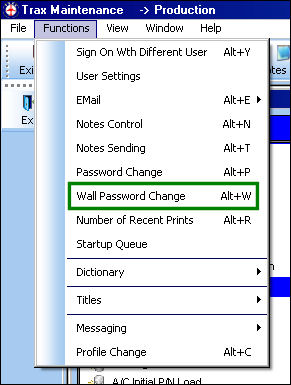
Only System Administrators should be permitted to set up wall security. Please see a TRAX system administrator if there are additional questions or concerns regarding wall security.
The Wall Password Change option allows for the change of a specific employees wall password.
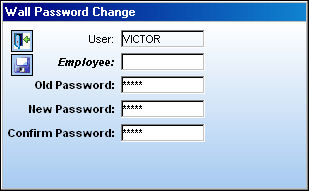
The following information/options are available in this window:
_____________________________________________________________________________________
User
The current user signed in to the system.
Employee
Right click to choose the employee who will have the wall password changed.
Old Password
The old password for the employee.
New Password
Enter the new password to replace the old password.
Confirm Password
Enter the new password again the be confirmed before saving.
_____________________________________________________________________________________
Share
Print
|
©1997-2026 Trax USA Corp. All rights reserved. This manual may not be copied, photocopied, reproduced, translated, or converted to any electronic or machine-readable form, in whole or in part, without prior written approval from Trax USA Corp. |
 |