
 Share
Share
 Print
Print
|
|
|
|
|


By selecting the Override Sampling Schedule  button from the Engineering Control, Schedule Tab, users can create override sampling schedules for aircraft. Sampling schedules are created in order to inspect a smaller sample amount of aircraft instead of each aircraft from a certain fleet. This functionality is typically reserved for larger fleets where it would be more efficient to inspect such a group instead of the entire fleet. Applying these sampling override schedules and effectivity to certain aircraft is dependant on a Sampling Effective percentage and the sampling method selected through this window. This functionality also works in conjunction with the Sampling checkbox of the A/C Master, Optional 1 Tab (for more information refer to the Settings Training Manual).
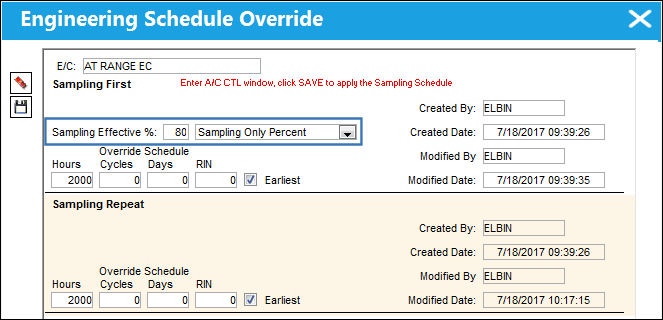
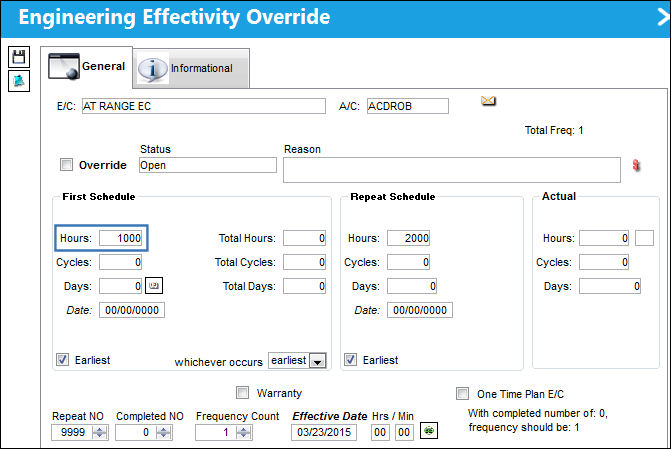
When the Override Sampling Schedule button is selected, the Engineering Schedule Override window appears as follows:
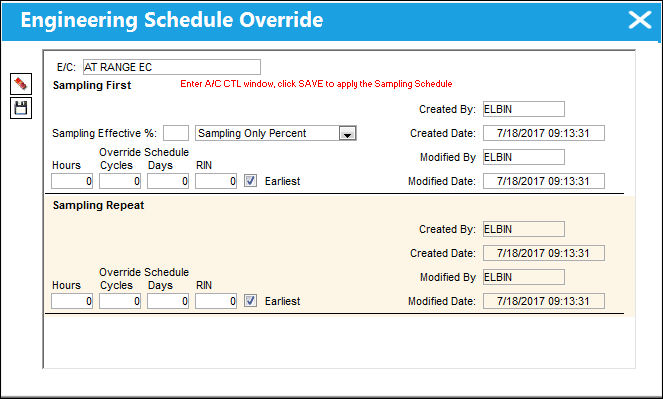
The following information/options are available in this window:
_____________________________________________________________________________________
E/C
The Engineering Control that specifies aircraft or component scheduled maintenance intervals. The Engineering Control that is having its schedule overridden.
Sampling First
The initial sampling schedule.
Sampling Effective % - The percentage of aircraft that will have effectivity to the Sampling E/C. The system will randomly select aircraft tail numbers and make them effective until the percentage defined is fulfilled. This field is contingent on the the Sampling drop down below and the Sampling checkbox of the A/C Master, Optional 1 tab.
This field is only available when the Sampling drop down is set to 'Sampling Override 100%' and/or 'Sampling Only Percent'.
Sampling drop down - This drop down lists the different methods of applying the sampling schedules to a fleet. The selection of this window determines how to integrate the above Sampling Effective % as well as the A/C Effectivity. This drop down is contingent with the Sampling aircraft registered via the A/C Master, Optional 1 tab. The options are as follows:
- All aircraft will be effective, but only percentage entered will have the Sampling Override Schedule applied (schedule is applied to random selection of aircraft).
- The percentage entered in the Sampling Effectivity % field will have A/C Effectivity and the Sampling Override Schedule will be applied (effectivity is applied to random selection of aircraft).
- All aircraft will be effective, but only Sampling A/C will have the Sampling Override Schedule applied.
- Only Sampling Aircraft will be made effective and have the Sampling Override Schedule applied.
Sampling First Override Schedule - The initial Schedule Override Hours/Cycles/Days and RIN that act as parameters for the E/C. The system will default to the Earliest occurrence of these parameters, unless the Earliest flag is unchecked, then it will be the latest occurrence.
Sampling Repeat
The repetitive sampling schedule after the initial schedule is met.
Sampling Repeat Override Schedule - The Repeat Schedule Override Hours/Cycles/Days and RIN that act as parameters for the E/C (if applicable). The system will default to the Earliest occurrence of these parameters, unless the Earliest flag is unchecked, then it will be the latest occurrence.
Created By
The user who created the record.
Created Date
The date the record was created.
Modified By
The user who last modified the record.
Modified Date
The date the record was last modified.
_____________________________________________________________________________________
As notes at the top of the window in red, to apply changes to the Sampling Override Schedule, users must manually deselect then re-select the A/C Type/Series in the E/C Effectivity window then save.
Sampling Override Functionality:
The Sampling drop down allows users to select between different methods of applying sampling override schedules. These methods work in conjunction with the Sampling Effective % and the aircraft with the Sampling checkbox selected in the A/C Master, Optional 1 tab. These settings will determine which percentage of aircraft receives effectivity to the E/C and which aircraft will apply to the entered sampling override schedule. The following are examples of the functionality available through each of the Sampling drop down options.
Before proceeding, note that five aircraft have been selected as Sampling A/Cs.
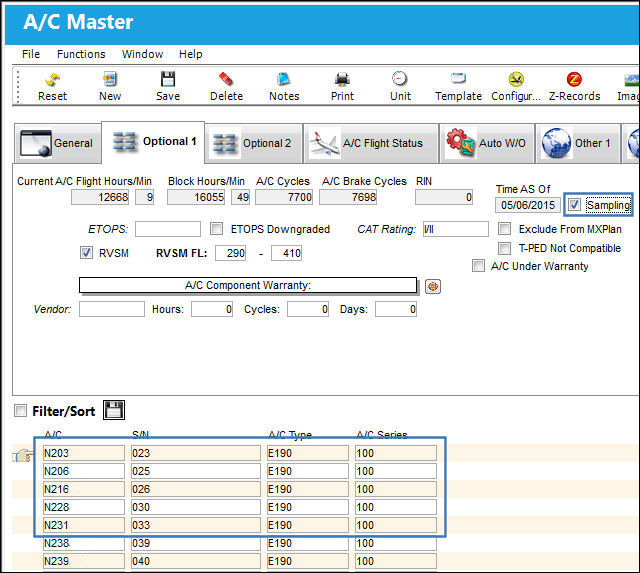
For more information refer to the A/C Master, Optional 1 Tab via the Settings Training Manual.
When selected, only Sampling Aircraft will be made effective and have the Sampling Override Schedule applied.
For example, a new E/C is created with a 'Sampling A/C Flag Only' schedule. A Sampling Effective percentage (10%) and a schedule (2000hrs) are entered.
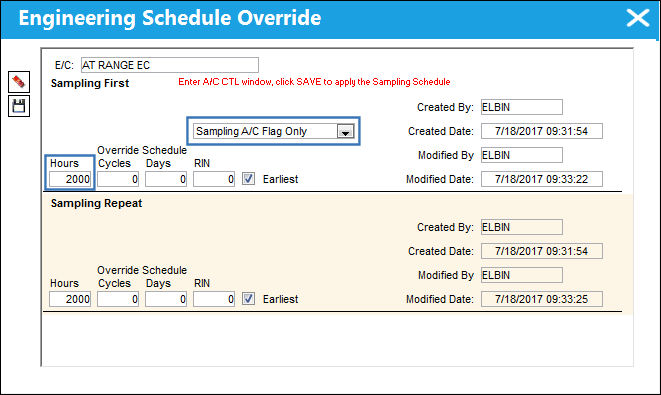
From the Engineering Control, Schedule tab, the Sampling Override Schedule is listed.
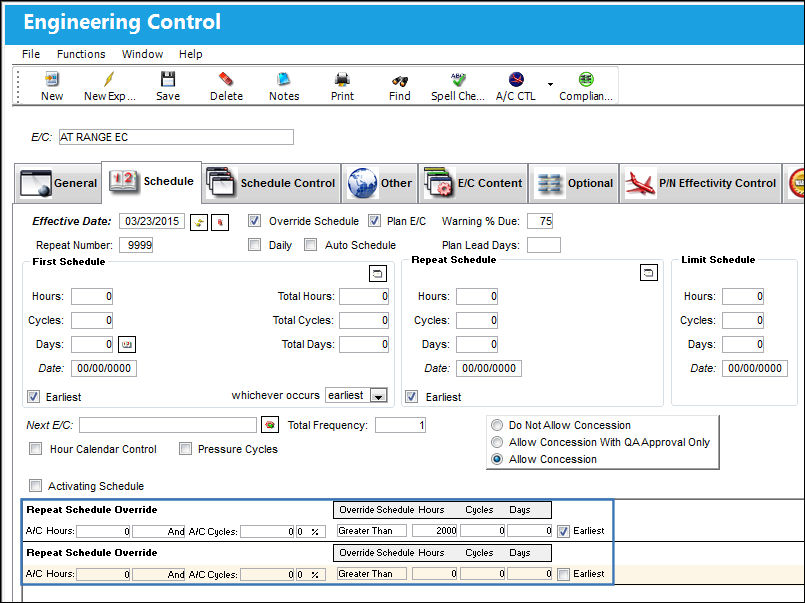
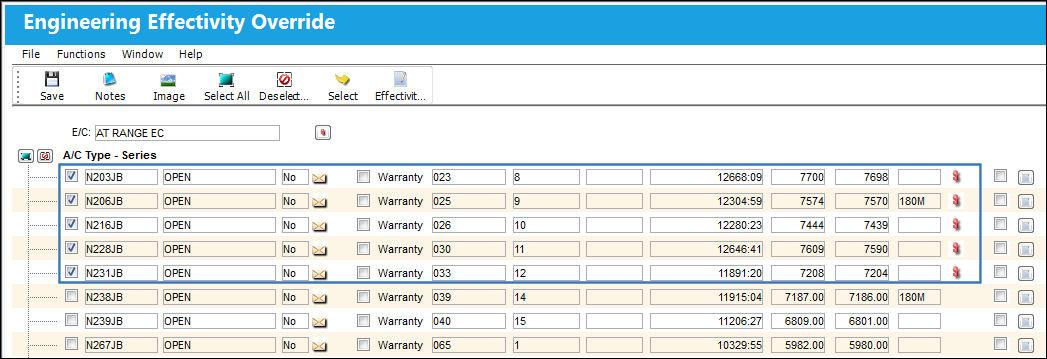
Select the A/C Control  button to view the effectivity.
Notice that the five Sampling Aircraft are the only effective aircraft.
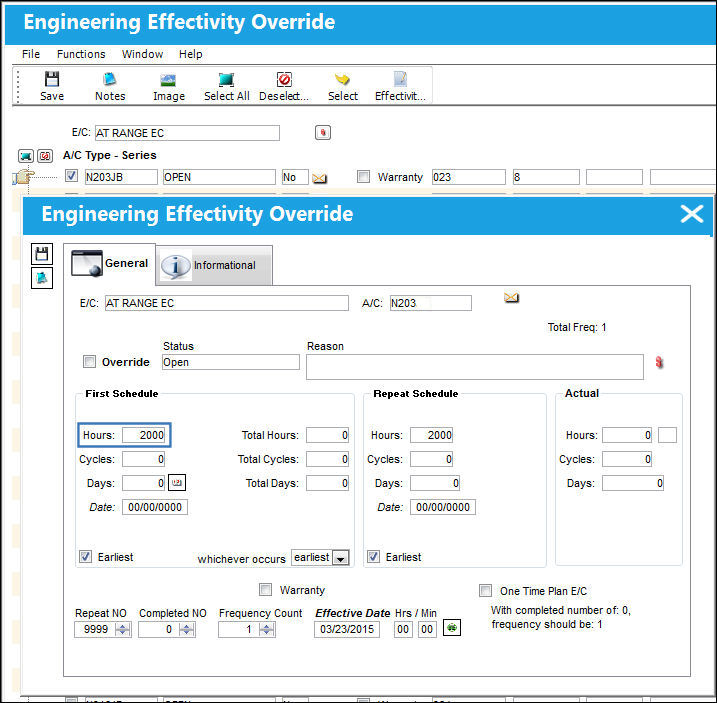
Select into an effective aircraft and notice that the schedule is being taken from the E/C's Sampling Schedule (2000hrs).
When selected, the percentage entered in the Sampling Effectivity % field will have A/C Effectivity and the Sampling Override Schedule will be applied (effectivity is applied to random selection of A/Cs).
For example, a new E/C is created with a 'Sampling Only Percent' schedule. A Sampling Effective percentage (80%) and a schedule (2000hrs) are entered.
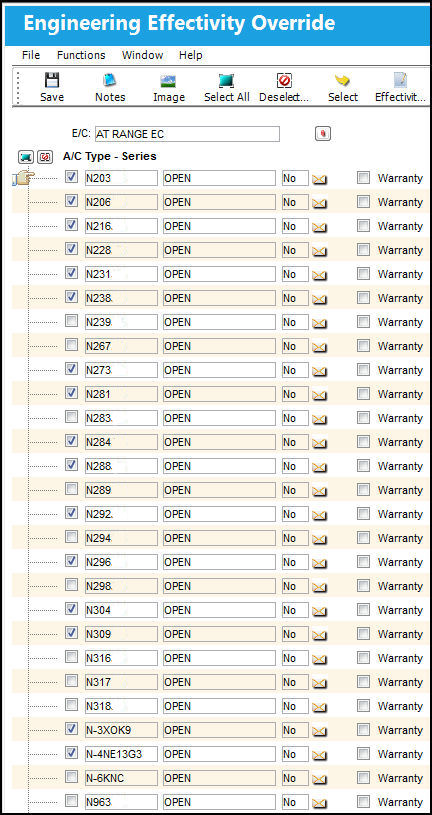
From the Engineering Effectivity Override window, notice that 80% of the Aircraft are selected as indicated in the Sampling Effective % field above. (These A/C are selected randomly.)
Select into an effective aircraft and notice that the schedule is being taken from the E/C's Sampling Schedule (2000hrs).
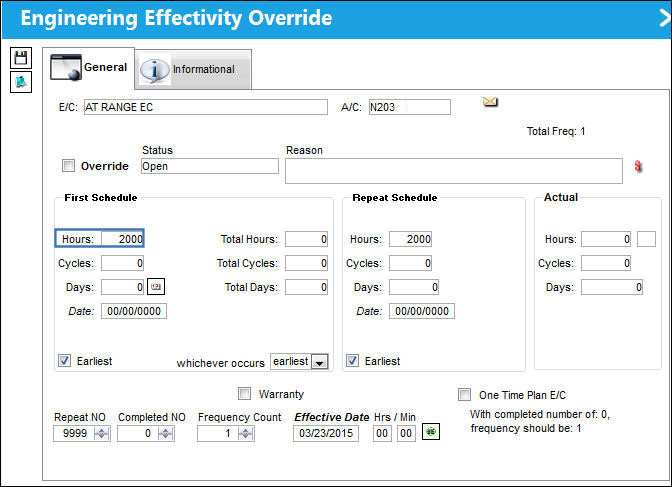
When selected, all aircraft will be effective, but only percentage entered will have the Sampling Override Schedule applied (schedule is applied to random selection of aircraft).
For example, another E/C is created with a 'Sampling Override 100%' schedule. A Sampling Effective percentage (80%) and a schedule (2000hrs) are entered.
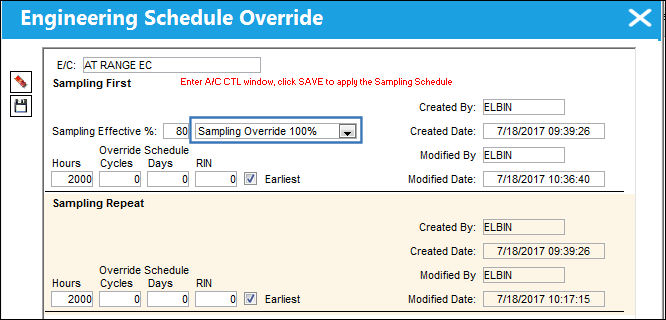
From the Engineering Effectivity Override window notice that all of the Aircraft are selected.
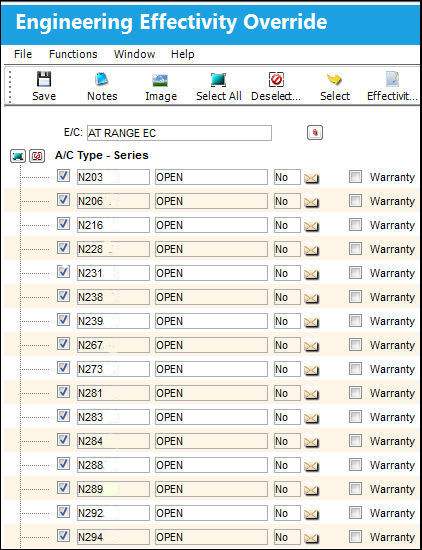
However, only the Sampling Effective percentage entered (80%) have the Sampling Override Schedule (2000hrs). This schedule is applied to a random selection of Aircraft.
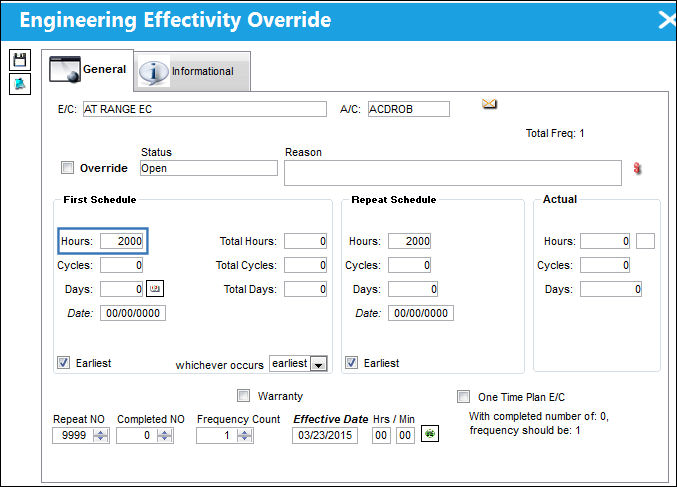
The remaining percentage (20%) does not have the Sampling Override Schedule.
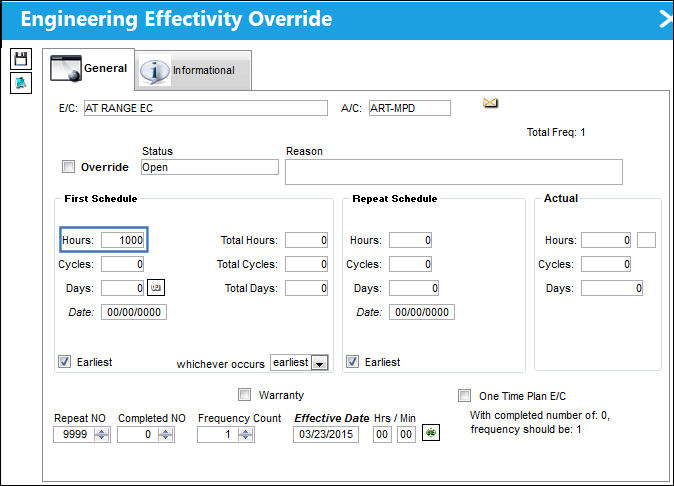
When selected, all aircraft will be effective, but only Sampling A/C will have the Sampling Override Schedule applied.
For example, one final E/C is created with a 'Sampling A/C Flag 100%' schedule. A Sampling Effective percentage (10%) and a schedule (2000hrs) are entered.
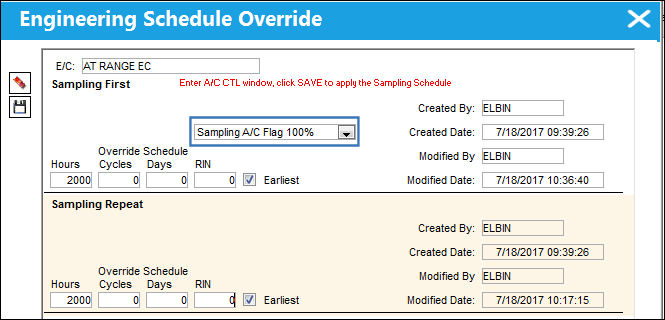
From the Engineering Effectivity Override window notice that all of the Aircraft are selected.
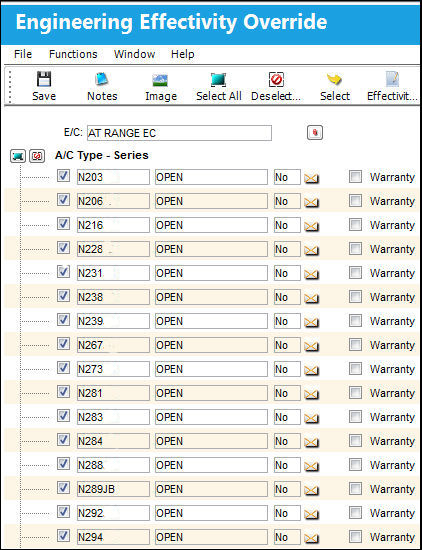
However, only the five Sampling Aircraft have the Sampling Override Schedule (2000hrs) applied.
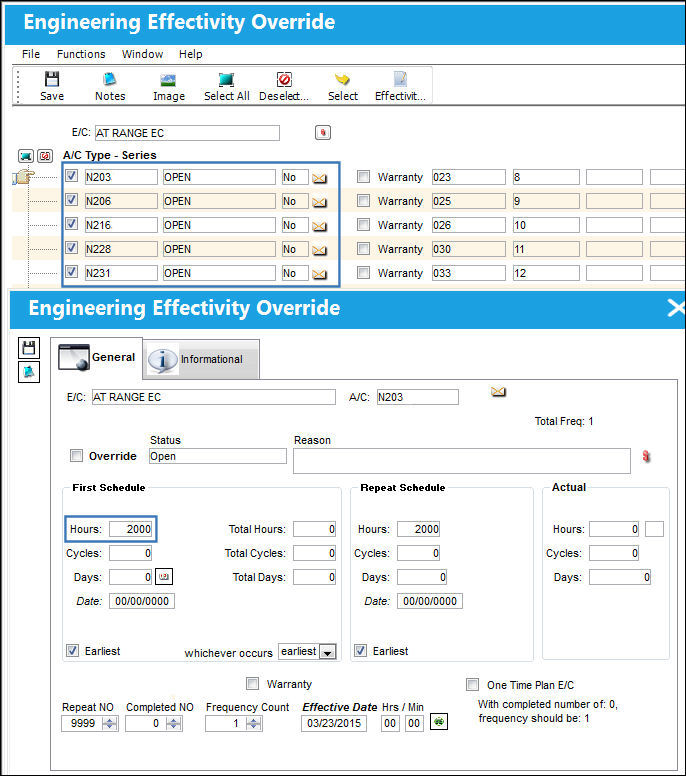
The remaining non-sampling aircraft do not have the Sampling Override Schedule.
Share
Print
|
©1997-2026 Trax USA Corp. All rights reserved. This manual may not be copied, photocopied, reproduced, translated, or converted to any electronic or machine-readable form, in whole or in part, without prior written approval from Trax USA Corp. |
 |