
 Share
Share
 Print
Print
|
|
|
|
|


Part Number Engineering Controls (P/N E/C) that have a days controlled schedule can be set up to forecast due dates based on the number of days since the E/C's Effective Date or based on the number of days that the P/N S/N has been installed. From TRAX Version X to Version 11, the configuration of this option has been modified in order to address a potential system limitation.
 In TRAX Version 12.5, enhancements were made for Aircraft Engineering Controls (A/C E/C). The modification does not directly impact P/N E/Cs, but the Calendar Days checkbox was replaced with the Calendar Days drop down, and a 'No Fly' option was added that allows the user to set up A/C E/C's to forecast due dates based on the number of days since the A/C last flight date or E/C last compliance date, whichever is more recent. The No Fly option is for A/C E/Cs only.
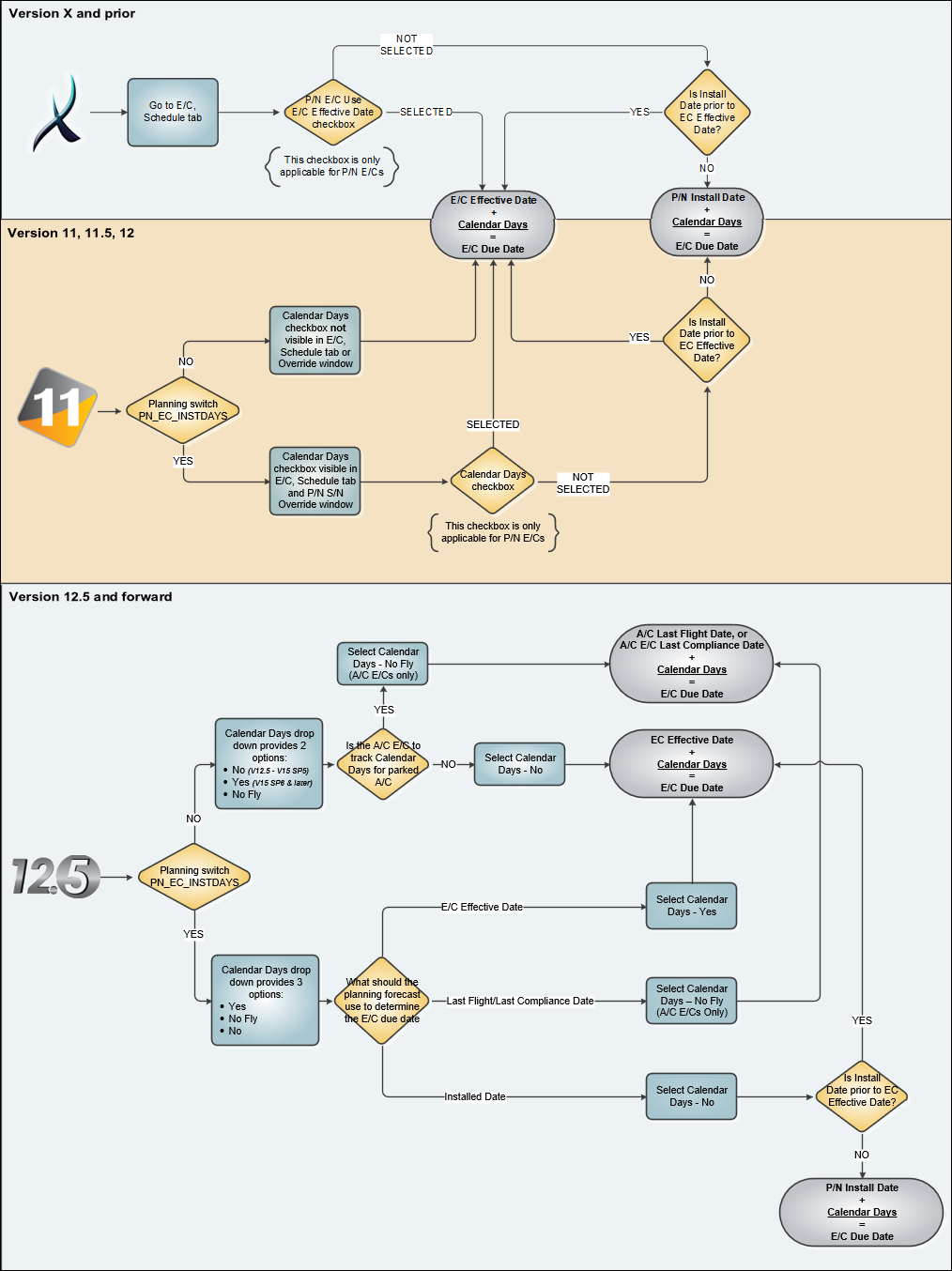
The following flowchart explains how the P/N E/C Calendar Days functionality is configured.
TRAX Version 12.5 and later releases
The P/N E/C Calendar Days functionality was not changed in Version 12.5, however the Calendar Days checkbox has been removed and replaced with the Calendar Days drop down option. Regardless of Planning Switch  PN_EC_INSTDAYS, the Calendar Days drop down is now always available, however the available options vary based on the switch setting.
The planning forecast will calculate an E/C's due date based on the switch setting and the selection made from the E/C Schedule tab, Calendar Days drop down.
 PN_EC_INSTDAYS = Yes:
Calendar Days options:
- Yes - the planning forecast calculates the due date from the E/C's Effective Date.
- No - the planning forecast calculates the due date from the part's installed date. For P/N E/Cs only.
- No Fly - the planning forecast calculates the due date from the last A/C flight or last E/C compliance date, whichever is more recent. For A/C E/Cs only.
PN_EC_INSTDAYS = No:
Calendar Days options:
- Yes - the planning forecast calculates the due date from the E/C's Effective Date.
- No Fly - the planning forecast calculates the due date from the last A/C flight or last E/C compliance date, whichever is more recent. For A/C E/Cs only.
Note: When PN_EC_INSTDAYS is set to No, in Version 15 the available options are Yes and No Fly. In Version 12.5 the options are No and No Fly. The change from No to Yes was a field name change only, functionality did not change. When using the alternative to No Fly, the planning forecast calculates from the E/C's Effective Date. (This came into effect TRAX Version 15 SP6).
 PN_EC_INSTDAYS = :
Calendar Days options:
- Yes - the planning forecast calculates the due date from the E/C's Effective Date.
- No - the planning forecast calculates the due date from the part's installed date. For P/N E/Cs only.
- No Fly - the planning forecast calculates the due date from the last A/C flight or last E/C compliance date, whichever is more recent. For A/C E/Cs only.
PN_EC_INSTDAYS = :
Calendar Days options:
- No - the planning forecast calculates the due date from the E/C's Effective Date.
- No Fly - the planning forecast calculates the due date from the last A/C flight or last E/C compliance date, whichever is more recent. For A/C E/Cs only.
 PN_EC_INSTDAYS = :
Calendar Days checkbox:
- - the planning forecast calculates the due date from the E/C's Effective Date.
- - the planning forecast calculates the due date from the part's installed date. For P/N E/Cs only.
PN_EC_INSTDAYS =
Calendar Days checkbox is not available.
- The planning forecast calculates the due date from the E/C's Effective Date (as if the checkbox were selected).
 TRAX Version 11, 11.5, and 12
The P/N E/C Calendar Days functionality was modified in Version 11. The P/N E/C Use E/C Effective Date checkbox was removed and replaced with the Calendar Days checkbox, controlled by Planning Switch PN_EC_INSTDAYS. When this switch is set to Yes, the Calendar Days checkbox will be visible for P/N E/Cs.
Switch set to Yes, checkbox NOT selected:
P/N E/Cs can be tracked based on the part's Installation Date when PN_EC_INSTDAYS is set to Yes and the Calendar Days checkbox is NOT selected. Once that part is removed from the aircraft, the P/N E/C actual Days will reflect the amount of days since the P/N S/N was installed. At this point, once removed from the aircraft, the Days will stop counting. The Days count will continue to calculate the P/N E/C actuals when the part is re-installed onto an aircraft. This checkbox is only available when the switch is set to Yes, and the checkbox is only an option for P/N E/Cs. This checkbox can be applied for individual E/Cs from the Schedule tab, or the checkbox can be overridden for specific P/N Serial Numbers via the Engineering Effectivity Override window.
If the part was installed on the aircraft prior to the P/N E/C's Effective Date, the planning forecast would count days only from the E/C's Effective Date, not from the part's installed date. For the planning forecast to include the days the part was installed on the aircraft prior to the P/N E/C's Effective Date, the user needs to determine the number of days accrued between the install date and E/C Effective Date and update the P/N E/C actuals for the part.
Switch set to Yes, checkbox selected:
When the Calendar Days checkbox is selected, all Days-controlled P/N E/Cs are tracked based on Calendar Days counting from the E/C's Effective Date, not the part's Installed Date. Whether the part is installed on the aircraft (on-wing) or removed from the aircraft (off-wing), the part will continue to accrue calendar days. Again, this checkbox can be applied for individual E/Cs from the Schedule tab, or the checkbox can be overridden for specific P/N Serial Numbers via the Engineering Effectivity Override window. To address the previous limitation, in Version 11 while the P/N E/C is tracked based on Calendar Days since the Effective Date the Hours and Cycles schedules can also be utilized.
Switch set to No (checkbox not available):
When set to No, all Days-controlled P/N E/Cs are tracked based on Calendar Days counting from the E/C's Effective Date, not the part's Installed Date. To address the previous limitation, in Version 11 while the P/N E/C is tracked based on Calendar Days since the Effective Date the Hours and Cycles schedules can also be utilized. While the switch is set to No, the Calendar Days checkbox in not visible and the system functions as though it is always selected.
Note: When set to No, the mixed schedule functionality is activated. Therefore, if existing E/Cs accrue time while this switch is set to Yes and is later switched to No, utilizing a schedule of hours/cycles mixed with days will require you to contact Customer Support to review your data for optimal accuracy. This additional precaution is only required when switching from Yes to No settings. This precaution is not required for newly created E/Cs that have yet to accrue time/data.
 TRAX Version X and prior
Checkbox NOT selected:
When the P/N E/C Use E/C Effective Date checkbox is not selected, the P/N E/C's Calendar Days will be tracked based on the part's Installed Date, not the E/C's Effective Date. Once that part is removed from the aircraft, the actual Days will reflect the amount of days since the P/N S/N was installed. At this point, once removed from the aircraft, the Days will stop counting. The Days count will continue to calculate the P/N E/C actuals when the part is re-installed onto an aircraft.
Note: If the part was installed on the aircraft prior to the P/N E/C's Effective Date, the planning forecast would count days only from the E/C's Effective Date, not from the part's installed date. For the planning forecast to include the days the part was installed on the aircraft prior to the P/N E/C's Effective Date, the user needs to determine the number of days accrued between the install date and E/C Effective Date and update the P/N E/C actuals for the part.
Checkbox selected:
When the P/N E/C Use E/C Effective Date checkbox is selected, the P/N E/C's Calendar Days will be tracked based on the E/C's Effective Date, not the part's Installed Date. When selected, the system tracks the P/N E/C as 'Calendar Days,' meaning that the Part Number Serial Number will start accumulating days based on the Effective Date of the P/N E/C. Whether the part is installed on the aircraft (on-wing) or removed from the aircraft (off-wing), the part will continue to accrue calendar days.
There is a limitation with this checkbox in Version X and prior releases. When the checkbox is selected, the Hours and Cycles fields of the E/C are grayed out which means if the Engineering Requirement required a Calendar drive with Hour or Cycles, multiple E/Cs will have to be created. This limitation has been addressed in TRAX Version 11.
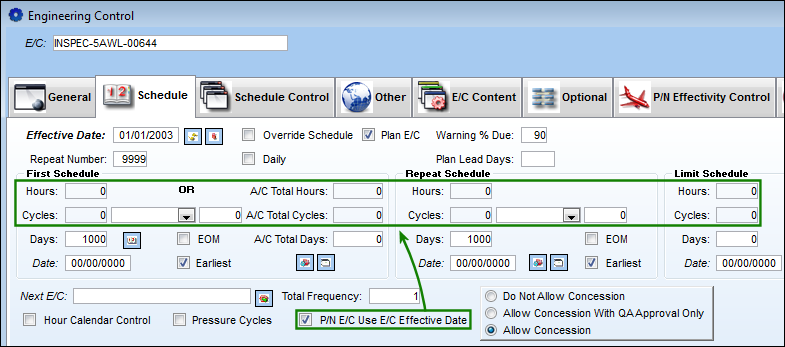
For more details and examples from the E/C windows and Planning Query refer to Switch PN_EC_INSTDAYS via the Planning Switches Manual.
Share
Print
|
©1997-2026 Trax USA Corp. All rights reserved. This manual may not be copied, photocopied, reproduced, translated, or converted to any electronic or machine-readable form, in whole or in part, without prior written approval from Trax USA Corp. |
 |