
 Share
Share
 Print
Print
|
|
|
|
|


PN_EC_INSTDAYS - Count P/N E/Cs by E/C's Calendar Days or Part's Installed Days

Count P/N E/Cs by E/C's Calendar Days or Part's Installed Days
Affected Window: w_ac_planning_qry
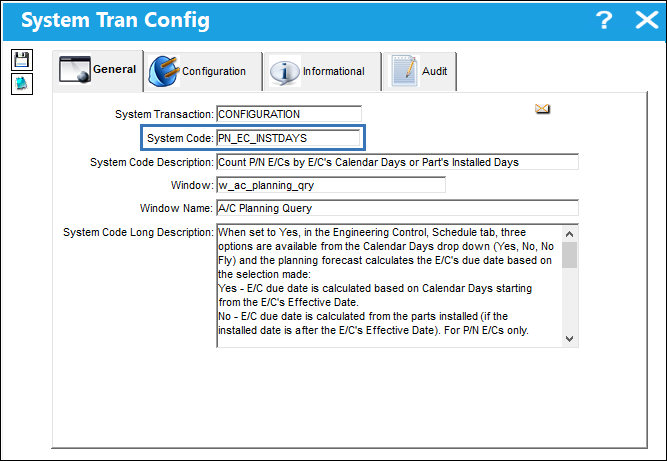
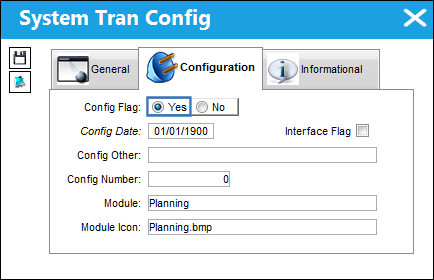
The planning forecast will calculate an E/C's due date based on the switch setting and the selection made from the E/C Schedule tab, Calendar Days drop down.
 PN_EC_INSTDAYS = Yes:
Calendar Days options:
- Yes - the planning forecast calculates the due date from the E/C's Effective Date.
- No - the planning forecast calculates the due date from the part's installed date. For P/N E/Cs only.
- No Fly - the planning forecast calculates the due date from the last A/C flight or last E/C compliance date, whichever is more recent. For A/C E/Cs only.
PN_EC_INSTDAYS = No:
Calendar Days options:
- Yes - the planning forecast calculates the due date from the E/C's Effective Date.
- No Fly - the planning forecast calculates the due date from the last A/C flight or last E/C compliance date, whichever is more recent. For A/C E/Cs only.
Note: When PN_EC_INSTDAYS is set to No, in Version 15 the available options are Yes and No Fly. In Version 12.5 the options are No and No Fly. The change from No to Yes was a field name change only, functionality did not change. When using the alternative to No Fly, the planning forecast calculates from the E/C's Effective Date. (This came into effect TRAX Version 15 SP6).
 PN_EC_INSTDAYS = :
Calendar Days options:
- Yes - the planning forecast calculates the due date from the E/C's Effective Date.
- No - the planning forecast calculates the due date from the part's installed date. For P/N E/Cs only.
- No Fly - the planning forecast calculates the due date from the last A/C flight or last E/C compliance date, whichever is more recent. For A/C E/Cs only.
PN_EC_INSTDAYS = :
Calendar Days options:
- No - the planning forecast calculates the due date from the E/C's Effective Date.
- No Fly - the planning forecast calculates the due date from the last A/C flight or last E/C compliance date, whichever is more recent. For A/C E/Cs only.
 PN_EC_INSTDAYS = :
Calendar Days checkbox:
- - the planning forecast calculates the due date from the E/C's Effective Date.
- - the planning forecast calculates the due date from the part's installed date. For P/N E/Cs only.
PN_EC_INSTDAYS =
Calendar Days checkbox is not available.
- The planning forecast calculates the due date from the E/C's Effective Date (as if the checkbox were selected).
When the system is configured to calculate the P/N E/C's due date from the part's installed date, the part needs to be installed after the P/N E/C's Effective Date for the planning forecast to calculate the due date accurately. If the P/N E/C's Effective Date is after the part's installed date, the due date is calculated from the P/N E/C's Effective Date. If the part had previous remove/install transactions, prior to the P/N E/C's Effective Date, and those previous accrued times need to be included in the current calculations, the P/N E/C actuals for the part need to be updated to track and forecast the due date correctly. For more information, refer to the P/N E/C Actuals Calculations scenario guide.
For more information on the differences in this functionality between TRAX Version X, 11, and 12.5, refer to P/N E/C Calendar Days Planning, via the Engineering Training Manual.
Switch Set to Yes:
When set to Yes, in the Engineering Control, Schedule tab, three options are available from the Calendar Days drop down (Yes, No, No Fly) and the planning forecast calculates the E/C's due date based on the selection made.
- - E/C due date is calculated based on Calendar Days starting from the E/C's Effective Date.
- - E/C due date is calculated from the parts installed date (if the installed date is after the E/C's Effective Date). For P/N E/Cs only.
- - E/C Due Date is calculated from the last A/C flight or the last E/C compliance date, whichever is more recent. For A/C E/Cs only.
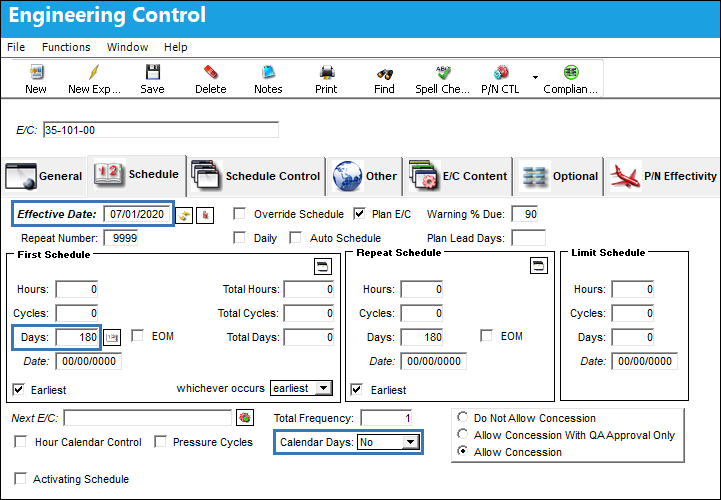
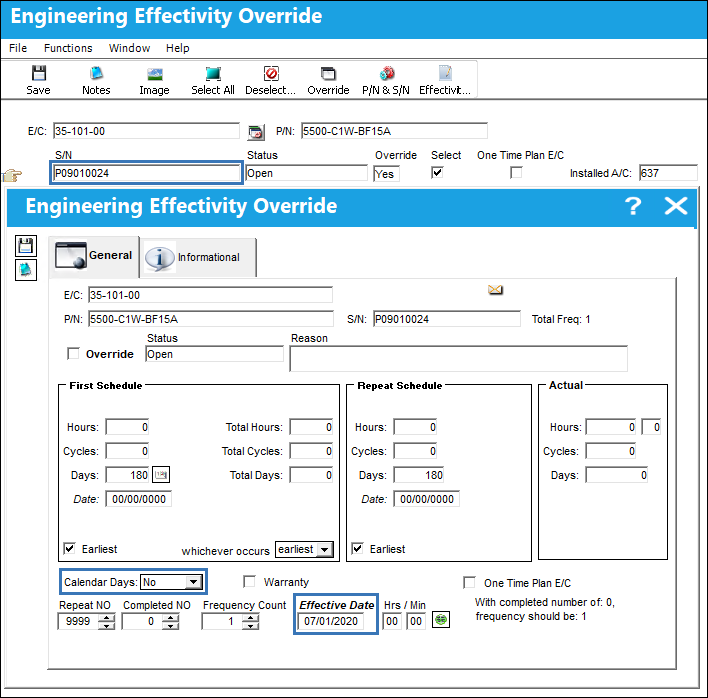
The below P/N E/C's Effective Date is 07/01/2020, Calendar Days is set to No, and the E/C has a repeat schedule of 180 days.
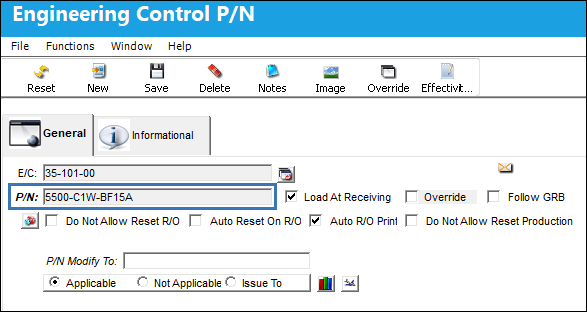
P/N is linked to the P/N E/C.
P/N S/N is tracking against the P/N E/C and has an Effective Date of 07/01/2020; the E/C has not yet been complied with.
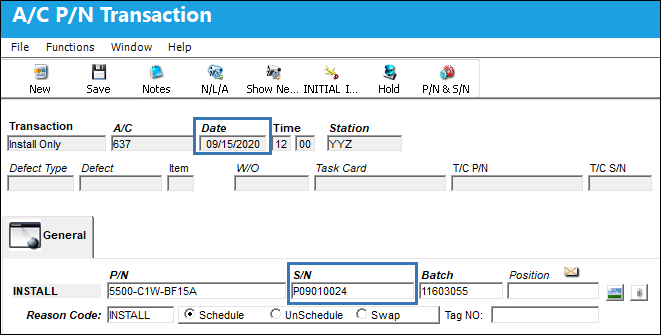
The P/N S/N was installed 09/15/2020.
Because the P/N E/C's Calendar Days drop down is set to No, the planning forecast calculates the Due Date based on the .
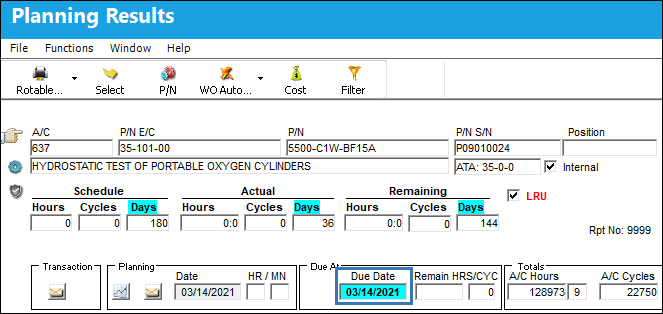
The Due Date is therefore 180 days after the part's installed date.

If the part was installed on the aircraft prior to the P/N E/C's Effective Date, the planning forecast would count days only from the E/C's Effective Date, not from the part's installed date. For the planning forecast to include the days the part was installed on the aircraft prior to the P/N E/C's Effective Date, the user needs to determine the number of days accrued between the install date and E/C Effective Date and update the P/N E/C actuals for the part.
Using the same P/N E/C above, the Calendar Days is set to Yes; the E/C Effective Date is still 07/01/2020.
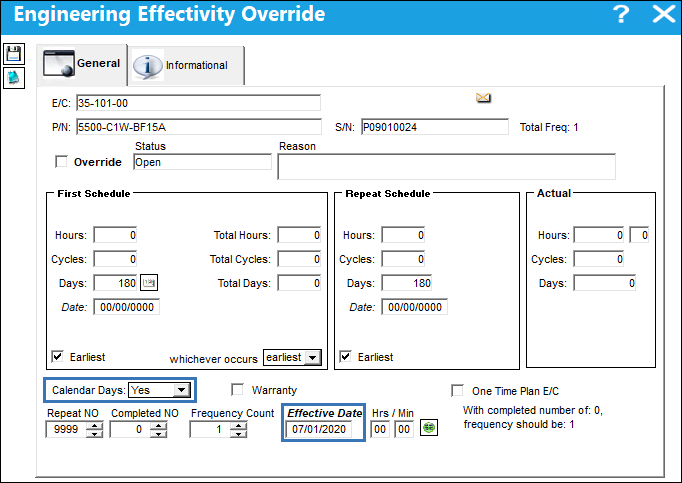
Because the P/N E/C's Calendar Days drop down is set to Yes, the planning forecast calculates the Due Date based on the .
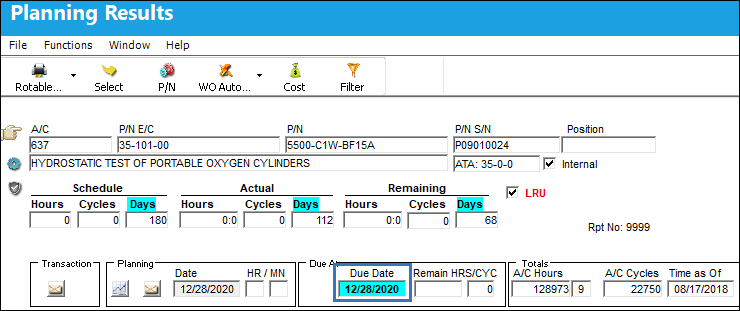
The Due Date is therefore 180 days after the P/N E/C's Effective Date.

The below A/C E/C Effective Date is 10/01/2020, Calendar Days is set to No Fly, and the E/C has a repeat schedule of 10 days.
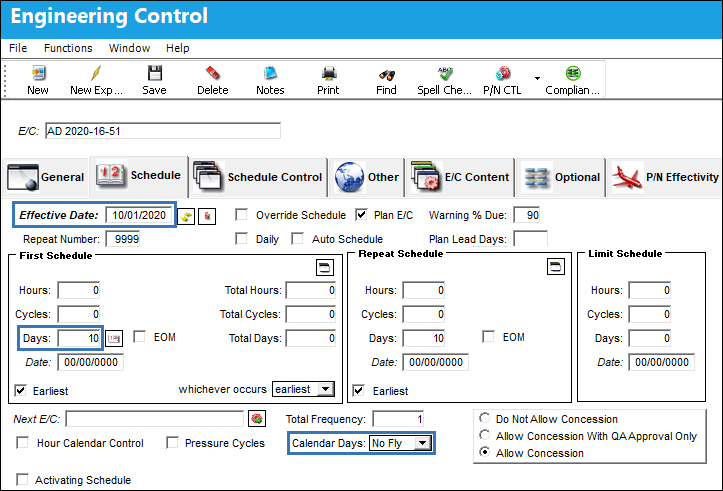
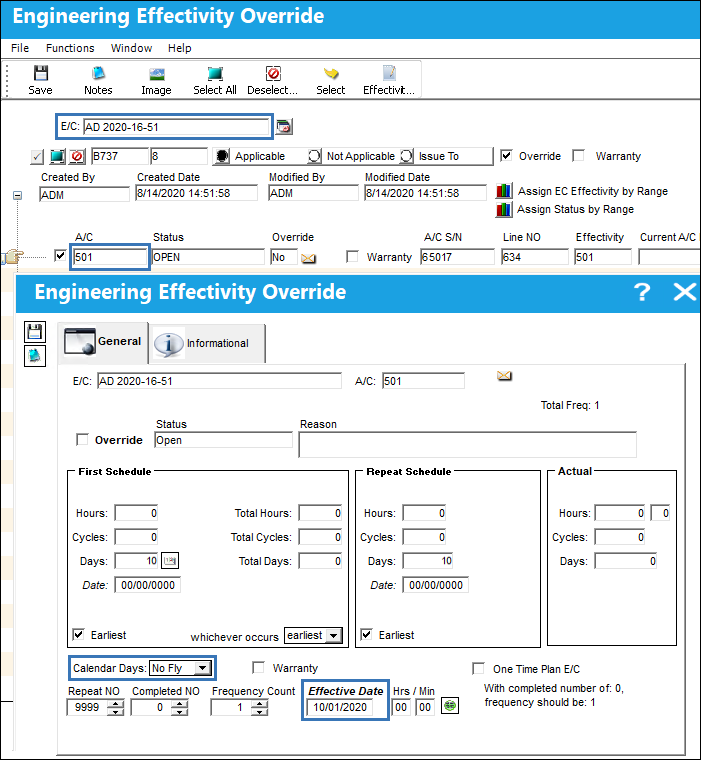
A/C is tracking against the A/C E/C and has an Effective Date of 10/01/2020.
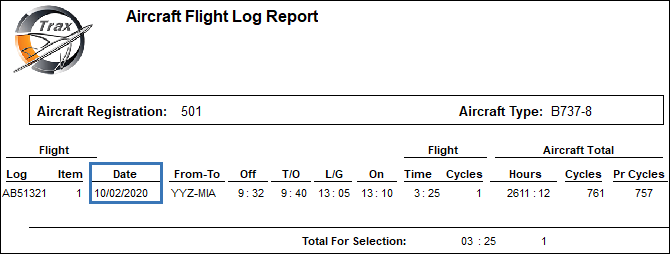
The A/C last flight date is 10/02/2020.
The A/C E/C is then complied with 10/13/2020.
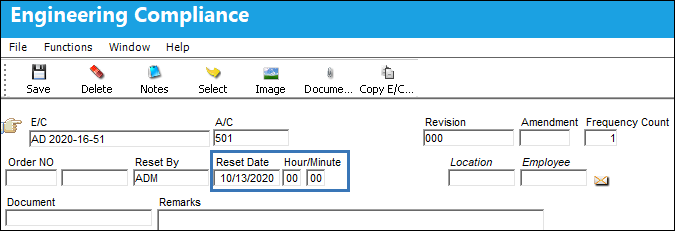
The A/C E/C Effective Date is updated to reflect the last compliance date.
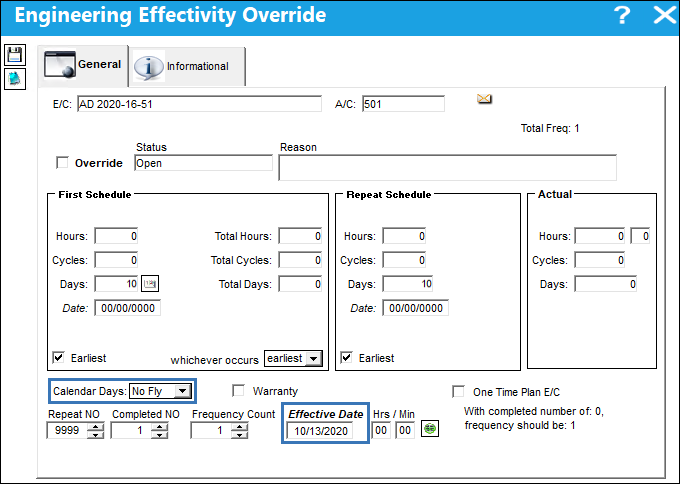
Because the Calendar Days drop down is set to No Fly, when the planning forecast is generated it looks at the A/C last flight date and the E/C last compliance date (Effective Date) and uses the most recent date to calculate the Due Date. Since the E/C has not flown since 10/02/2020 and the A/C E/C was complied with 10/13/2020, the planning forecast uses the last compliance date to calculate the Due Date.
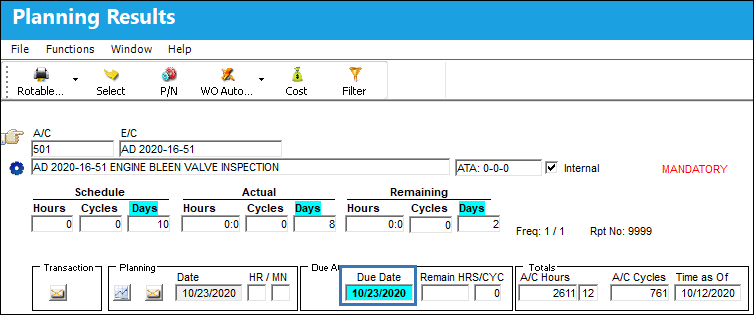
The Due Date is therefore 10 days after the A/C E/C Effective Date.

The A/C is then flown and the A/C last flight date is now 10/20/2020; the A/C E/C Effective Date is still 10/13/2020.
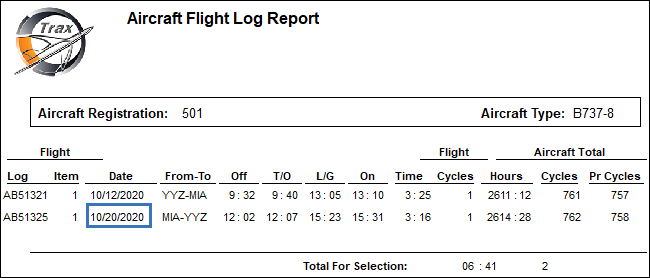
Because the A/C last flight date is more recent than the A/C E/C last compliance date, the planning forecast calculates the Due Date based on the.
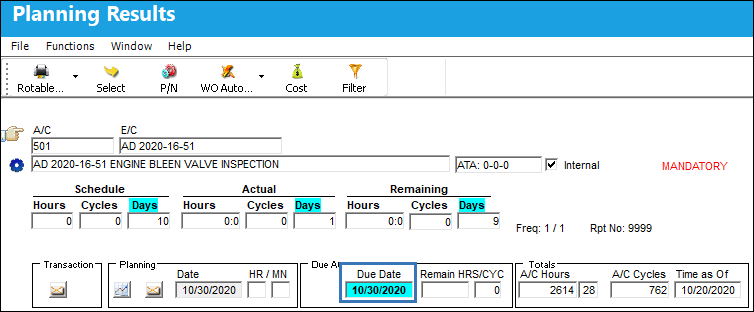
The Due Date is therefore 10 days after the last A/C flight date, October 20, 2020.

Switch Set to No:
When set to No, only two options are available from the Calendar Days drop down (Yes, No Fly) and the planning forecast calculates the E/C's due date based on the selection made.
- Yes - E/C due date is calculated based on Calendar Days starting from the E/C's Effective Date.
- - E/C Due Date is calculated from the last A/C flight or the last E/C compliance date, whichever is more recent (A/C E/Cs only).
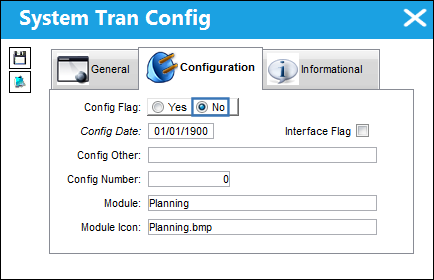
When set to No, the mixed schedule functionality is activated. Therefore, if existing E/Cs accrue time while this switch is set to Yes and is later switched to No, utilizing a schedule of hours/cycles mixed with days will require you to contact Customer Support to review your data for optimal accuracy. This additional precaution is only required when switching from Yes to No settings. This precaution is not required for newly created E/Cs that have yet to accrue time/data.
In TRAX Version 12.5 -> Version 15 SP5:
When PN_EC_INSTDAYS is set to No and No is selected from the Calendar Days options, the system functions the same as when PN_EC_INSTDAYS is set to Yes and Yes is selected from the Calendar Days options - the planning forecast will use the E/C's Effective Date to calculate the due date. Refer to example above.
In TRAX Version 15 SP6 (and later releases):
When PN_EC_INSTDAYS is set to No and Yes is selected from the Calendar Days options, the system functions the same as when PN_EC_INSTDAYS is set to Yes and Yes is selected from the Calendar Days options - the planning forecast will use the E/C's Effective Date to calculate the due date. Refer to example above.
When PN_EC_INSTDAYS is set to No, and No Fly is selected from the Calendar Days options, the system functions te same as when PN_EC_INSTDAYS is set to Yes and No Fly is selected from the Calendar Days options - the planning forecast calculates the due date from the last A/C flight or last E/C compliance date, whichever is more recent. Refer to the example above.
Share
Print
|
©1997-2026 Trax USA Corp. All rights reserved. This manual may not be copied, photocopied, reproduced, translated, or converted to any electronic or machine-readable form, in whole or in part, without prior written approval from Trax USA Corp. |
 |