
 Share
Share
 Print
Print
|
|
|
|
|


The Engineering Control Activating Schedule is enabled by selecting the Activating Schedule checkbox in the Engineering Control, Schedule tab. Utilizing this option makes the Activating Total Hours/Cycles/Days fields available, along with the Earliest checkbox, to specify when the First Schedule begins for the effective component(s) after the hours, cycles, and/or days are accumulated. This Schedule can be overridden through the Override Standard Schedule (E/C) Button, via The Engineering Control, Schedule Tab or the Override functionality of the P/N CTL Button, via Engineering Control.
The following scenarios show the effect of the Activating Schedule on the Engineering Control in regard to its planning, as seen in the A/C Planning Query, particularly when applied to the Total Hours/Cycles/Days.
The Plan E/C checkbox must be selected for the E/C to appear in the A/C Planning Query.
Aircraft Total Hours:
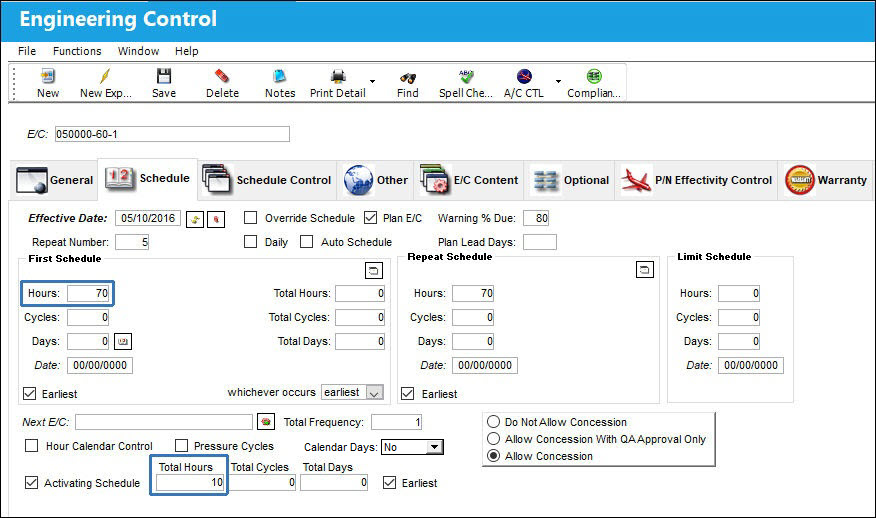
The following Engineering Control has been created. Notice the Hours of the First Schedule and the Total Hours specified in the Activating Schedule.
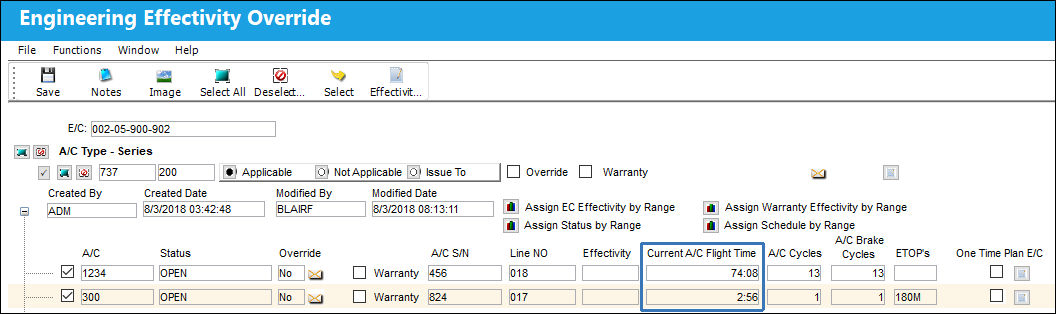
Notice the E/C has effectivity to the following A/C. Only one of the effective A/Cs have accumulated Flight Hours more than that of the E/C's Activating Schedule.
After running the A/C Planning Query for the E/C, notice only the A/C with more Flight Hours than the Activating Schedule appears. Additionally, in the Planning Results, the E/C is Due At the combined Activating Hours and Scheduled Hours. In turn, the Actual Hours are the amount of Hours that exceed the Activating Hours (Current Flight Time - Activating Hours = Actual Hours).
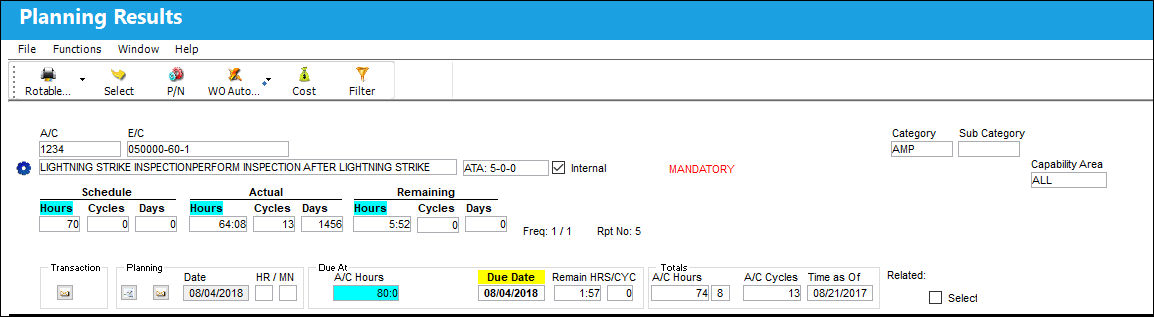
With the Schedule Hours still set to that of the E/C's First Schedule, the Remaining Hours are the difference between the Schedule and Actual Hours, not the Current Flight Time, as is standard functionality.
Aircraft Total Cycles:
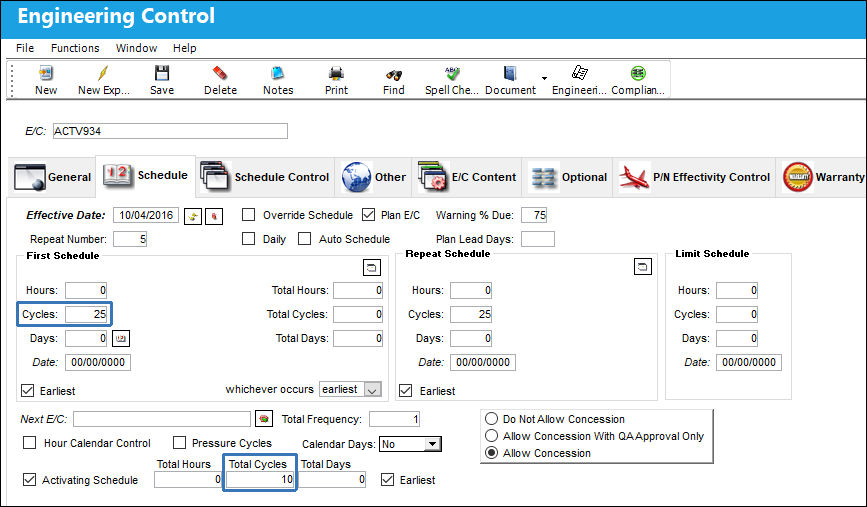
The following Engineering Control has been created. Notice the Cycles of the First Schedule and the Total Cycles specified in the Activating Schedule.
Notice the E/C has effectivity to the following A/C. Only one of the effective A/Cs have accumulated Aircraft Cycles more than that of the E/C's Activating Schedule.
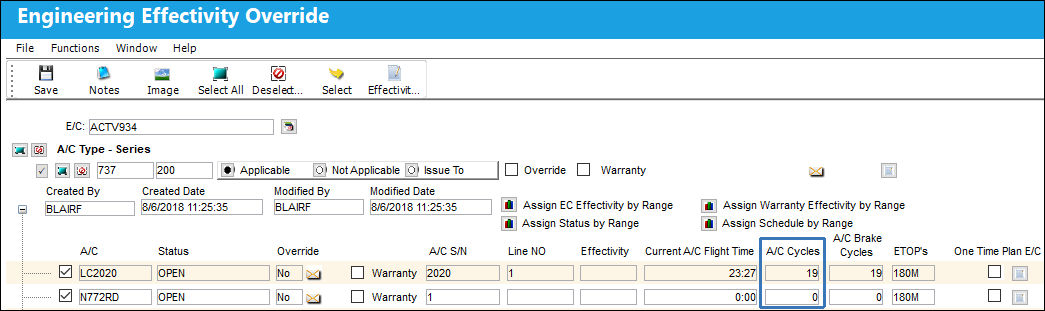
After running the A/C Planning Query for the E/C, notice only the A/C with more Aircraft Cycles than the Activating Schedule appears. Additionally, in the Planning Results, the E/C is Due At the combined Activating Cycles and Scheduled Cycles. In turn, the Actual Cycles are the amount of the Cycles that exceed the Activating Cycles (Aircraft Cycles - Activating Cycles = Actual Cycles).
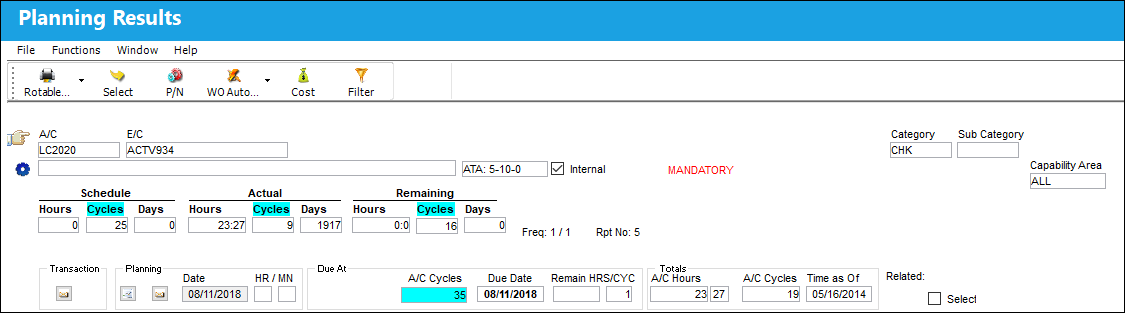
With the Schedule Cycles still set to that of the E/C's First Schedule, the Remaining Cycles are the difference between the Schedule and Actual Cycles, not the Aircraft Cycles, as is standard functionality.
Aircraft Total Days:
The following Engineering Control has been created. Notice the Days of the First Schedule and the Total Days specified in the Activating Schedule.
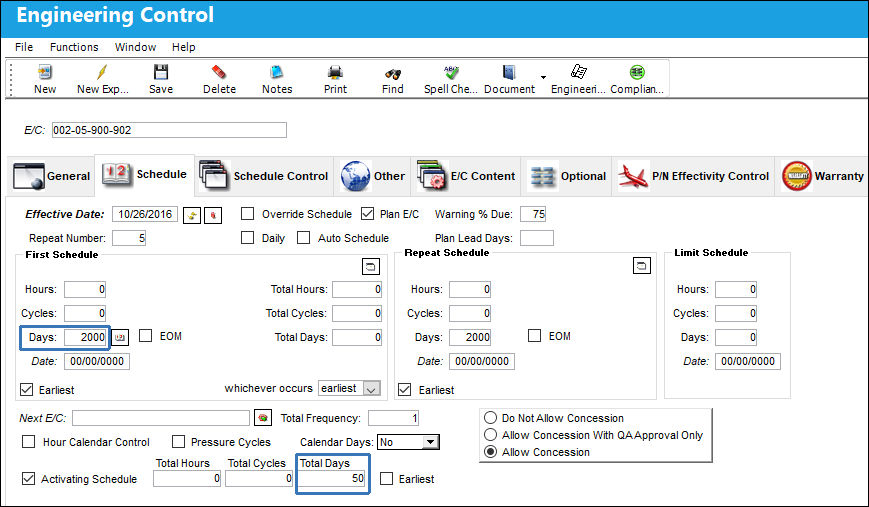
Notice the E/C has effectivity to the following A/C.
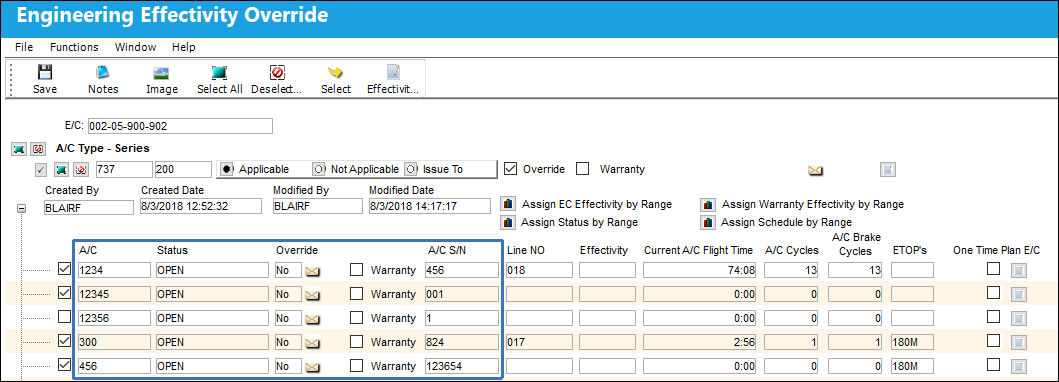
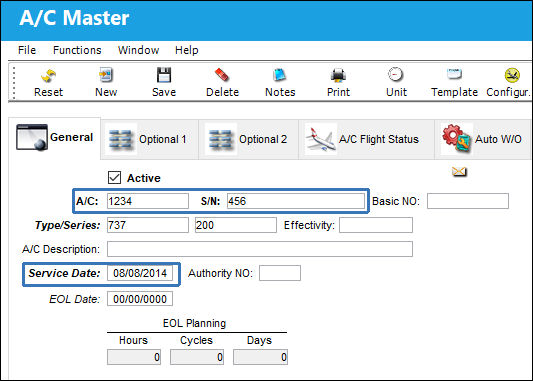
For one specific A/C, notice the Service Date from which the Aircraft Days begin.
After a particular amount of Days after the A/C Service Date, an A/C Planning Query is run. Notice that because the amount of Days that have passed is greater than the Activating Days, the A/C does appear in the Planning Results. Additionally, the E/C is Due At the combined Activating Days and Scheduled Days. In turn, the Actual Days are the amount of the Days that exceed the Activating Days (Aircraft Days - Activating Days = Actual Days).
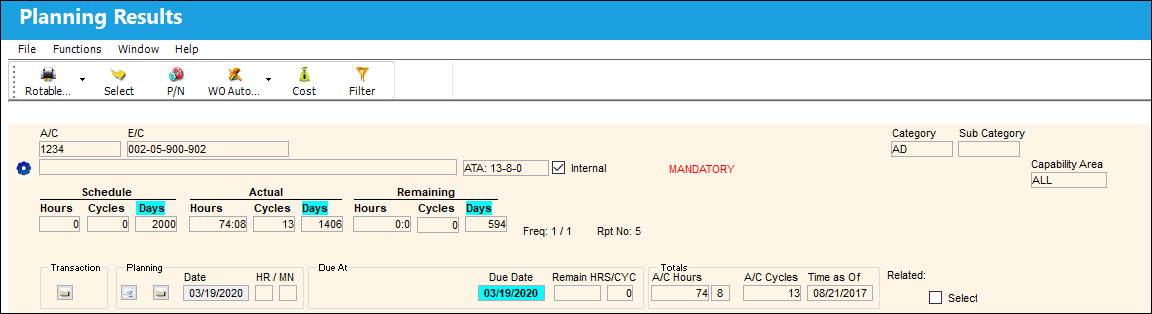
With the Schedule Days still set to that of the E/C's First Schedule, the Remaining Days are the difference between the Schedule and Actual Days, not the Aircraft Days, as is standard functionality.
Part Number Activating Schedule:
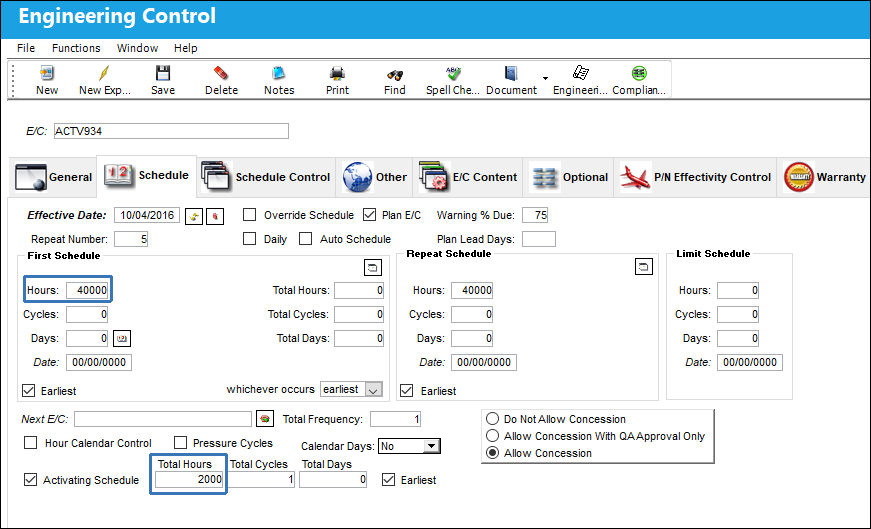
The functionality of the Activating Schedule is the same for P/N E/Cs as it is for A/C E/Cs. The following Engineering Control has been created. Notice the Hours of the First Schedule and the Total Hours specified in the Activating Schedule.
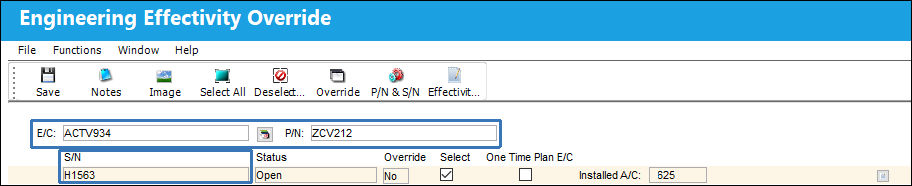
The E/C is made effective to a particular P/N S/N.
Notice the Hours that the P/N S/N has accumulated.
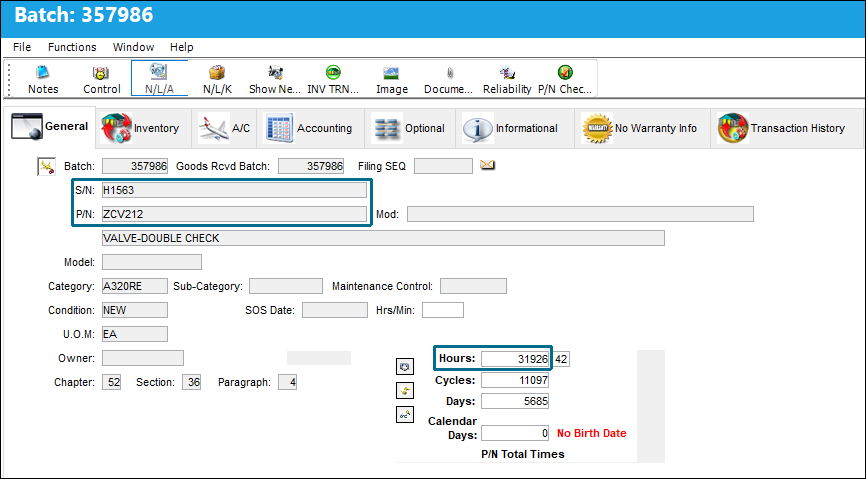
After running the A/C Planning Query for the E/C, notice since the P/N S/N has accumulated more Hours than the amount specified on the Activating Schedule, it does appear in the Planning Results. Additionally, the E/C is Due At the combined Activating Hours and the Scheduled Hours. In turn, the Actual Hours are the amount of the Hours that exceed the Activating Hours (P/N Hours - Activating Hours = Actual Hours).
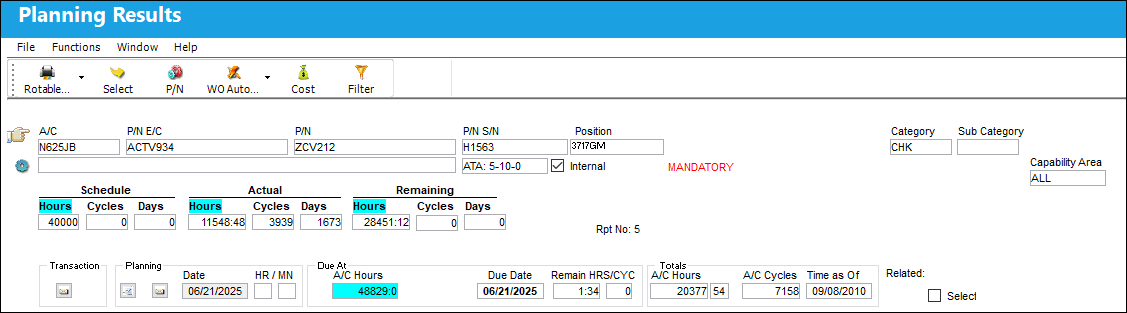
With the Schedule Hours still set to that of the E/C's First Schedule, the Remaining Hours are the difference between the Schedule and Actual Hours, not the P/N Hours, as is the standard functionality.
Share
Print
|
©1997-2026 Trax USA Corp. All rights reserved. This manual may not be copied, photocopied, reproduced, translated, or converted to any electronic or machine-readable form, in whole or in part, without prior written approval from Trax USA Corp. |
 |