
 Share
Share
 Print
Print
|
|
|
|
|


Manual Compliance can be conducted for a specific Aircraft Engineering Control through selecting the desired record from the Engineering Manual Compliance window, accessed through the A/C CTL  button.
The system displays the Engineering Manual Compliance window.
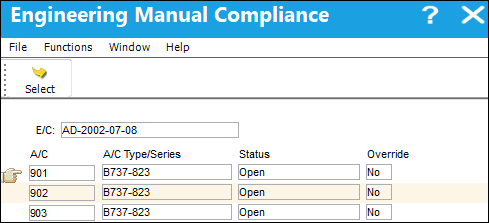
 With the proper security, the Status of the Engineering Manual Compliance for the individual records will be cascaded and reflected from the Status of the E/C.
 The feature mentioned above is security controlled via the Security Explorer/ Engineering/ Update/ Engineering Control/ E/C Allow All Status Cascade - Individual. For additional information, refer to the Security Explorer, via the System Administration Training Manual.
Select the aircraft tail number compliance is required for. Confirm the Hand  pointer is pointing to the desired record and click on the Select
  button to display the Engineering Manual Compliance Detail.
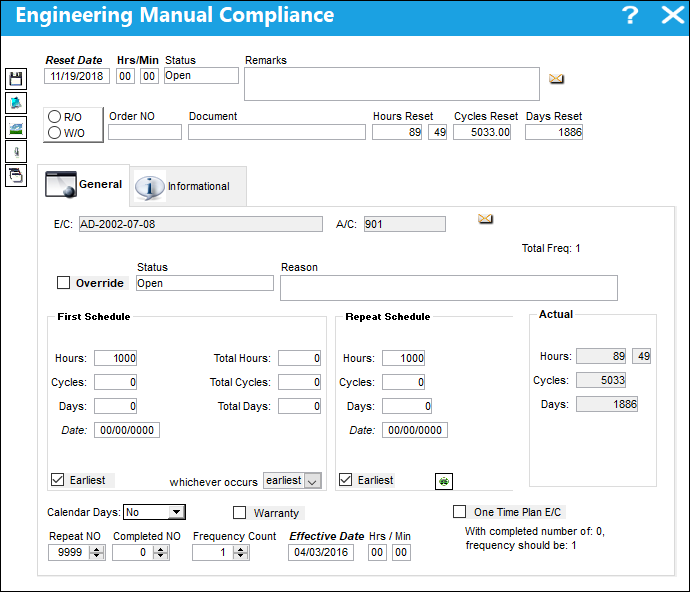
Within the Engineering Manual Compliance Detail for the A/C E/C, the Compliance information can be populated at the top.
The following information/options are available in this window:
_____________________________________________________________________________________
Reset Date
The date the E/C was complied with.
Hrs/Min
The time this E/C was complied with.
Status
The current status of the E/C Compliance (e.g., Open, Cancel, Terminate, etc.).
Remarks
This field is used to enter any additional information regarding the compliance event. This is a free text field.
R/O or W/O
If the E/C was complied with on a Repair Order or a Work Order.
Order No
The relevant Repair or Work Order Number the E/C was complied against.
Document
The Document information entered in Manual Compliance.
Hours/Cycles/Days Reset
Hours/Cycles/Days accumulated when the control was reset.
If the user enters a Reset Date prior to the current effective date of the E/C for the aircraft, the system will only write a historical record and update the Completed NO., however the Effective Date will not change. If the user enters a date after the current effective date, the system will write a history record and change the effective date of the item. If the user changes the status to Terminated, Cancel or N/A, the system will make the repeat number equal to the completed number. This will terminate the E/C and it will no longer appear in the Planning query option.
The compliance record for the E/C is written upon saving the record. The user can edit and delete previously created compliance records if required via the Compliance  button, via Engineering Control Compliance.
_____________________________________________________________________________________
General information regarding the A/C E/C can be viewed and/or edited, as needed, through the following tabs and buttons:
Engineering Manual Compliance (A/C) |
Engineering Manual Compliance (A/C) |
|---|---|
|
|
|
 Save button


 Share
Print
Share
Print
|
©1997-2026 Trax USA Corp. All rights reserved. This manual may not be copied, photocopied, reproduced, translated, or converted to any electronic or machine-readable form, in whole or in part, without prior written approval from Trax USA Corp. |
 |