
 Share
Share
 Print
Print
|
|
|
|
|


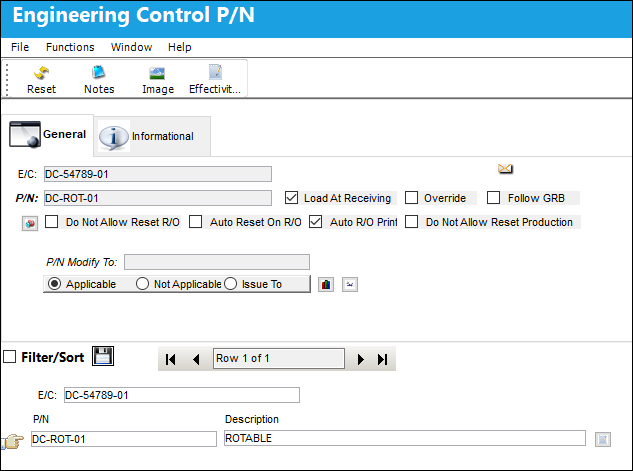
Manual Compliance can be conducted for a specific P/N Engineering Control through selecting the desired record from the Engineering Control P/N window, accessed through the P/N CTL  button.
The Engineering Control P/N window displays a list of all the P/Ns tracking against the E/C.
The Engineering Control P/N window is a query only window; users cannot edited or updated information in this window. To update information, the user must do so via the P/N CTL button, via Engineering Control. For more information regarding the fields and functions in the Engineering Control P/N window, refer to the P/N CTL button, via Engineering Control Buttons of the Engineering - E/C Training Manual.
From the Engineering Control P/N window, the user selects into a P/N to view the applicable P/N S/Ns in the Engineering Effectivity Override window.
 With the proper security, the Status of the Engineering Manual Compliance for the individual records will be cascaded and reflected from the Status of the E/C.
Regardless of security, the status of an individual E/C can be changed to Cancel, Terminated, N/A, and APLNOTBODY from any status from the main E/C.
With security access, the status of an individual E/C can be changed to Open, Rejected, or Pending from Cancel, Terminated, N/A, and APLNOTBODY from the main E/C.
Without security access (Trax Version X and all prior releases), the status of an individual E/C can be changed to Open from Cancel, Terminated, N/A, and APLNOTBODY from the main E/C.
 The feature mentioned above is security controlled via the Security Explorer/ Engineering/ Update/ Engineering Control/ E/C Allow All Status Cascade - Individual. For additional information, refer to the Security Explorer, via the System Administration Training Manual.
Share
Print
|
©1997-2026 Trax USA Corp. All rights reserved. This manual may not be copied, photocopied, reproduced, translated, or converted to any electronic or machine-readable form, in whole or in part, without prior written approval from Trax USA Corp. |
 |