
 Share
Share
 Print
Print
|
|
|
|
|


The New  button allows the user to create new P/N Software Configurations.
When Switch  AUTOAUTHPNSWCONF is set to Yes, the system will automatically authorize new P/N Software Configurations. When set to No, the system will not automatically authorize the P/N Software Configuration and the authorization process will need to be carried out; unauthorized P/N Software Configurations will be flagged as containing an open revision until they have been authorized.
Note: When Switch PNSOFTEC is set to Yes, the system will track P/N Software Configuration using only the Software Location ID (SLID) and the P/N Software. When set to No, the system will track P/N Software Configuration using the hardware P/N, Equipment Reference Designators (ERD), SLID, and P/N Software.
For additional information, refer to Switch AUTOAUTHPNSWCONF and Switch PNSOFTEC via the Settings Switches Manual.
 This button is security controlled via the Security Explorer/ Settings/ Update/ P/N Software Configuration/ New Button. For additional information, refer to the Security Explorer, via the System Administration Training Manual.
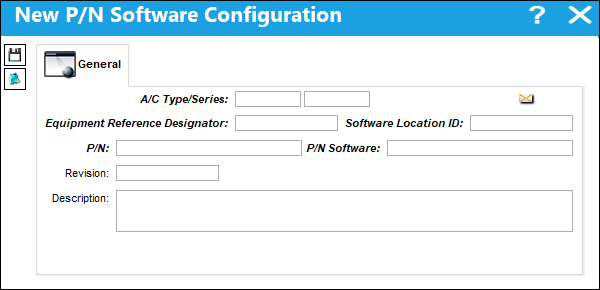
The following information/options are available in this window:
_____________________________________________________________________________________
A/C Type/Series
The Aircraft Type and Series/Fleet assignment.
Equipment Reference Designator (ERD)
The aircraft position ERD (Equipment Reference Designator) reference. This is the physical position on the aircraft where the hardware part is installed.
Software Location ID (SLID)
The Software Location Identification (SLID) code. The SLID is where the software for the part is loaded onto the hardware part's ERD location. One ERD may have multiple SLIDs as a hardware part may have multiple software components.
P/N
The hardware part that is installed on the aircraft in its ERD position.
P/N Software
The software part that is installed on the aircraft for the hardware part.
Revision
The P/N Software Configuration revision.
Description
The P/N Software Configuration description.
_____________________________________________________________________________________
Once the new P/N Software Configuration has been saved it will appear in the P/N Software Configuration window under the applicable A/C Type/Series.
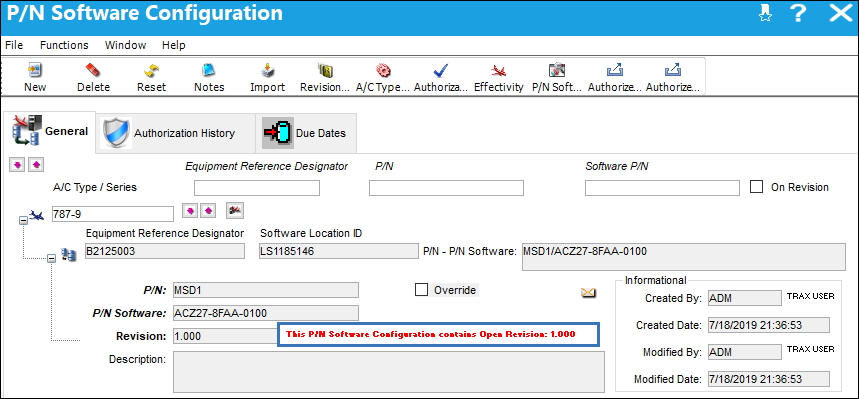
When Switch AUTOAUTHPNSWCONF is set to No, the new P/N Software Configuration will be flagged as containing an open revision, and will remain flagged until it has been authorized.
Share
Print
|
©1997-2026 Trax USA Corp. All rights reserved. This manual may not be copied, photocopied, reproduced, translated, or converted to any electronic or machine-readable form, in whole or in part, without prior written approval from Trax USA Corp. |
 |