
 Share
Share
 Print
Print
|
|
|
|
|


Program Settings

Navigation Panel/ User Settings/ Program Settings
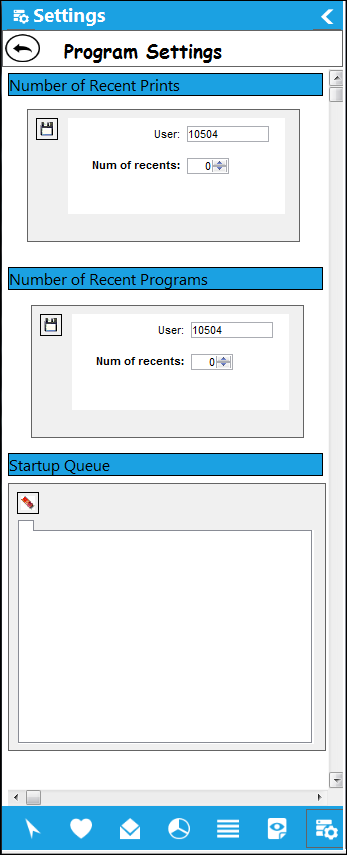
In Program Settings, the user is able to specify the number of Recent Prints, Recent Programs and the Startup Queue. All of these options are conveniently located under one tab and are beneficial to the user in specifying the quantity limitation for recent prints and the limitation of recent programs from displaying in the 'Recent' section of the Favorite tab.
The Save  button is conveniently located for each option and is required in order for the change to take effect in the application.
 This is security controlled via Security Explorer/ System Administration/ Explorer/ System Transaction Configuration/ User Settings Menu - Program Settings. For additional information, refer to the Security Explorer via the System Administration Training Manual.
Share
Print
|
©1997-2026 Trax USA Corp. All rights reserved. This manual may not be copied, photocopied, reproduced, translated, or converted to any electronic or machine-readable form, in whole or in part, without prior written approval from Trax USA Corp. |
 |