
 Share
Share
 Print
Print
|
|
|
|
|


The A/C In/Out Service  button is used by the Maintenance Control department to place an A/C out of service and then return it to service as necessary. This button is typically used in the event of an incident. The aircraft can be placed in or out of service via the Work Order. If the aircraft is placed 'Out of Service,' via the Work Order, it will be placed back 'In Service' automatically when the Work Order is closed. If it is a Line Work Order, the aircraft must be placed back 'In Service' manually.
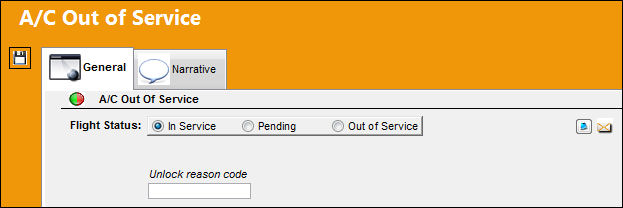
The following information/options are available in this window:
_____________________________________________________________________________________
In Service radio button
Select this radio button to place the aircraft in service and ready to fly. The green  light will appear for this aircraft in the A/C Controller Panel. Go to Technical Records/Update.
Pending radio button
Select this radio button if the aircraft status is pending review of any related Defect Reports. The yellow  light will appear for this aircraft in the A/C Controller Panel. Go to Technical Records/Update.
Out Of Service radio button
Select this radio button to place the aircraft out of service and unable to fly. The red  light will appear for this aircraft in the A/C Controller Panel (Technical Records/ Update). The Out Of Service, Advised, and Estimated In Service fields will appear after the Out Of Service radio button is selected.
Unlock Reason Code
This field allows users to select a reason code when the aircraft is placed 'in service' manually. This field is only available when the aircraft is in service. Therefore, the In Service radio button must be selected. This is an informational-only field and is accessible through any window where the A/C Out of Service window is accessible. This field is based off of System Transaction Code Technical Records/Unlock Reason A/C CP OOS. This field is only available when Technical Records Switch  URACCPOOS is set to Yes. For more information, refer to Switch URACCPOOS via the Technical Records Switches Manual.
_____________________________________________________________________________________
 Additional information relevant to the record can be included in the A/C Out of Service, Narrative Tab.
Share
Print
|
©1997-2026 Trax USA Corp. All rights reserved. This manual may not be copied, photocopied, reproduced, translated, or converted to any electronic or machine-readable form, in whole or in part, without prior written approval from Trax USA Corp. |
 |