
 Share
Share
 Print
Print
|
|
|
|
|


How to Load an IPC Manual and Create P/N Master
The TraxDoc IPC Import utility is used to automatically create records for parts and vendors from the data contained in an AIPC or EIPC manual.
The following data can be automatically loaded for parts:
- A PN_MASTER record representing the part.
- Optional information, such as PN description and chapter/section/paragraph will be loaded if available.
- A PN_INTERCHANGEABLE record for the main interchangeable.
- Additional PN_INTERCHANGEABLE records for any interchangeables described in the IPC.
- Both one-way and both-way interchangeable parts can be loaded.
- Effectivity data for parts and interchangeables.
 The SPC Code (Spare Part Class Code), available in the import file, allows users to specify a P/N Category. The P/N Category code options are '1' for expendable parts, '2' for rotable parts, and '6' for repairable parts.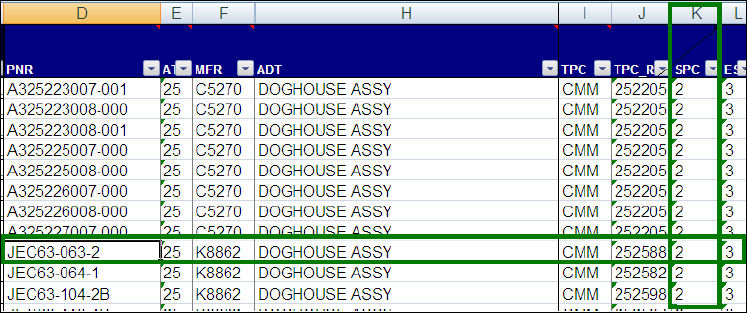
These SPC Codes are then taken by TRAX from the import file and applied to the part.
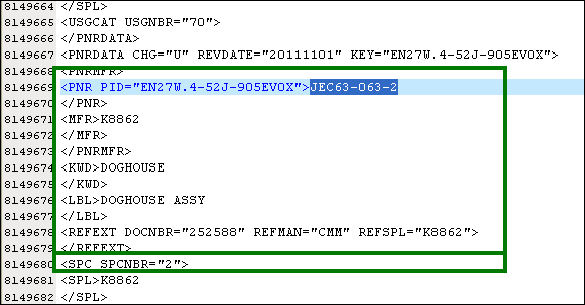
If the part already exists within TRAX when the IPC starts loading and the existing P/N Category for the part in TRAX does not match the P/N Category noted in the SPC Code, the user will be notified of the error via the exception report for the import load.
The following data can be automatically loaded for vendors:
- A RELATION_MASTER record representing the vendor.
- Optional information, such as vendor addresses and phone numbers, will be loaded if available. Due to limitations in the IPC format, the vendor’s city, state, postal code, and country cannot be loaded, but this data will appear in the main address line.
Share
Print
|
©1997-2026 Trax USA Corp. All rights reserved. This manual may not be copied, photocopied, reproduced, translated, or converted to any electronic or machine-readable form, in whole or in part, without prior written approval from Trax USA Corp. |
 |