
 Share
Share
 Print
Print
|
|
|
|
|


Select the Effectivity  button to apply A/C Effectivity to the TraxDoc from the TraxDoc Master Detail window.
When the button is selected, the TraxDoc Effectivity window appears as follows. Select the fleet type/series applicable. To select only specific Tail Numbers within a fleet Type/Series, select the fleet's Expand  button and then select the applicable Tail Numbers.
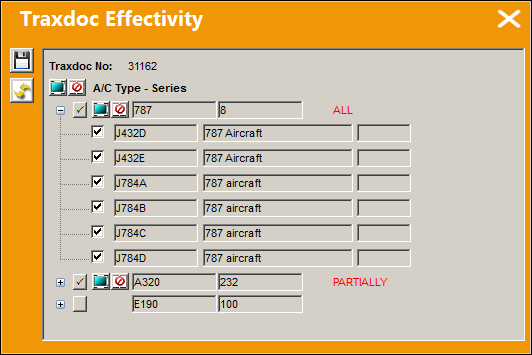
The following information/options are available in this window:
_____________________________________________________________________________________
Traxdoc No.
The TraxDoc that is having its Aircraft Effectivity configured.
Fleet Select All  / Deselect All
  buttons
Use these buttons to select all fleets (including every aircraft) or to deselect all fleets.
A/C Type/Series
The entire aircraft fleet. An entire fleet can be selected for effectivity by selecting the A/C Type/Series checkbox or individual aircraft from that fleet can be selected by selecting the Expand / Collapse  buttons.
A/C Type/Series  button
Select this button to add effectivity to the entire fleet.
Expand / Collapse buttons
Use these buttons to view all of a fleet's aircraft or to hide all of a fleet's aircraft. Once expanded, individual aircraft can be selected or deselected for effectivity.
Aircraft Select All / Deselect All buttons
Use these buttons to select all of a fleet's aircraft or to deselect all of a fleet's aircraft. The part will be effective to only those selected aircraft.
ALL
Indicates that all aircraft for the selected type/series are effective. If only one available Type/series is selected, but all of the aircraft within that type/series are selected, the effectivity is classified as ‘ALL.’
PARTIALLY
Indicates that some but not all aircraft for the selected type/series are effective. If multiple type/series are selected, but one of the selected type/series has aircraft within that are not selected, the effectivity is classified as ‘Partially.’
Select checkbox
Select this checkbox if the P/N is to be effective to this aircraft. Only those aircraft with this checkbox selected will have effectivity.
Aircraft
The individual aircraft that make up the fleet.
_____________________________________________________________________________________
Share
Print
|
©1997-2026 Trax USA Corp. All rights reserved. This manual may not be copied, photocopied, reproduced, translated, or converted to any electronic or machine-readable form, in whole or in part, without prior written approval from Trax USA Corp. |
 |