
 Share
Share
 Print
Print
|
|
|
|
|


The Revision Removal  button allows users to delete existing revisions from TraxDoc documents.
For example, open the TraxDoc Master window, then select a Trax Doc. Once selected, the TraxDoc Document window opens. Select the Revision Removal button via the Manual Links Multi  button.
From the TraxDoc Revision Removal window, all Revisions are listed with the option to delete any or all of the TraxDoc's Revisions.
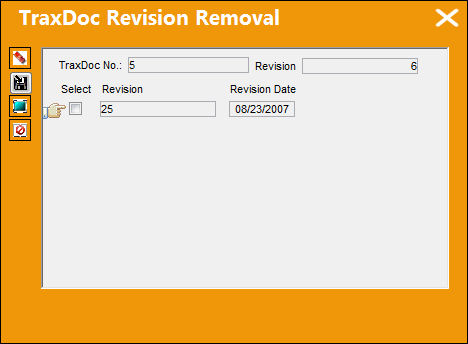
The following information/options are available in this window:
_____________________________________________________________________________________
TraxDoc No
The TraxDoc Document ID number, which is automatically generated by the system.
Revision
The document’s current revision number. Each TraxDoc can have multiple revisions as the data/records created through the TraxDoc will need to be updated (revised) regularly depending on the requirements of the aircraft manufacturer, regulatory agency, airline, etc.
Select checkbox
Select this checkbox to choose which Revision to be deleted.
Revision Name
The name of the Revision.
Revision Date
The document’s current revision date.
_____________________________________________________________________________________
Select the Delete  button to delete the selected Revisions, as necessary.
The Revision can be exported and removed from TRAX by selecting the Export to File  button. For more information refer to the Export to File Button.
Share
Print
|
©1997-2026 Trax USA Corp. All rights reserved. This manual may not be copied, photocopied, reproduced, translated, or converted to any electronic or machine-readable form, in whole or in part, without prior written approval from Trax USA Corp. |
 |