
 Share
Share
 Print
Print
|
|
|
|
|


The Tools Locator drop down option, from the Inventory Transaction window, allows for the management of tools within the system. The tool functionalities in Inventory Transaction are only valid if the Tools Locator option is selected in the drop down menu on the main screen:
As with the majority of search queries in TRAX, it is recommendable to enter as many search filters as possible to minimize the search result. Select search criteria and click on the Find  button.
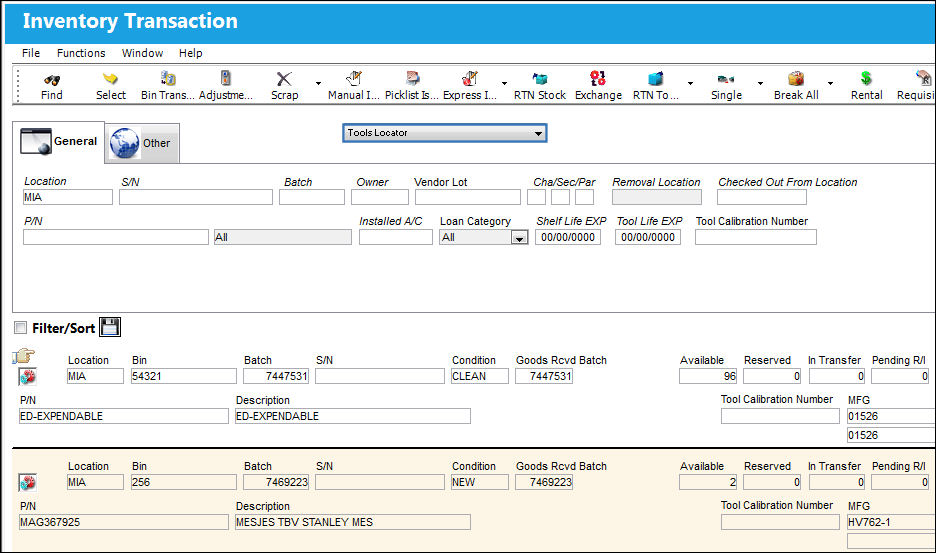
Query:
The following information/options are available in this window:
_____________________________________________________________________________________
MFG 
The manufacturer's code and name.
Approved Certificate Number
The type of certificate approving the part (ie. Form 1, EASA etc.). The user may choose from a pre-defined transaction code, or enter the Approval Certificate manually.
Checked Out From Location
The Location from which a Tool was originally checked out.
This field cannot be utilized with the Protect Location checkbox selected in the user's Security settings. For more information, refer to the Security, General tab.
_____________________________________________________________________________________
To explore the creation of Tools in the system, refer to Setting Up Tools via the Part Number Master.
With the Tool Locator View selected, the following buttons are available:
- Tool Check-In Button
- Tool Check-Out Button
- Tool Picklist Button
- Tool Concession Button
- Tool Calibration Change Button
Additionally, the Calibrated Tool Master Checklist Print is available.
 Share
Print
Share
Print
|
©1997-2026 Trax USA Corp. All rights reserved. This manual may not be copied, photocopied, reproduced, translated, or converted to any electronic or machine-readable form, in whole or in part, without prior written approval from Trax USA Corp. |
 |