
 Share
Share
 Print
Print
|
|
|
|
|


Select the Select a file to import  button to allow a user to import any file type into TraxDoc. Imported files are stored in the Trax database and are accessible by all Trax users who have permission granted.
From the Select File To Import Window select any file type from your computer or networked drive to import into this document.
A TRAX user must have the required Windows© application installed on the local computer to open the file.
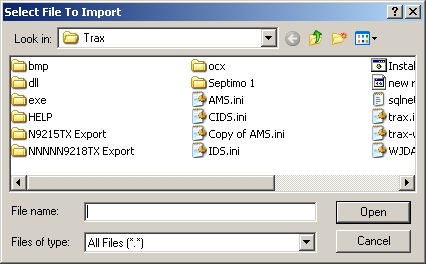
An XSL (eXtensible Stylesheet Language) file is a file which defines how to transform XML to another format. TRAX takes the XML for a Task Card, transforms it using the XSL file, and produces a PDF file. In this way, TRAX can have the same data for a Task Card in the XML, yet each customer can vary how their Task Card looks when viewed/printed.
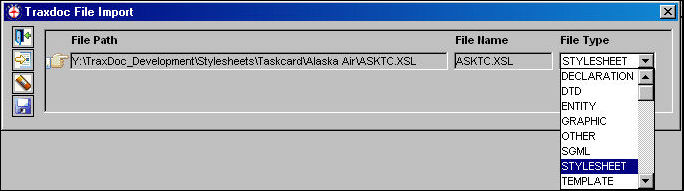
The Traxdoc File Import Window appears. Select the STYLESHEET file type from the File Type drop down menu. Select the Save  button. The Save prompt appears. Select OK.
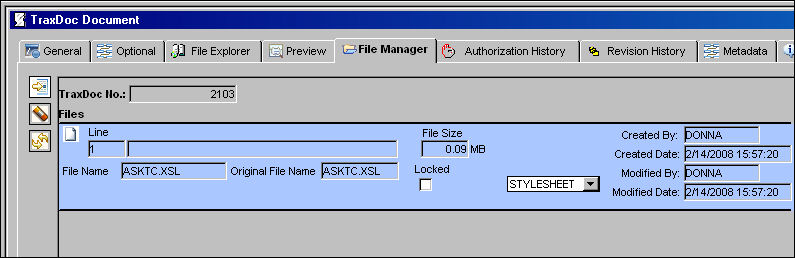
The stylesheet has been saved into the file.
Share
Print
|
©1997-2026 Trax USA Corp. All rights reserved. This manual may not be copied, photocopied, reproduced, translated, or converted to any electronic or machine-readable form, in whole or in part, without prior written approval from Trax USA Corp. |
 |