
 Share
Share
 Print
Print
|
|
|
|
|


Select the Create folder under current TraxDoc path  button to allow the user to create a folder in the current TraxDoc path. A user can set up a directory structure in TraxDoc similar to Windows© Explorer.
The user can create folders in a TraxDoc Document or create folder within the existing folders in a TraxDoc Document.
Create a folder in an existing folder as follows:
- Select a Folder (
 ).
). - Click the Select
 button to open the folder and view its contents.
The folder that is open is displayed at the top of window. - Click the New
 button.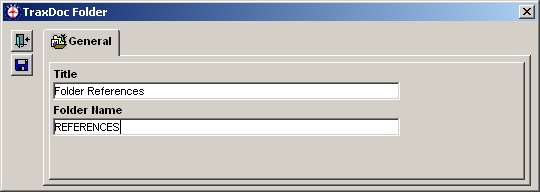
The following information/options are available in this window:
_____________________________________________________________________________________
Title
Enter a title for the Folder.
Folder Name
Enter a Folder Name.
_____________________________________________________________________________________
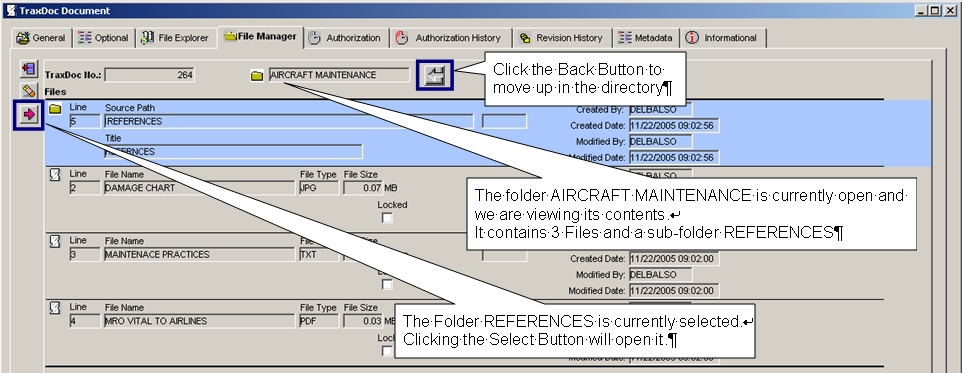
To navigate a directory structure select a Folder () and click the Select button to open the folder and view its contents. The folder that is currently open is shown at the top of the window. Select the Back  button to move up in the directory structure.
The folder AIRCRAFT MAINTENANCE is currently open and we are viewing its contents.
It contains 3 Files and a sub-folder REFERENCES.
The folder REFERENCES is currently selected.
Clicking the Select button will open it.
Select the Back button to move up in the directory structure.
Share
Print
|
©1997-2026 Trax USA Corp. All rights reserved. This manual may not be copied, photocopied, reproduced, translated, or converted to any electronic or machine-readable form, in whole or in part, without prior written approval from Trax USA Corp. |
 |