|
TRAX MANUALS > TraxDoc > TraxDoc Module > TraxDoc, Update Menu > TraxDoc Master > TraxDoc Document Detail > TraxDoc Document Detail, File Manager Tab > New Button, via TraxDoc Document Detail, File Manager Tab > Import OCR Text for Text Search Button, via TraxDoc File Manager
Import OCR Text for Text Search Button, via TraxDoc File Manager
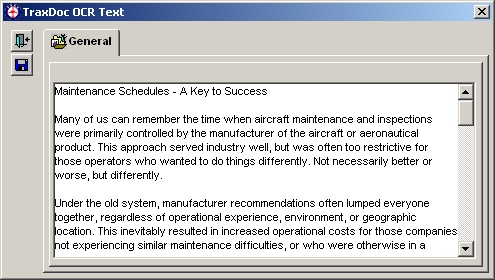
The Import OCR text for text search  button allows the user to scan documents using an OCR scanner. The document is saved as a .TXT file and its contents will be searchable. button allows the user to scan documents using an OCR scanner. The document is saved as a .TXT file and its contents will be searchable.
Use the OCR software on your computer to scan a document, then cut and paste the scanned text into the TraxDoc OCR Text Window.
Note: TRAX does not provide Optical Character Recognition Software. Trax Users must use the OCR software provided by the scanner equipment manufacturer.
|
See Also New Button, via TraxDoc Document Detail, File Manager Tab Select a File to Import Button, via TraxDoc File Manager Drag & Drop File/Folder Structure Under Current TraxDoc Path Button, via TraxDoc File Manager Import a File via PDF Print Capture Button, via TraxDoc File Manager Create a Link to a Webpage Button, via TraxDoc File Manager Create a Link to an Application Button, via TraxDoc File Manager Import a File via the Scanner Button, via TraxDoc File Manager Create a Folder Under Current TraxDoc Path Button, via TraxDoc File Manager Load PDF Files Button, via TraxDoc File Manager Load Files into Shared Directory Button, via TraxDoc File Manager Create a Link to a File Button, via TraxDoc File Manager Load XML Content Button, via TraxDoc File Manager |
|

 Share
Share
 Print
Print


