
 Share
Share
 Print
Print
|
|
|
|
|


When a compliance record is deleted, the system will update the Status, Completed No, and Modified By/Modified Date fields accordingly; however, the A/C or P/N S/N effective date will not automatically update to its previous effective date. To change the effective date, the user must do so manually using the A/C CTL  button or the P/N CTL
  button, via the Engineering Control.
Select the Delete  button and the following warning appears:
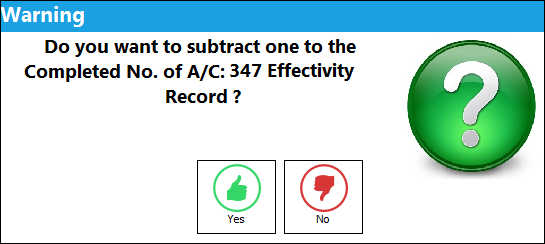
Select Yes for the system to subtract 1 from the Complete No, or select No for the system to leave the Completed No as is.
If the user deletes the compliance record for a Parent E/C, any related Child E/C compliance records will not automatically be deleted; the user must delete the compliance record for each Child E/C.
If a P/N E/C is complied with that modifies the P/N and the compliance is later deleted, the P/N will have to be changed back manually using the P/N S/N Change  button, via Inventory Transaction.
 Deleting Compliance for P/N Software E/C
If a compliance record is being deleted for a P/N Software E/C that changed an aircraft's P/N Software Configuration, based on the 'From Software' and 'To Software' in the E/Cs Software tab, the following transactions will occur:
Note: Switch  PNSOFTEC must be set to Yes, and Switch UPDATESWCOMPLEC must be set to No.
In the Engineering Effectivity Override window:
- Able to roll back the Completed NO by '1'
- The E/C Effective Date reverts back to the previous 'From Software' effective date
In the Engineering Control:
- The E/C effectivity status for the A/C re-opens
- The main E/C status reverts to open, if the status was terminated due to all A/C being complied with
In the P/N Software Configuration window:
- A/C effectivity is added back to the 'From Software', and the P/N Software status changes to open if it was N/A
- A/C effectivity is removed from the 'To Software', and the P/N Software status changes to N/A if nothing else is effective
In the Software Configuration Authorization Explorer window:
- Under the P/N Software column, the software reverts and will show the 'From Software' as being the current software
- Under the Authorized P/N Software column, the 'To Software' E/C reappears to show an upgrade is available
Share
Print
|
©1997-2026 Trax USA Corp. All rights reserved. This manual may not be copied, photocopied, reproduced, translated, or converted to any electronic or machine-readable form, in whole or in part, without prior written approval from Trax USA Corp. |
 |