
 Share
Share
 Print
Print
|
|
|
|
|


Task Card Category
The System Transaction Codes are displayed with both the Code Names and Descriptions. The Code Descriptions directly illustrate their functionality and role in the system, as fields are populated and tasks are performed.
Transaction Code: |
Task Card Category |
General Description: |
Task Card Category that will be associated with each Task Card |
Are Authorization Steps Available? |
Y |
Is System Notification Available? |
Y |
Trax Control Panel Path(s): |
Engineering/ Update/ Task Card |
Window(s): |
w_task_card_eu |
Related Switch(es): |
|
Functions: |
Categorizing the Task Card by Inspection, Checks, Engine and etc for sort print and searching purpose. |
Available Functionality:
Also allows for authorization processes to be followed as required by each category. In addition this transaction code provides system notification for newly created, modified and/or deleted task cards.
The Task Card Category code may be entered via Setting/Explorer/System Transaction Codes.
Set-up is identical to the creation of any other System Transaction Code and has the added functionality of system notification and task card authorization process steps set-up.
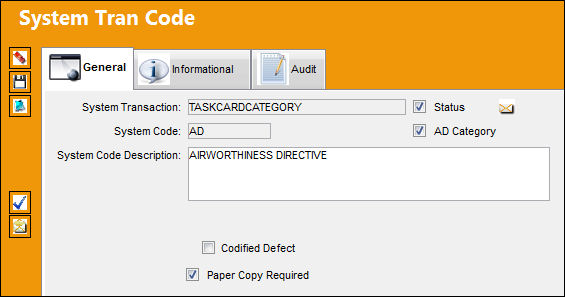
The following information/options are available in this window:
_____________________________________________________________________________________
AD Category 
Select this checkbox to apply the AD Category Code to a newly created Task Card. Selecting this checkbox will trigger the 'Was the Reference Document marked AD?' field (via the W/O Non-Routine Task Card, Optional 1 tab) to default to Yes. For additional information, refer to the W/O Non-Routine Task Card, Optional 1 tab via the Production Training Manual.
Codified Defect checkbox
When the Codified Defect checkbox is selected, the Keywords tab appears in the Task Card window when the System Code (ie: B-CHECK) is selected. For additional information, refer to the Task Card, Keywords Tab via the Engineering Training manual.
Paper Copy Required checkbox
Select this checkbox to have the Paper Copy Required checkbox appear when the specified transaction code is selected for a Task Card. For additional information, refer to the Task Card, Optional 2 Tab, via the Task Card section of the Engineering - T/C Training Manual.
Authorization Step  button
Select the Authorization Step button to pre-define authorization processes for Task Cards. For additional information, refer to the Authorization Steps Button, via Task Card Category.
System Notification  button
Select this button to set up notifications by Task Card Category. By Task Card Category a User may be notified by system noted or an e-mail of newly created, modified and/ or deleted Task Cards. For information on how to set up System Notifications, refer to Setup - System Notification, via System Notifications of the Settings Training Manual.
_____________________________________________________________________________________
Share
Print
|
©1997-2026 Trax USA Corp. All rights reserved. This manual may not be copied, photocopied, reproduced, translated, or converted to any electronic or machine-readable form, in whole or in part, without prior written approval from Trax USA Corp. |
 |