
 Share
Share
 Print
Print
|
|
|
|
|


Select the N/R Analysis  button to view a printable graphical representation of an analysis of the Non-Routine Task Cards for all work orders.
The N/R Analysis button also appears in the Shop Work Order window and contains the same functionality for a Shop Work Order.
 This button is security controlled via Production/ Update/ W/O/ W/O Sel NR Analysis. For more information refer to the Security Explorer via the System Administration Training Manual.
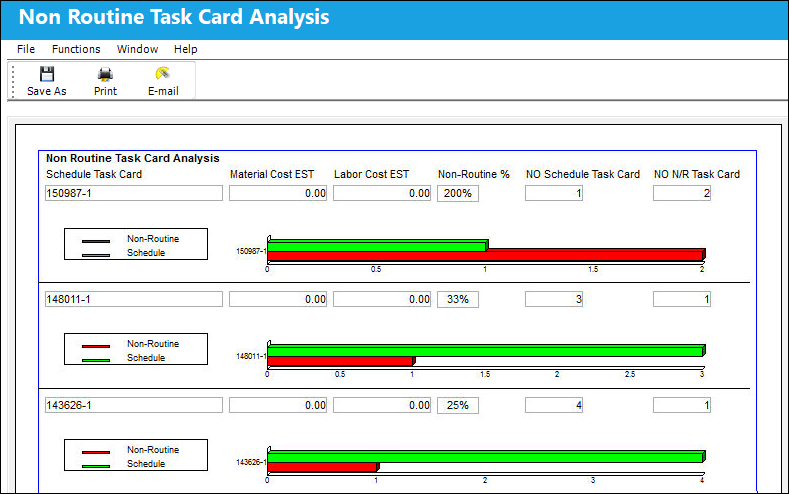
At the top of the screen you will see a table like this:

The following information/options are available in this window:
_____________________________________________________________________________________
Schedule Task Card
The Number of the scheduled Task Card.
Material Cost EST
The estimated material cost for this Task Card.
Labor Cost EST
The estimated labor cost for this Task Card.
Non-Routine %
The percentage of how often a N/R Task Card was created from this Task Card.
NO Schedule Task Card 
Records the number of Work Orders this Task Card is associated to.
NO N/R Task Card
Records the number of Work Orders this Non-Routine Task Card is associated to.
_____________________________________________________________________________________
At the bottom of the screen, find the graphical display of the above data:
Share
Print
|
©1997-2026 Trax USA Corp. All rights reserved. This manual may not be copied, photocopied, reproduced, translated, or converted to any electronic or machine-readable form, in whole or in part, without prior written approval from Trax USA Corp. |
 |