|
TRAX MANUALS > Planning > Planning Module > Planning, Query Menu > A/C Planning Query > A/C Planning (Interactive Planner View), General Tab > A/C Planning (Interactive Planner View) Results > Planning Element Detail Area, via (A/C Planning) Interactive Planner > (A/C Planning) Interactive Planner, Planning Element Detail Area Buttons > Planning Query Button, via (A/C Planning) Interactive Planner, Planning Element Detail Area
Planning Query Button, via (A/C Planning) Interactive Planner, Planning Element Detail Area
Select the Planning Query  button. button.
TRAX displays the Planning Query Window. This allows the user to enter new search criteria without having to exit the Interactive Planner view. Enter required criteria and select the Find  button. button.
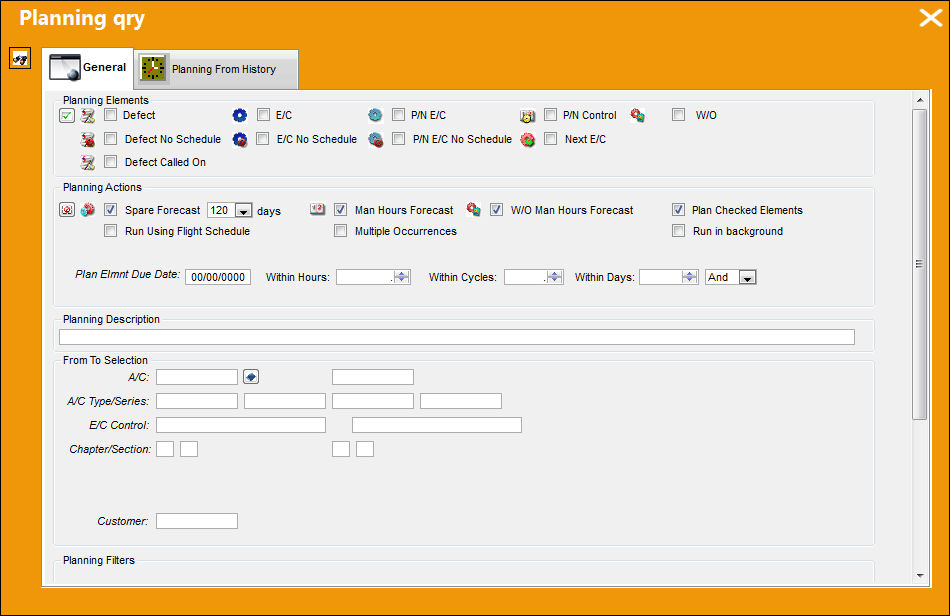
TRAX re-calculates the information in the Planning Element Detail Area and Unscheduled Tasks Area depending on the new criteria selected. All other information in the Interactive Planner remains the same.
|
See Also (A/C Planning) Interactive Planner, Planning Element Detail Area Buttons Find Button, via (A/C Planning) Interactive Planner, Planning Element Detail Area Select All/De-select All Button, via (A/C Planning) Interactive Planner, Planning Element Detail Area Add Tasks Button, via (A/C Planning) Interactive Planner, Planning Element Detail Area Create Work Order Button, via (A/C Planning) Interactive Planner, Planning Element Detail Area Expand All/Collapse All Button, via (A/C Planning) Interactive Planner, Planning Element Detail Area Remove Task Grouping Button, via (A/C Planning) Interactive Planner, Planning Element Detail Area Turn On Detail View Button, via (A/C Planning) Interactive Planner, Planning Element Detail Area |
|

 Share
Share
 Print
Print


