Publication Date: 8/17/2026 Share Print

Previous Topic

Next Topic

Book Contents

Book Index

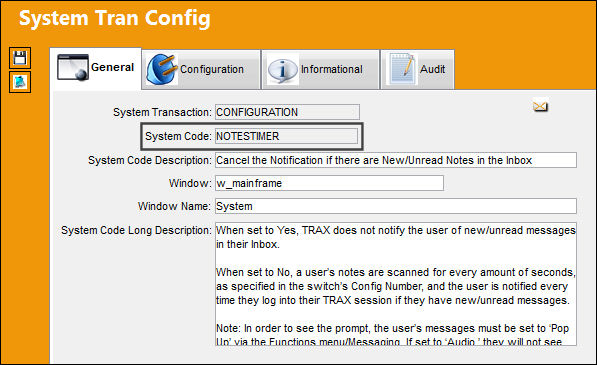
NOTESTIMER - Cancel the Notification if there are New/Unread Notes in the Inbox

Cancel the Notification if there are New/Unread Notes in the Inbox

Affected Window: w_mainframe
NOTESTIMER_Configuration


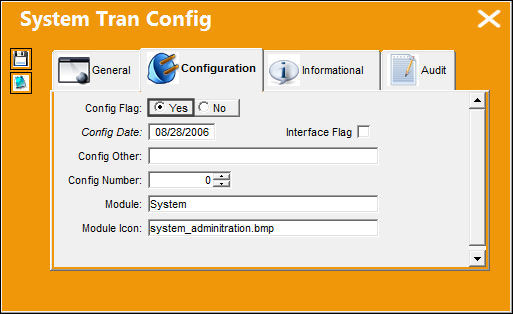
Switch Set to Yes:

When set to Yes, TRAX does not notify the user of new/unread messages in their Inbox.
SYS_ADMIN_yes

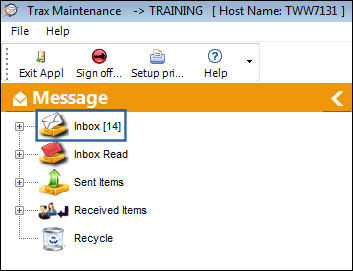
In the following example, a user has logged onto TRAX and there are new/unread messages in the Inbox. Notice there is not a notification regarding this.
NOTESTIMER_Yes_1


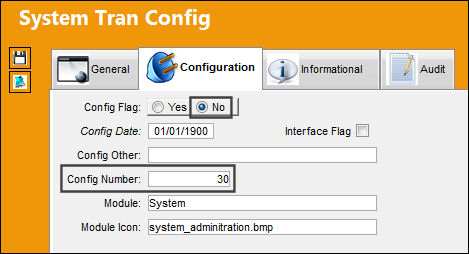
Switch Set to No:

When set to No, a user’s notes are scanned for every amount of seconds, as specified in the switch’s Config Number, and the user is notified every time they log into their TRAX session if they have new/unread messages.
NOTESTIMER_No_1

In the following example, a user has logged onto TRAX and there are new/unread messages in the Inbox. Notice there is a notification regarding this.
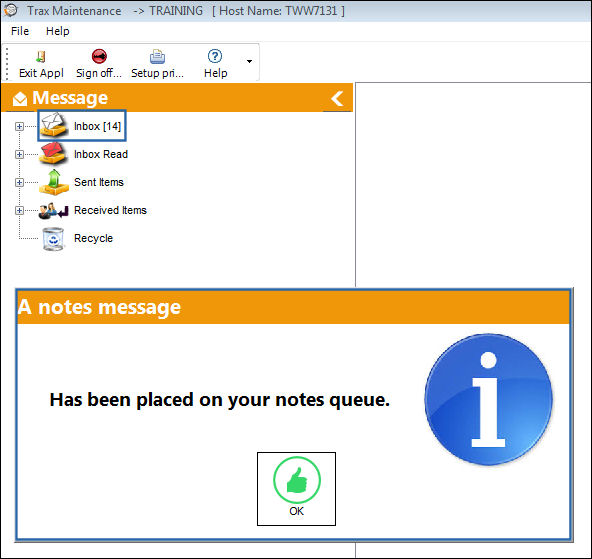
NOTESTIMER_No_2

Note: In order to see the prompt, the user's messages must be set to 'Pop Up' via the Functions menu/Messaging. If set to 'Audio' they will not see the prompt. For more information refer to Messaging via the System Standards Training Manual.

See Also

System Administration Switches

AMYUNIPAPERSIZE - Default Paper Size for Amyuni Printers

BATCH - Batch Next Sequence Number

BLOB - BLOB Next Sequence Number

BLOBSIZE - Specify File Size for BLOB (in Kilobytes)

CHECKPWRDHIST - Check Password History to Validate Against Recently Used Passwords

CONVEXDT - Use Date and Time as Reset Date for Configurations

CONVPATH - Conversion Path

DATELIDS - Get the ID for TRAX_CONVERSION_DATAELEMENTS Table

DELETEPRINTS - Specify Number of Days to Delete Emailed, Printed or Retrieved W/Os That Have Been Printed

DISCREPT - Place Text 'SERVICE PACK TESTING IN PROGRESS' in Trax Discrepancy Report

DOCEXE - Default path to External Document Management System program

DOCNO - Set Default Path in Config Other Field And Determine Next Sequence Number for Documents

DROPLIMIT - Number of Records in Drop Down Windows

EMAILDRV - E-Mail Print Driver Format

EMAILSEQ - Email Attachment Number Next SEQ

ESAVEPTH - Default Path to Save E-Mail Attachments

GSACTITLE - A/C Field Title (Internal Use Only)

GSCYCLESTITLE - Cycles Field Time (Internal Use Only)

GSHOURSTITLE - Hours Field Title (Internal Use Only)

HELPFILE - Link Help File Path to TRAX Help Button

HIDEDASHBOARD - Hide Dashboard from TRAX Startup

IMGNODEL - Delete Prompt Does Not Appear for Pasted Images in Image Control

INTRFSQL - Tracks the Date the Last Time the Interface SQL was Applied

JEWIPTRN - J/E Transaction Number Sequence

LICENSE - License Control – TRAX USE ONLY

MEMREST - Recover Memory on Control Panel Activate

NOTEOVR - Allow Notes Override/ Modification By All Other Users

NOTES - Notes Next Sequence Number

ORDRRCDP - Order Receiving Discrepancy Transaction

PDFMERGECOMMAND - Execute Batch File Using OS Shellexecute Command in PDF Merge

POPUPMSG - Notes Pop-Up Message Notification Instead of Audio Notification

PPREVIEW - Print Preview Files Library Path

PRINTDIR - Set the path for the Work Pack Print printer job program to write the result reports

PRINTSEL - Print Data Selection Page With Reports

PRINTSGN - Change Printer on Sign-On

PRNATTDOCS - Print Document Control Attachments

SCANBRIG - Scanner Parameters

SCANCOMP - Scanner Parameters

SCANCONT - Scanner Parameters

SCANFEDT - Scanner Parameters

SCANMODE - Scanner Parameters

SCANNPAG - Scanner Parameters

SCANPAPF - Scanner Parameters

SCANRESL - Scanner Parameters

SECMALP - Security Password Minimum of Alpha Characters

SECMCALP - Security Password Minimum Number of Lower Case Alpha Characters

SECMID - Security ID Minimum Number of Characters

SECMNC - Security Password Minimum Number of Numeric Characters

SECMPAS - Security Password Minimum Number of Characters

SECNPTRY - Security Number of Password Retry Before Account Deactivation

SESSPW - Do not prompt for password on session logon

SMTPMAIL - Send SMTP E-mail

SURAUTPRT - Automatic Print Survey

SYSDTDBS - System Date/Time From Database Server

SYSDTTZC - System Date Time Zone Conversion

SYSLOCZONE - Main Station Location Time Zone

SYSPRTSC - System Prints Security

TAB - TAB Next Sequence Number

TMPDIR - Path of Temporary Directory

TRAXNO - TRAX Discrepancy Reports – TRAX USE ONLY

UATTIMEOFF - Turn Off the User Display and Server Time in TRAX

UPGRADEVER - Automatic TRAX Upgrade Prompt

VERSION - Version – TRAX USE ONLY

VIDEOPH - Video Documentation Library Path

WALLHOLD - Invalid Wall Password for Employee on Hold

Top of Page Publication Date: 8/17/2026 Share Print