
 Share
Share
 Print
Print
|
|
|
|
|


TRAX Application Exceptions
The TRAX Application Exceptions window tracks Oracle errors received by database users which can appear for any number of reasons. This window is useful because if the user fails to save a screen shot of the error message, the TRAX Administrator can use the window to find out what the Oracle error means. From there they can see if it is something for the Database Administrator to resolve or if it must be logged in to TRAX Support.
The window is divided into three different sections. For this documentation they will be referred to as Query, Results, and Details:
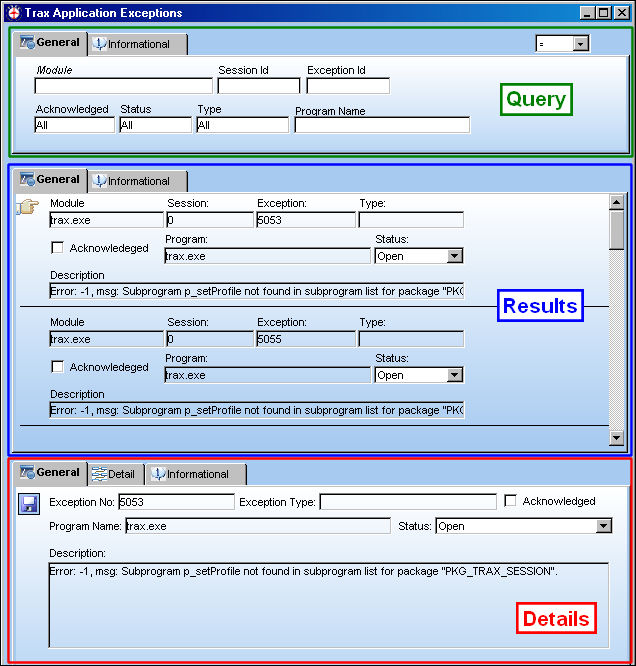
Query Section:
_____________________________________________________________________________________
Module
The TRAX Module where the error occurred.
Session Id
The Session identification number.
Exception Id
The Exception identification number.
Acknowledged drop down
Indicates whether or not the error has been acknowledged by an administrator. Errors are acknowledged if the Acknowledged checkbox is selected.
Status drop down
Indicates the current error status. The options are either 'Resolved', 'Open', or 'All.'
Type drop down
The error type. The types include: 'Error', 'Warning', 'Information', 'Exception', or 'All.'
Program Name
The name of the program where the error occurred.
_____________________________________________________________________________________
_____________________________________________________________________________________
Created By
The user who created the record.
Created Date
The date the record was created.
Modified By
The user who last modified the record.
Modified Date
The date the record was last modified.
_____________________________________________________________________________________
Select the Find  button to search based on the criteria entered above.
Results Section:
_____________________________________________________________________________________
Module
The TRAX Module where the exception occurred.
Session
The Session identification number.
Exception
The Exception identification number.
Type
The exception type.
Acknowledged checkbox
Indicates whether or not the error has been acknowledged by an administrator. Acknowledged errors will not be removed from the listing, and the Status will not be affected.
Program
The program where the exception occurred.
Status drop down
Indicates the current exception status. If the exception has been corrected, Resolved can be selected then saved. Resolved exceptions will not be removed from the listing. And the Acknowledged checkbox will not be affected by the Status.
Description
The description of the exception.
_____________________________________________________________________________________
_____________________________________________________________________________________
Created By
The user who created the record.
Created Date
The date the record was created.
Modified By
The user who last modified the record.
Modified Date
The date the record was last modified.
_____________________________________________________________________________________
Details Section:
_____________________________________________________________________________________
Exception No.
The Exception identification number.
Exception Type
The exception type.
Acknowledged checkbox
Indicates whether or not the exception has been acknowledged by an administrator.
Program Name
The name of the program where the exception occurred.
Status drop down
Indicates the current exception status. If the exception has been corrected, Resolved can be selected then saved. Resolved exceptions will not be removed from the listing. And the Acknowledged checkbox will not be affected by the Status.
Description
The description of the exception.
_____________________________________________________________________________________
_____________________________________________________________________________________
File Path
File path is, for Traxdoc records, the identifier of the record that produced the exception. This field primarily helps TRAX programming diagnose the cause of the exception.
Stack Trace
The line of code that the application was calling when the exception arose. This field primarily helps TRAX programming diagnose the cause of the exception.
_____________________________________________________________________________________
_____________________________________________________________________________________
Created By
The user who created the record.
Created Date
The date the record was created.
Modified By
The user who last modified the record.
Modified Date
The date the record was last modified.
_____________________________________________________________________________________
Select the Save  button to save any changes made to the Acknowledged checkbox or the Status drop down.
Share
Print
|
©1997-2026 Trax USA Corp. All rights reserved. This manual may not be copied, photocopied, reproduced, translated, or converted to any electronic or machine-readable form, in whole or in part, without prior written approval from Trax USA Corp. |
 |