
 Share
Share
 Print
Print
|
|
|
|
|


TRAX Release System Upload
The TRAX Release System Upload functionality is an import/export tool that allows a company the ability to migrate configuration settings between environments within TRAX that is version-controlled and not a 'live' data copy from database to database. This tool allows for both full and partial import of information. Configurations can be migrated from a 'Production' environment to 'Test' environments, but not from 'Test' to 'Production.'
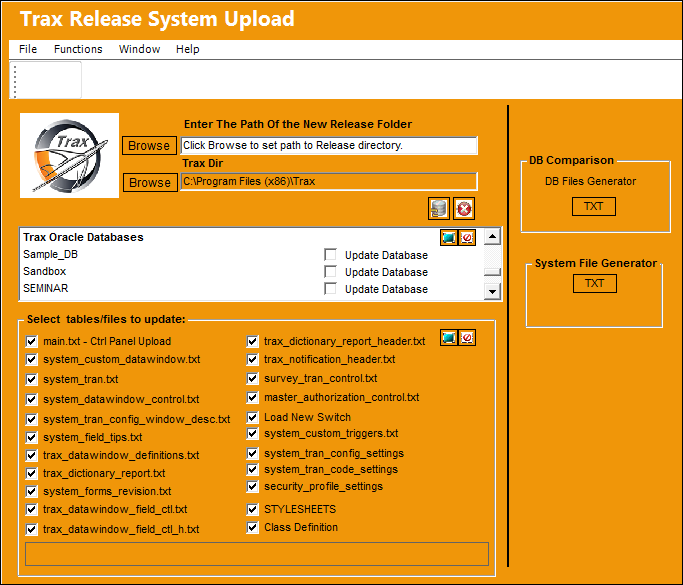
The following information/options are available in this window:
_____________________________________________________________________________________
Browse
Browse to the path where the information will be imported.
Browse
Browse to the appropriate TRAX directory.
Enter new version
Enter the newest version/release.
Update TRAX Release  button
Select the Update TRAX Release button to begin the import process.
Stop Trax Release  button
Select this button to halt and importing/exporting.
Trax Oracle Databases
View a list of all databases in the system. The user may select the Select  All/Deselect All
  button to choose which databases to update.
Select tables/files to update
Select from a list of tables/files to import/export. The user may select the Select All/Deselect All button to choose which tables and files to update.
These checkboxes will all be selected by default.
 All checkboxes are security controlled via System Administration/ Update/ TRAX Release System Upload. For additional information, refer to the Security Explorer, via the System Administration Training Manual.
DB Files Generator  button
Select for files to be created from the database.
System File Generator button
Select the System File Generator button to begin the export.
_____________________________________________________________________________________
Share
Print
|
©1997-2026 Trax USA Corp. All rights reserved. This manual may not be copied, photocopied, reproduced, translated, or converted to any electronic or machine-readable form, in whole or in part, without prior written approval from Trax USA Corp. |
 |