
 Share
Share
 Print
Print
|
|
|
|
|


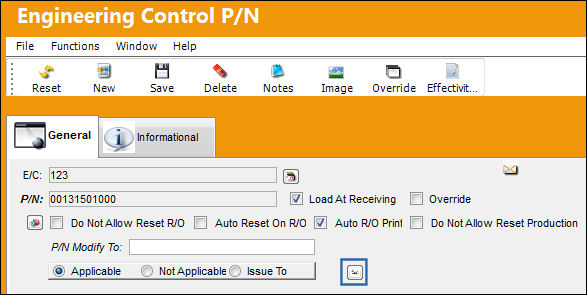
The Positioning Control  button is designed to specify E/C applicability based on the part's installed position. Select the Positioning Control button to define P/N Positions by Engineering Control. The Positioning Control button is used along with the P/N A/C Configuration. This functionality should contain the same A/C Position information as detailed in the P/N A/C Configuration window for the E/C to effectively apply.
From the Engineering Control P/N window, select the Positioning Control button.
Enter the A/C and A/C position information in the A/C Position field.
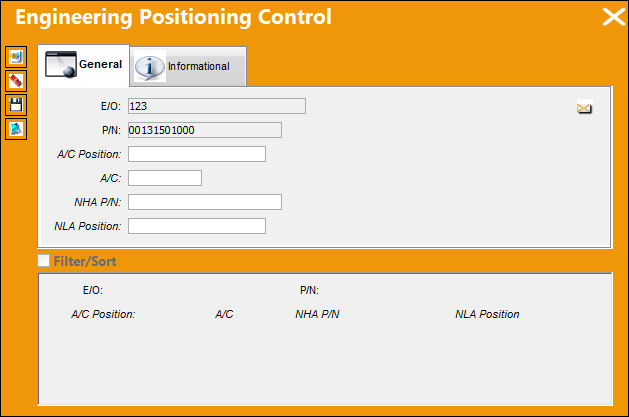
The following information/options are available in this window:
_____________________________________________________________________________________
E/O
The Engineering Control that specifies aircraft or component scheduled maintenance intervals.
P/N
The Part Number reference for the aircraft part.
A/C Position
The aircraft position reference.
A/C
The individual aircraft tail number.
NHA P/N
The part’s Next Higher Assembly P/N (if applicable).
NLA Position
The position of the Next Lower Assembly.
_____________________________________________________________________________________
If the specified part has a P/N Control, its schedule can be overridden and kept as such, regardless of any transactions that are conducted and/or any updates that are made within the P/N Master, through the Override checkbox, via the P/N Control Authorization.
The status of the installed part will automatically set to 'Open' when installed on the aircraft position specified in both the Engineering Positioning Control and P/N A/C Configuration window, otherwise upon the P/N's installation onto the specified aircraft, the status of the P/N will be set to 'N/A.'
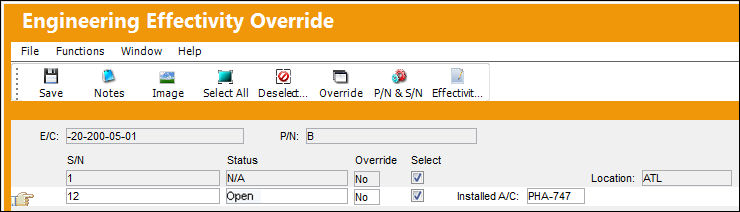
For more information refer to P/N E/C Position Controls.
For more information on how P/N E/C Effectivity can be affected throughout the system, refer to the P/N E/C Effectivity Tracking Guide.
Share
Print
|
©1997-2026 Trax USA Corp. All rights reserved. This manual may not be copied, photocopied, reproduced, translated, or converted to any electronic or machine-readable form, in whole or in part, without prior written approval from Trax USA Corp. |
 |