
 Share
Share
 Print
Print
|
|
|
|
|


This manual will help review different configuration options and scenarios that affect P/N E/C Effectivity.
Engineering Control Range button
- The Range
 button allows users to specify the P/N E/C effectivity status for ranges of Serial Numbers. All other S/Ns that don't fall in within the specified S/N ranges (if any) will be set to a default status. The S/N ranges and statuses set up through this button will come into effect for the various S/Ns as those S/Ns are initially loaded into the system (via P/Os, L/Os, P/N Initial Loads, etc.). Refer to the Engineering Control Range Button.
 - It's important to set Engineering switch
 ADDSTENGRANGE to Yes. This setting will allow users to specify Statuses for different in-range and out-of-range Serial Numbers.
 - Users can also copy the ranges set for other P/Ns from the same E/C by clicking the Copy Ranges
 button.
 - To help choose which S/Ns to be included in a range, select the Individual Component Selection
 button.
Load at Receiving checkbox
- Select this checkbox if new Part Numbers (Inventory) initially entered into the system should have Effectivity linked to this E/C. Whenever a part linked to this P/N E/C is initially entered into the database (be it through P/O, L/O, P/N Initial Load, etc.), the Load at Receiving checkbox comes into effect. This checkbox applies to on-wing receiving as well. For more information refer to the Load at Receiving Checkbox.
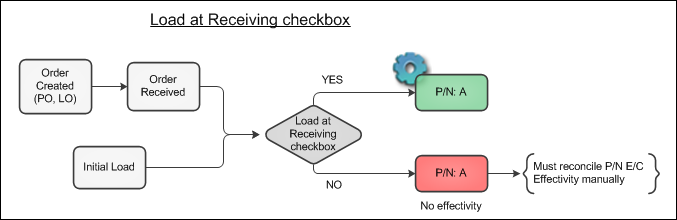
- When Engineering switch FOLLOWGRB is set to Yes, this checkbox is available in the E/C Category transaction code. This means that all P/N E/Cs for a particular E/C Category can have the Load at Receiving checkbox selected (or deselected) by default.
- Also see Engineering switch EFFLOADATREC. This switch controls the application of effectivity according to the Load At Receiving checkbox during Manufacturer Data Import.
P/N Position Controls
- If a P/N E/C has Positioning Control, then the E/C is only effective to that P/N when the P/N is installed on the specified Aircraft Position (S/N's Status will be 'Open' in Override window). If the P/N is installed on a position that is not specified, then the E/C will not be effective for the part (S/N's Status will be 'N/A' in the Override window). For more information refer to P/N E/C Position Controls.
- Additionally, in Version 12, Receiving switch PNECPOSCONT allows P/N E/Cs with Position Controls to be available in Receiving.
Actuals and P/N E/C Effectivity
- Consider the following options:
- P/N E/C Install Days trackingThis is driven by the Calendar Days checkbox / PN_EC_INSTDAYS switch
 Note: In TRAX Version 12, the Calendar Days checkbox has been removed and replaced with the Calendar Days drop down option.
 - AUTOECPNACTUAL - Automatically Update Actual Hours/Cycles on P/N S/Ns Effective to P/N E/C
- There is an audit table in Trax Quick Print called 'pn_sn_change_control_audit' that shows the before and after of the data that is updated via a P/N Change transactions. This information pertains to serialized parts. The data captured includes:
- Previous E/Cs linked to P/N S/N & Actuals
- Previous P/N Controls and Actuals
- New E/Cs being linked
- New P/N Controls being linked
- Transfer of Actuals
- P/N E/C Install Days trackingThis is driven by the Calendar Days checkbox / PN_EC_INSTDAYS switch
P/N Change Transaction
- When performing P/N Change transactions, in order for P/N E/C effectivity to be transfered from the old part to the new one, the new part must be an Interchangeable. Otherwise the effectivity for the new part will not be transfered.
- When doing a P/N Change transaction and the new P/N is different from the old P/N and wasn't already effective, the following configurations will affect how/if effectivity is transfered over to the new P/N S/N: FOLLOWGRB switch, Follow GRB checkbox, and switch PNSNCHG/EFFECTIVITY. For more information on how all of the configurations work together, refer to P/N Change Transactions.
- (Note regarding P/N Control interchangeable effectivity: P/N controls for a main part will carry over to its interchangeable parts by default. But if one of those interchangeable parts has its default P/N Controls manually overridden, when a main part is changed to an interchangeable via a P/N Change transaction, the interchangeable part won't follow the main part's P/N Controls. This rule does not apply P/N E/Cs.)
- There is an audit table in Trax Quick Print called 'pn_sn_change_control_audit' that shows the before and after of the data that is updated via a P/N Change transactions. This information pertains to serialized parts. The data captured includes:
- Previous E/Cs linked to P/N S/N & Actuals
- Previous P/N Controls and Actuals
- New E/Cs being linked
- New P/N Controls being linked
- Transfer of Actuals
Purchase Orders
- Parts received through Purchase Orders will be made effective to the applicable E/Cs when received depending on the configuration of the Load at Receiving checkbox in the P/N E/C window and the logic configured in the applicable P/N E/C Ranges.
Loan Orders
- Parts received through Loan Orders will be made effective to the applicable E/Cs when received depending on the configuration of the Load at Receiving checkbox in the P/N E/C window and the logic configured in the applicable P/N E/C Ranges.
Exchange Orders
- If a P/N S/N first enters the system via an Exchange Order, then the part will be made effective to the applicable E/Cs when received depending on the configuration of the Load at Receiving checkbox in the P/N E/C window and the logic configured in the applicable P/N E/C Ranges.
- However, if the S/N previously existed in the system, then Inventory switch CNCTPNHST is in effect (for example, this scenario occurs with MROs when one of their parts are returned via an exchange). When the switch is set to Yes, when a Part Number Serial Number is Accepted and saved in the Receiving Inspection window, a prompt appears asking if the user would like to connect this part to the existing history and compliance records for the same P/N S/N (if available). Users can also choose to not apply existing history records to the P/N S/N depending on their security clearance. Various security configurations are available. For more information refer to switch CNCTPNHST.
Exchange Order Out
- If a P/N S/N first enters the system via an Exchange Order Out, then the part will be made effective to the applicable E/Cs when received depending on the configuration of the Load at Receiving checkbox in the P/N E/C window and the logic configured in the applicable P/N E/C Ranges.
- However, if the S/N previously existed in the system, then Inventory switch CNCTPNHST is in effect (for example, this scenario occurs with MROs when one of their parts are returned via an exchange). When the switch is set to Yes, when a Part Number Serial Number is Accepted and saved in the Receiving Inspection window, a prompt appears asking if the user would like to connect this part to the existing history and compliance records for the same P/N S/N (if available). Users can also choose to not apply existing history records to the P/N S/N depending on their security clearance. Various security configurations are available. For more information refer to switch CNCTPNHST.
Repair Orders
- Select which E/Cs (and P/N Controls) to be reset and added to the Repair Order through the Repair Order Detail, Control Tab.
- If a P/N Change takes place refer to P/N Change transactions.
N/L/A Creation (via Receiving Inspection)
- Select the Reset GRN checkbox to override the previous goods received number (Goods Received Batch) and have the system automatically create a new GRN for this part after the transaction is completed. This is useful if an assembly is sent for repair and is returned with a new lower component. If the Reset GRN checkbox is checked, a new GRN is created. This will have the system create a new history for the assembly and not associate the new lower component with the history of the prior assembly.
A/C P/N Template Load
- Parts will be made effective to the applicable E/Cs when loaded depending on the configuration of the Load at Receiving checkbox in the P/N E/C window and the logic configured in the applicable P/N E/C Ranges.
Share
Print
|
©1997-2026 Trax USA Corp. All rights reserved. This manual may not be copied, photocopied, reproduced, translated, or converted to any electronic or machine-readable form, in whole or in part, without prior written approval from Trax USA Corp. |
 |