
 Share
Share
 Print
Print
|
|
|
|
|


Select the Change Task Card Revision  button to globally change the Task Card revision information.
Selecting this option creates a global change to Task Cards in the system. Please exercise extreme caution when using this option.
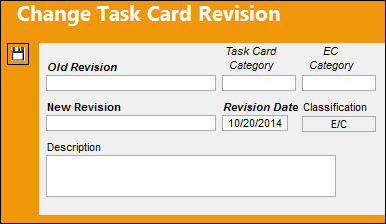
The following information/options are available in this window:
_____________________________________________________________________________________
Old Revision
The existing revision of the Task Card. If a Task Card category is selected, then just that specific Task Card category will be revised.
Task Card Category
The Task Card's Category, as defined in Task Card Category transaction code via the Engineering Transaction Codes. Task Card Authorization Steps are defined in System Transaction Codes by Task Card Category. The category of the Task Card to be changed.
This allows the user to restrict the global change to Task Cards with selected category.
E/C Category
The category of the E/C (e.g., AD, SB, CHECK). The category of the E/C related to the Task Card.
This allows the user to restrict the global change to E/Cs with selected category.
New Revision
The new Task Card number to be changed to.
Revision Date
The Date that the card was revised.
Description
The description of the reason for the revision. This can be edited at a later time, but not after it has been authorized.
Classification
Classifies revision as a Task Card or an E/C.
_____________________________________________________________________________________
Share
Print
|
©1997-2026 Trax USA Corp. All rights reserved. This manual may not be copied, photocopied, reproduced, translated, or converted to any electronic or machine-readable form, in whole or in part, without prior written approval from Trax USA Corp. |
 |