
 Share
Share
 Print
Print
|
|
|
|
|


The Maintenance Planning Document (MPD)  button activates a screen similar to the Zone or Panel screens.
From the Engineering Task Card Screen, the user may access this button by selecting the multi-button and then the MPD button.
 This button is security controlled via Security Explorer/ Engineering/ Update/ Task Card/ Task Card MPD. For additional information, refer to the Security Explorer via the System Administration Training Manual.
TRAX isplays the Task Card MPD window:
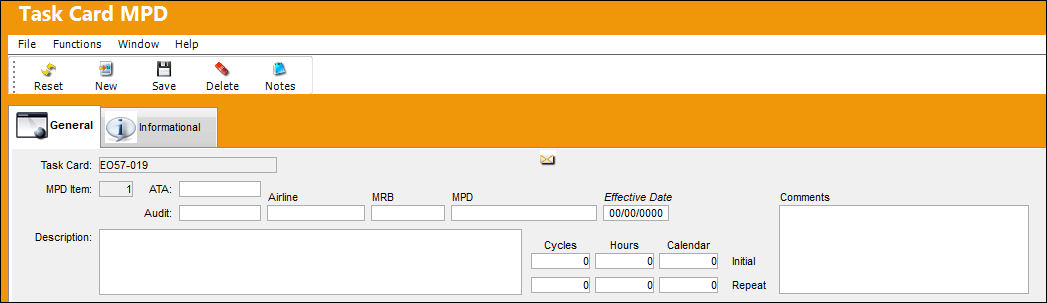
The following information/options are available in this window:
_____________________________________________________________________________________
Task Card
The Task Card / Job Card that details the scheduled maintenance work.
MPD Item
Maintenance Planning Document (MPD) item number.
ATA
Air Transportation Authority (ATA) code.
Audit
Audit number.
Airline
Airline code.
MRB
Maintenance Review Board code.
MPD
MPD name.
Effective Date
Effective date of MPD item.
Comments
Applicable comments.
Description
Description of MPD item.
Cycles
Total number of scheduled cycles applicable to the MPD item.
Hours
Total number of scheduled hours applicable to the MPD item.
Calendar
Total number of scheduled calendar days applicable to the MPD item.
Initial Schedule
The parameter for the initial occurrence of the Task Card. Some Task Cards may have multiple schedule parameters.
Repeat Schedule
The parameter for the subsequent repetitive occurrences of the Task Card. As with the Initial Schedule, some Task Cards may have multiple schedule parameters.
_____________________________________________________________________________________
Additional information relevant to the record can be viewed or included through the Task Card MPD, Informational Tab or the Notes  button.
Share
Print
|
©1997-2026 Trax USA Corp. All rights reserved. This manual may not be copied, photocopied, reproduced, translated, or converted to any electronic or machine-readable form, in whole or in part, without prior written approval from Trax USA Corp. |
 |