Download Online Help Print

Previous Topic

Next Topic

Book Contents

Book Index

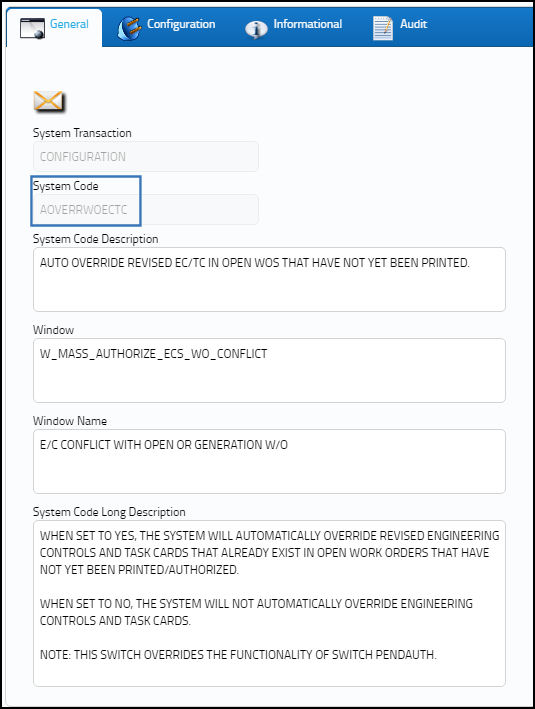
AOVERRWOECTC - Auto Override Revised EC/TC In Open Work Orders That Have Not Yet Been Printed

Auto Override Revised EC/TC In Open Work Orders That Have Not Yet Been Printed

Affected windows: w_mass_authorize_ecs_wo_conflict

AOVERRWOECTC1

Note: This switch overrides the functionality of Switch PENDAUTH.


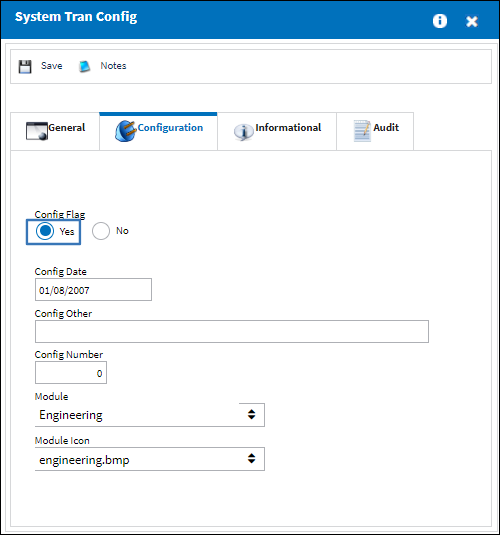
Switch Set to Yes:

Scenario 1:

When set to Yes, the system will automatically override the revised Engineering Controls and Task Cards that already exist in open Work Orders that have not yet been printed/authorized.

eMRO_Engineering_Yes

The following E/C has been created.

A Work Order is created and tied to the existing E/C.

The E/C is attached to the Work Order.

Create a new Work Order and attach the same E/C and print this W/O.

A revision is done for the E/C.

In the Engineering Authorization Management window, select the Mass Authorization but_mass authorize pending ECs button to begin the process of authorizing all pending E/Cs.

Select the Save but_save_small button in the Mass Authorization Pending E/Cs and Linked Task Cards window. The system will display a message warning the user that this action will authorize all pending E/Cs.

Shortly after the process begins, the system may display this warning message if one or more E/Cs were found to have W/O conflicts. After selecting 'OK,' the Mass Authorization is complete.


Scenario 2:

Engineering Switch PENDAUTH must be set to No in order to manually override the conflicting E/Cs. For additional information refer to Switch PENDAUTH, via the Engineering Switches Manual.

Create a Work Order:

Tie Engineering Controls to the Work Order:

Tie the same Engineering Control to a different Work Order:

Create a revision for the E/C and send for authorization.

In the Engineering Authorization Management window, select the Mass Authorization but_mass authorize pending ECs button to begin the process of authorizing all pending E/Cs.

Select the Save but_save_small button in the Mass Authorization Pending E/Cs and Linked Task Cards window. The system will display a message warning the user that this action will authorize all pending E/Cs.

The system will check each individual E/C and if there is a conflict between an E/C and a Work Order with a status of 'Open' or 'Generation' then the system will display the list of conflicts and allow the user to manually override the Work Order.

The following save prompt is displayed notifying that mass authorization for all pending E/Cs was completed.


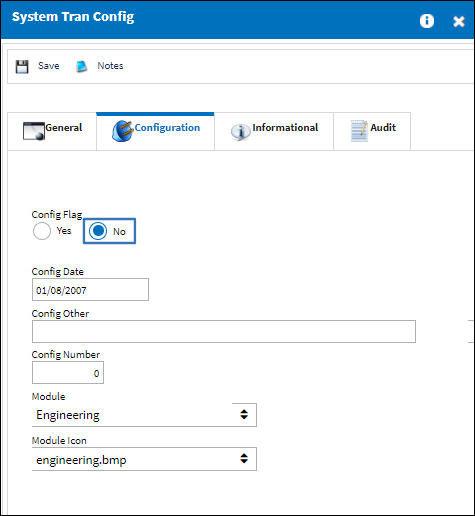
Switch Set to No:

When set to No, the system will not automatically override Engineering Controls and Task Cards.

eMRO_Engineering_No

Create a Work Order and tie the existing E/C to the W/O.

Attach the same E/C to a new Work Order and print:

Make a new Revision for the E/C.

In the Engineering Authorization Management window, select the Mass Authorization but_mass authorize pending ECs button.

The pending E/Cs are automatically authorized.

See Also

Engineering Switches

ADCOMPOPT - Display AD Component Text and AD Not Effective Checkboxes

ADDCONT - Add E/C Content Automatically

ADDSTENGRANGE - Status And Reason Field Added To The Engineering Control Window

ADEFFATCLDI - Avoid Removal of TC Effectivity When an Item is Deleted

ATACHPSCTMANDATORY - Task Card Mandatory ATA Chapter and Section

AUTOECPNACTUAL - Automatically Update Actual Hours/Cycles on P/N S/Ns Effective to P/N E/C

AVOIDRATCHOLD - Cannot Release Task Cards in Hold Status For Authorization

CHKPNMOD- Warning when NLA Modify To is not Part of the NHA

CHOMITEC - Characters to Omit in E/C

CHOMITTC - Characters to Omit in T/C

DCACEFFT - Enable A/C Effectivity at Document Control Level

DEFCUS - Default Customer Value For Task Card References

DONTPRINTTEXT - Do not print T/C Item text when the T/C has a TraxDoc Reference

ECATACHAPSECTMANDAT - Make Chapter and Section fields Mandatory

ECAUTH - E/C Authorization

ECAUTHPROT - Unauthorized Engineering Control fields Protected

ECAUTO - E/C Auto Creation

ECBLANKCLASSIF - E/C Classification field blank by default when creating a new E/C

ECCONTSORT - E/C Content Sort Order

ECEFFCONTROLPNAC - E/C Cannot Have Both P/N and A/C Effectivity

ECEFFTEXT - E/C Effectivity (APPLICABILITY) Code

ECEXPEMD - Make Expenditure field in E/C Mandatory

ECINTREV - Enter Revision and Revision Description on E/C Creation

ECMNLDUP - Disable E/C Affected Manual Duplicate Checks

ECNEWUPDATE - Update E/C To Be Activated

ECRENAME - E/C Rename

ECRESTRICTVENDOR - Restrict E/Cs to Specific Repair Order Vendors

ECSMPER - E/C Authorization Allowed By Creator

ECSUBCATEGORY - Make E/C Sub Category field Mandatory

ECTCLINK - Security Control to the New, Save, and Delete Buttons to Modify EC/TC Links

ECVIAREV - E/C Update Only Via Revision

EFFLOADATREC - Control Effectivity Application According To Load At Receiving Status

ENFORCERANGETYPE - Enforce Range Rules

ENGDFALL - Engineering Selection Window, Status Default to All

FOLLOWGRB - Track E/C Through GRB (Goods Received Batch)

LDPNWOPOS - A/C Readiness will Load P/Ns Without A/C Positions

LOCSITEALLOWED - Display Task Card, Allowed Locations Tab

LOCSITEHIDE - Hide Site field in the Allowed Locations and Location/Site Ban Tabs

MAJORREPAIRMAN - Make the Major Repair Mandatory in Engineering, Production, Shop, and Technical Records

MANLLOR - Disable Lower Level and Override checkboxes if E/C is Mandatory

MLTSKTC - Auto Populate Skill According to Previously Selected Skills

MPDLNROE - Override Effectivity in MPD Loader

NOSELECTEFFECTIVITY - Cannot Select to Override Effectivity for P/N and A/C Engineering Controls

ONWINGTASK - Do Not Allow User TO Edit Reset Date For Onwing P/N E/Cs

PENDAUTH - WO EC & TC Revision Override

PREIFECCOMPL - Prevent User From Removing Effectivity When EC Has Compliance History

RANGEHELPER - Display the Individual A/C Selection Button

REVAUTH - Task Card Authorization Revision

RINCONTROL - RIN Control

RMVRVBAR - Remove Revision Bar

RPTSCHDMAND - Make the E/C Repeat Schedule Mandatory

SAVEASEC - Save As Prompt Box for Old E/C Effectivity

SSCONT - Stylesheet Content Sequence Number

SUPERECCANCEL - Auto Cancel E/Cs That Have Been Superseded By A Date

TASKCARD - Task Card Footer

TC/CTL - Task Card Control Master Edit

TCAREAMD - Make Area field in Task Card and Work Order Task Card Mandatory

TCAREAMDNR - Make Area field in W/O Non Routine Task Card Mandatory

TCASDEF - Task Card Instead of E/C as the Default E/C Type

TCAUTHPROT - Unauthorized Task Card fields Protected

TCCTLSHT - Task Card Control Sheet Footer

TCDCHDR - Task Card Doc Control Attachment Printing

TCDISCAUTH - Enable Authorization Process for Task Card Discrepancy

TCEFFECT - A/C Effectivity At Task Card Level

eMRO TCEFFRANGE Allows The selection of a Range in Task Card Effectivity

TCEXDOC - Task Card Print Exclude Document Control Attachments and Images

TCHIDERTF - Task Card Item hide RTF Editor

TCITMEFF - Task Card Item Effectivity

TCITMEFO - Task Card Item Not Effective

TCITREV - Task Card Last Revised By (field) Update at the Item Level

TCMANSHP - Optional Man Hours on Shop Task Card

TCMSMAN - Make Main Skill Mandatory for Task Card Items

TCOPTMAN - Make Man Hours and Men Required fields Mandatory

TCPNNOTREV - Allow User to Update Task Card P/N Window

TCPREDRW - Task Card Pre-Draw Print After Each Task Card

TCPREPRT - Store Task Card as PDF/Word

TCQUICKRES - Task Card Quick Resolution Available

TCREFEX - Task Card Reference Exclusions

TCRVMAIL - Send Task Card Revision Notification to W/O Creator

TCSEDIT - Task Card Shop Item Editor

TCSMPER - Task Card Allow Authorization By Same Person Who Issued It

TCSTRHDR

TCTMAND - Task Card Type Mandatory

TCVIAREV - Task Card Update Only Via Revision

TCWEIBAL - Show the Weight and Balance Button

TCXMLENCODING - Use UTF-8 Encoding for Task Card XML

UPDATESWCOMPLEC - Disable Auto Upload of P/N Software Configuration at E/C Compliance

WARNECOVER - Engineering Authorization Information Box

Top of Page Download Online Help Print