Publication Date: 11/17/2026 Share Print

Previous Topic

Next Topic

Book Contents

Book Index

Hazardous Part Indicator, via Due List

logo_V7_Big

When a Part Number (P/N) has either the Hazardous Material and/or the Hazardous Substance checkboxes selected in the P/N Master, Inventory tab window in the core application, the Hazardous Substance icon appears to the right of the Part Status Indicator Part Availibity Green_Planning Control button in the Planning Control, Due List results.
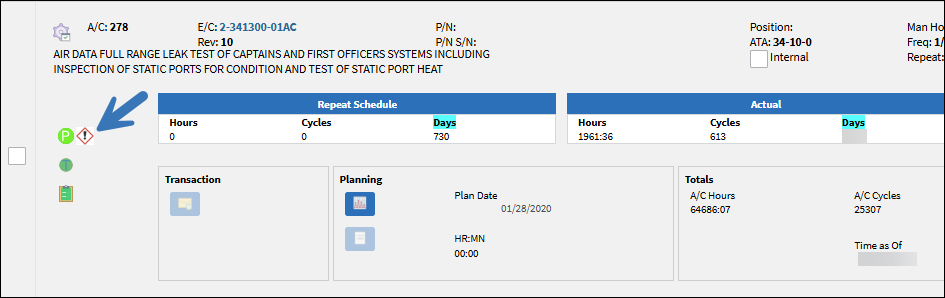
Select the Part Status Indicator Part Availibity Green_Planning Control button to open the Parts/Tools Table window. The Hazmat column states Yes or No to indicate if a part is flagged as a hazardous material and/or substance. Refer to Parts Status Indicator window for more details.

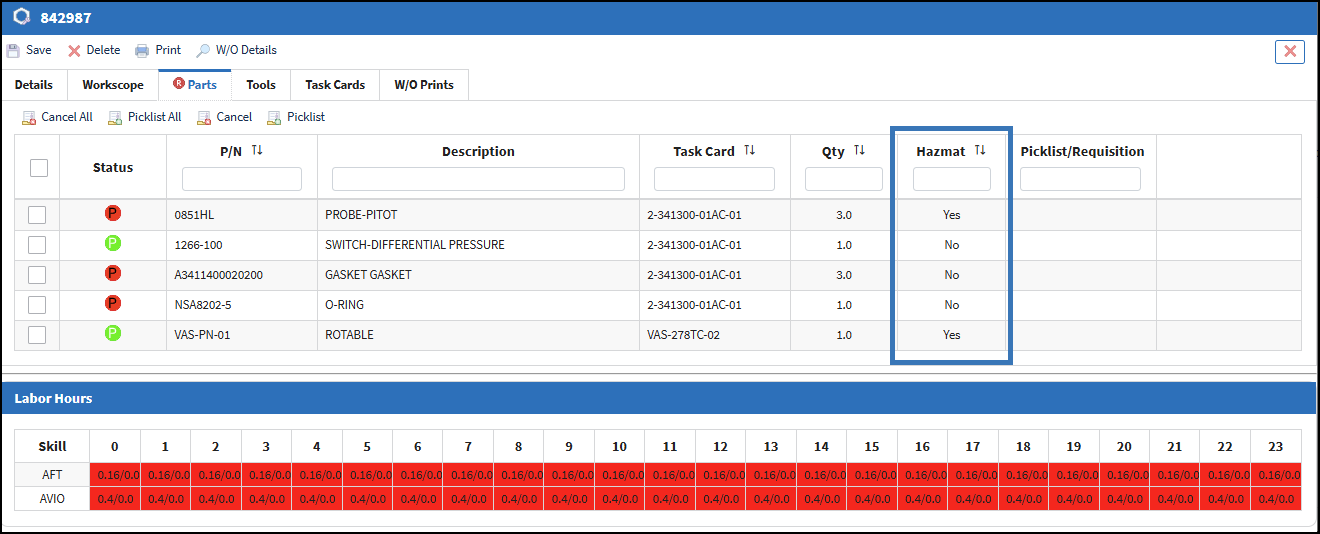
A Hazmat column is also visible in the Work Order under the Parts tab, stating Yes or No to indicate if a part is flagged as a hazardous material and/or substance. Refer to the Parts Tab, via W/O window for more details.
See Also

Planning Results, via Due List

A/C Totals, via Due List

Advance Filter Button, via Due List

Authorization Flag (Open Revision E/C), via Due List

Capability Area, via Due List

Category, via Due List

Due At, via Due List

Defect Fields, via Due List

E/C, via Due List

E/C Called On Button, via Due List

E/C Type, via Due List

ETOPS Designation, via Due List

Internal checkbox, via Due List

Last Compliance, via Due List

Last Occurrence, via Due List

Limit Schedule Icon, via Due List

Mandatory Flag, Due List

Load Level Date, via Due List

Man Hours, via Due List

Mix Schedule Button, via Due List

NHA and NLA Fields, via Due List

Parent E/C Button, via Due List

Part Status Indicator Button, via Due List

Pending E/C Revision Icon, via Due List

Planning Info Button, via Due List

Plan Notes Button, via Due List

Position, via Due List

Reservation Status Indicator, via Due List

Revision, via Due List

Sampling Schedule Indicator, via Due List

Schedule, Actual, Remaining Hours/Cycles/Days, via Due List

Sub Category, via Due List

Tool Status Indicator Button, via Due List

Transaction Notes Button, via Due List

Whichever Occurs, via Due List

W/O Flag, via Due List

Top of Page Publication Date: 11/17/2026 Share Print