 Download Online Help
 Print
|
|
|
|
|


AVAILCNT - RFID Scanning a Receiving Transfer Will be Processed Automatically
Modify Available Quantity After Physical Inventory Adjustment
Affected Window: w_physical_count_eu
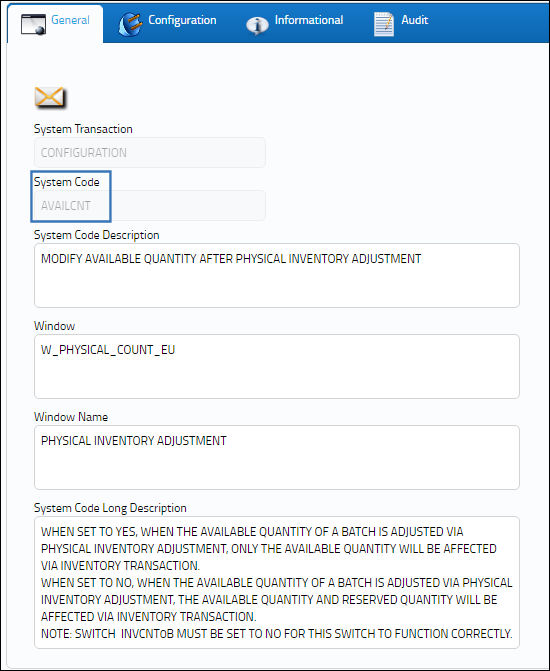
Note: Switch  INVCNT0B must be set to No for this switch to function correctly.
Switch Set to Yes:
When set to Yes, when the available quantity of a batch is adjusted via Physical Inventory Adjustment, only the available quantity will be affected via Inventory Transaction.
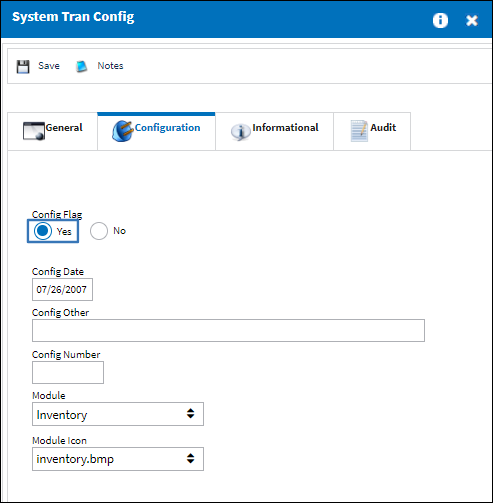
The following Picklist was generated.
A specified amount of parts were reserved in a particular Location.
Notice the parts available and reserved.
A Physical Inventory Count Generation is performed.
The Physical Inventory Count Print is generated.
An inventory count of '0' is performed and saved.
The adjustment is made and saved.
Physical Inventory Count Adjustment print.
The system displays an the new Available and Reserved quantities.
Switch Set to No:
When set to No, when the available quantity of a batch is adjusted via Physical Inventory Adjustment, the available quantity and reserved quantity will be affected via Inventory Transaction.
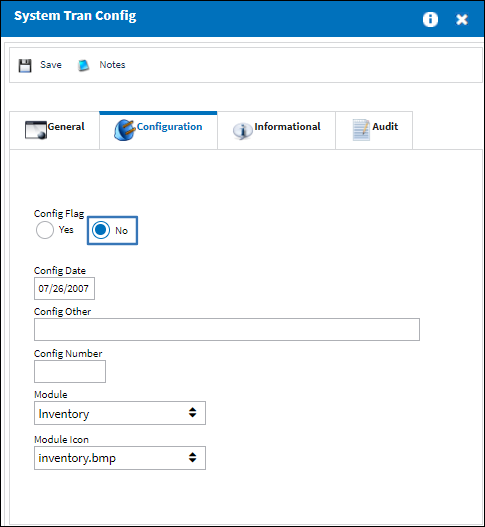
The following Picklist was generated.
A specified amount of parts were reserved in a particular Location.
Notice the parts available and reserved.
A Physical Inventory Count Generation is performed.
The Physical Inventory Count Print is generated.
An inventory count of '0' is performed and saved.
The adjustment is made and saved.
Physical Inventory Count Adjustment print.
The part now appears as pending inventory with an available quantity of '0' and a reserved quantity of '0.'
Download Online Help
Print
|
©1997-2018 Trax USA Corp. All rights reserved. This manual may not be copied, photocopied, reproduced, translated, or converted to any electronic or machine-readable form, in whole or in part, without prior written approval from Trax USA Corp. |
 |