 Download Online Help
 Print
|
|
|
|
|


REOEAUTO - Reorder Level Automatic Calculation After Issues
Reorder Level Automatic Calculation After Issues
Affected Windows: w_inventory_exchange_order_issue, w_inventory_one_step_transfer, w_inventory_rental_order_issue, w_inventory_transaction_adjustment, w_inventory_transaction_break_kit, w_inventory_transaction_break_kit_ctl, w_inventory_transaction_break_kit_item, w_inventory_transaction_express_issue, w_inventory_transaction_manual_issue, w_inventory_transaction_picklist_issue, w_inventory_transaction_picklist_issue, w_inventory_transaction_return_of_loan, w_inventory_transaction_return_to_vendor, w_inventory_transaction_scrap, w_inventory_transaction_tool_check_out, w_physical_count_adjustment_sel, w_co_order_detail_eu, w_co_order_header_eu, w_co_order_header_eu, w_order_auto_print_sel, w_to_order_detail_eu, w_pn_inventory_level_eu
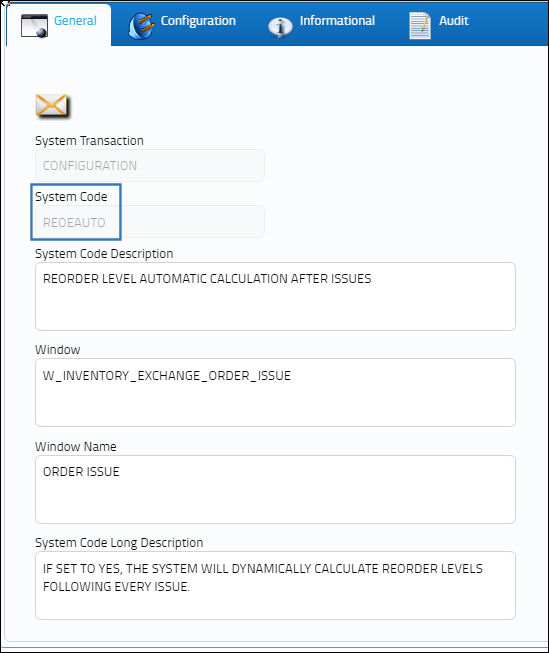
Switch Set to Yes:
When set to Yes, the system will dynamically calculate re-order levels following every issue.
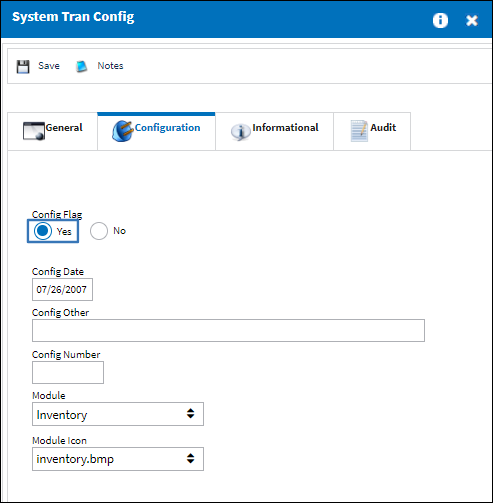
A P/N is available for a particular Location.
The Reorder Level was manually set for the Location. When the Trigger Requisition checkbox is selected, if stock quantities are low or if this is the first time entering this part into the system, then a requisition will be triggered upon save.
Stock quantities are low therefore a requisition was created.
The Reorder Level was automatically set accordingly. This value is calculated based on the parts order issue history.
Switch set to No:
When set to No, the system will allow you to manually set the re-order level.
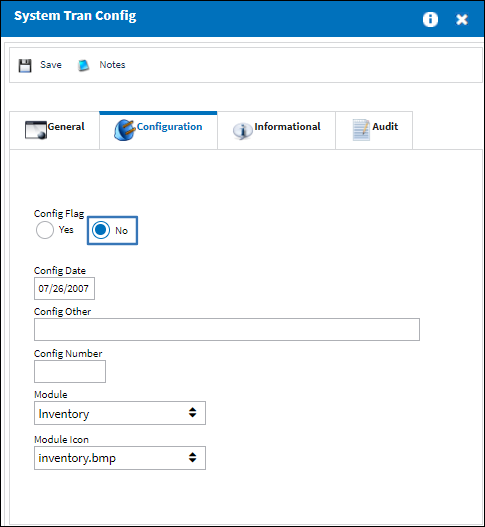
A P/N is available for a particular Location.
The Reorder Level was manually set for the Location. When the Trigger Requisition checkbox is selected, if stock quantities are low or if this is the first time entering this part into the system, then a requisition will be triggered upon save.
Stock quantities are low therefore a requisition was created.
The Reorder Level is still set to as it was.
Download Online Help
Print
|
©1997-2018 Trax USA Corp. All rights reserved. This manual may not be copied, photocopied, reproduced, translated, or converted to any electronic or machine-readable form, in whole or in part, without prior written approval from Trax USA Corp. |
 |