Download Online Help Print

Previous Topic

Next Topic

Book Contents

Book Index

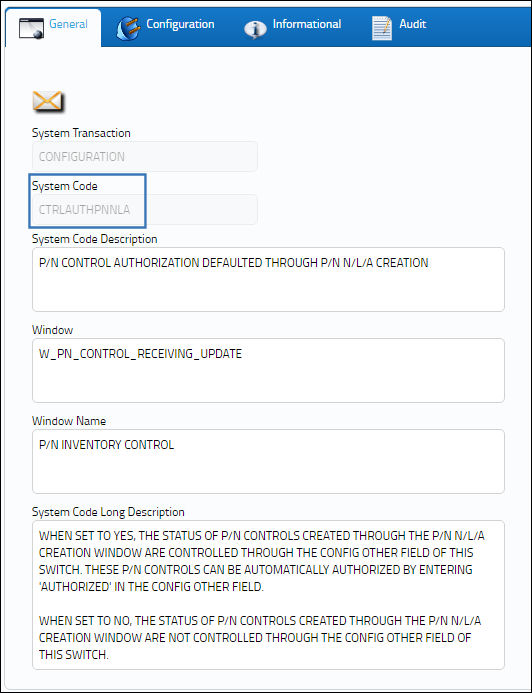
CTRLAUTHPNNLA - P/N Control Authorization Defaulted through P/N N/L/A Creation

P/N Control Authorization Defaulted through P/N N/L/A Creation

Affected Window: w_pn_control_receiving_update

CTRLAUTHPNNLA1

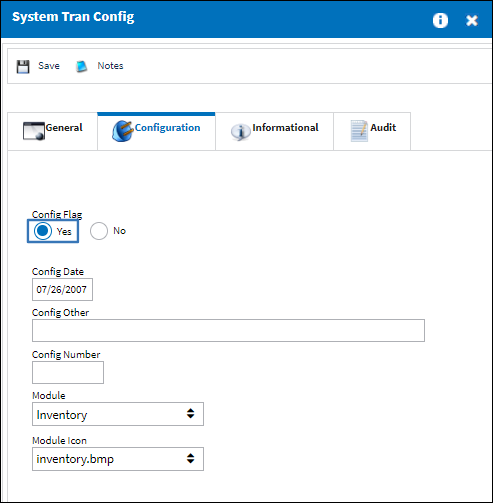
Switch Set to Yes:

When set to Yes, the Status of P/N Controls created through the P/N N/L/A Creation window are controlled through the Config Other field of this switch. These P/N Controls can be automatically authorized by entering 'Authorized' in the Config Other field.

eMRO_Inventory_Yes

Open the P/N N/L/A Creation window via Technical Records/Update and enter an N/H/A. Notice that the following N/L/As are pending P/N Control creation. Save the window once all required information is entered.

Note: For more information regarding this window refer to P/N N/L/A Creation via the Technical Records Training Manual.

Select the P/N Control but_pn control (blue) button for each N/L/A to open the P/N Inventory Control window. Notice that the Status drop down field is set to 'Authorized' for each P/N Control as defaulted by the Config Other field of this switch.

Select the N/L/A Explorer but_nla_explorer_small button to open the P/N Assembly Explorer window. Select into one of the Assembly's P/N Controls.

When the P/N Inventory Control window appears, notice that the P/N Control Statuses are 'Authorized.'

Note: This functionality is also available from the P/N N/L/A Creation window that appears when P/N Initial Loading an assembly. For more information refer to the P/N Initial Load via the Inventory Training Manual.


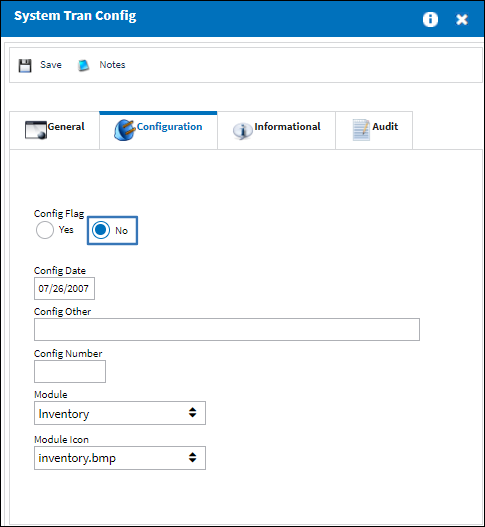
Switch Set to No:

When set to No, the Status of P/N Controls created through the P/N N/L/A Creation window are not controlled through the Config Other field of this switch.

eMRO_Inventory_No

For example, open the P/N N/L/A Creation window via Technical Records/Update and enter an N/H/A. Notice that the following N/L/As are pending P/N Control creation. Save the window once all required information is entered.

Select the P/N Control but_pn control (blue) button for each N/L/A to open the P/N Inventory Control window. Notice that the Status drop down field is set to 'Pending' for each P/N Control. The Status field is not being defaulted by the Config Other field of this switch.

Select the N/L/A Explorer but_nla_explorer_small button to open the P/N Assembly Explorer window. Select into one of the Assembly's P/N Controls.

When the P/N Inventory Control window appears, notice that the P/N Control Statuses are 'Pending' authorization.

See Also

Inventory Switches

APJAAF01 - JAA Unique Tracking Number

AUTBINTRANS - RFID Scanning a Bin Transfer Will be Processed Automatically

AUTISSUE - RFID Scanning a Issue Transfer Will be Processed Automatically

AUTOREORDERFORMULA - Formula Specific To Reorder Levels That Calculates The Requisition or PO Order Quantity

AUTOREORDFORMNOTAC - Ignoring Existing Requisitions, Formula Specific To Reorder Levels That Calculates The Requisition or PO Order Quantity

AUTOTRANSFROMMAINLOC - Create Auto Transfer From Main Location

AUTOWMS - Automated Warehouse Management System

AUTRCVING - RFID Scanning a Receiving Transfer Will be Processed Automatically

AVAILCNT - RFID Scanning a Receiving Transfer Will be Processed Automatically

AVOIDRPPICA - Avoid Requisition Print Window When A Physical Inventory Count Adjustment Runs

BOCRT - Create Requisition For Parts Below Re-Order Level When P/N Reserved on Picklist

BYPASROU - Bypass Location Routing on Picklist Creation

CERTIFREF - Certificate Reference Number

CNCTPNHST - Link History and Compliance of matching P/N S/N in Receiving Inspection

CNCTPNHSTNORI - Link History and Compliance of Matching P/N S/N That Will Not Be Going Through R/I via Interface

CONSINED - Consignment Inventory Auto Purchase

CONSINEX - Consignment Inventory Auto Purchase / By Unit Used Only

CONSTRCNT - Generated Quantity Remains Constant in Recount After P/N Movements

CONTACT - Contact Next Sequence Number

CTRLAUTH - P/N Control Authorization Default

DEFDESRTS - Update Defect Description In Return To Stock Window

DEFRIFG - Default R/I at RTS and PN Initial Load

DFCNLCBN - Default Condition, Location, and Bin for Tool Check In

DFLTRIFG - Receiving Inspection (RI) checkbox Selected by Default for P/N Initial Load and Return to Stock

DIFFACISSU - Soft warning to appear during manual issue when requisition exists against the issued P/N

DISABLERTV - Prevent Return To Vendor Transaction if Order is Invoiced

DSBL_ISSTLTOM - Disable Mandatory Entry Of Issue To Field For Tool Check In

ETOPS - ETOPS Allow Warning at Manual Issue

EXPSHLQL - Allow Shelf Life Expired P/N to be Received Only in Quarantine Location

GREYOUTBINPREF - Grey Out The Bin Field If Part Is Setup With Preferred Bins

INVCNT0B - Delete Batches With Zero (0) Quantity On Physical Inventory Count Adjustment

INVCOUNTALL - Inventory Physical Count With Multiple Locations

INVOICESOPRT - Customer Order Invoice Print not available at S/O Picklist Issue

INVOWNICON - Override Consigned Parts Icon

INVTRCHOUT - General Tab Selected by Default in Inventory Transaction Tool Check Out Window

ISSPRTDF - Default Number of Prints For Issues

ISSTCMAND - Make Task Card Mandatory in Picklist Creation / Manual Issue / Express Issue

ISSUETOC - Issued To – Use Employee Code Only

ISSUETOM - Issued To (field) Mandatory

LABELPRNTOPEN - Issued To (field) Mandatory

LHTUNSTMEMO - Get TRX Unsent MEMOS

MANUALIP - Show Manual Issue Print

MANUALTIP - Show Manual Tool Issue Print After Tool Check Out Transaction

MKTOWOMD - Make W/O (field) Mandatory for Tool Check Out

MSGMDEC - Do Not Show the Message About the Mandatory E/C

MSGMDECQ - Show the Message about the Mandatory E/C as a Question

MSGPLANDUE - Show the message if the P/N Control or P/N E/C has reached or surpassed the percentage of their schedule

NLACTRLS - Prevent Manual Issue of Parts which have NLAs with Overrun P/N Controls

NLAWARRANTY - Apply Warranty to NLA Units Associated with an Assembly

NO1STPRI - Do Not Allow One-Step Transfer If Batch Has Quantity Pending R/I

NOEMPTYIFNONLA - Do Not Display Missing NLA If Component Does Not Have An NLA

NOTBOGUSPART - Blocks BOGUS Parts From Importing Into Inventory

OWNCHGALL - Assign/Remove Owner For P/N In Inventory

PCKLISTCAN - Display Canceled Picklist for Manual Review

PCKLISTPSLOCATION - Create Packing & Shipping Record if Picklist Delivery Location and Picklist Issue Location Do Not Match

PIBLIND - Display Available Quantity On Physical Inventory Count Print

PICKLIST - Picklist Next Sequence Number

PICKSELORDEROVR - Override Picklist Batch Reservation Logic

PKLSTMRVW - Picklist Issue Manual Review

PKQTYOWNER - Picklist Reservation of Owned Parts First for 3rd Party W/Os

PLCMDLS - Make Delivery Location and Site fields Mandatory in Picklist Creation

PLCMP - Make Priority Mandatory in Picklist Creation

PLPOLOC - Print Picklist In Original Location

PNBINCHG - P/N Identification Tag Bin Change to Receiving Bin

PNCLNOTF - Notify User When PN Control is Created, Modified, or Deleted

PNEXPMVJOB - Create Job For Expired Inventory

PNINVHIS - P/N Inventory History Next Sequence Number

PNROBYLOC - Repair Order Prefer Vendor By Location

PNSNCHG/EFFECTIVITY - Remove Engineering Effectivity on the old P/N S/N after P/N S/N Change Transaction

POOLSEQ - Next Sequential Number for a P/N Pool

RCVPRTDF - Set Default Number of Prints for P/N Identification Tag

REFNUMORDESCRIP - Map Bin Label Print All Header to P/N Reference

REOEAUTO - Reorder Level Automatic Calculation After Issues

REOPNODR - Re-Open Order checkbox to be Selected by Default

RIACCEPTPEND - P/N Controls default to 'Pending' on Acceptance of Receiving Inspection

RMVRTS - Return To Stock Not Allowed If Part Is Installed On Aircraft

RTSAURO - Return to Stock R/O Creation

RTSCHKEX - Return to Stock Check Existing Exchange Order

RTSCOST - Use Value Of Zero Instead Of Average For RTS

RTSCOSTA - Inventory Adjustment Use Average Cost Instead Of Zero

RTSNOTES - RTS Notes Not Applied to Subsequent Inventory Transaction Records

RTSOWNER - Make Owner (field) Mandatory

RTSUNKINVMSG - Soft Warning for Return to Stock of Unknown Parts

RTSUNKINVNO - Prevent Return to Stock of Unknown Parts

RTV/JE - RTV Select G/L Account From P/N

SCRAP/AUTHORIZATION - Scrap Authorization

SCRAP4RO - RO/RECEIVING Transaction Created when an R/O Batch is Scrapped

SHOWEXPEC - Show all expired E/Cs during Manual Issue

SHOWLOANCAT

SLIFEXPEXC - Exchange Order Issue Not Allowed for Parts with Shelf Life Expired

SOS - SOS Condition for All Parts in Return to Stock

SOSCTLHR - Show SOS Control Hours

STOREHZDSPN - Enables Hazardous Parts to be Stored in ASRS BINs

TAGTOOLCHKIN - Suppress Tag Reprint at Tool Check In Window

TOOLCALCONTROL - Enables Tool Calibration Control Securities in Several Windows

TOOLCHKINLOCPROTECT - Protect Location in Tool Check-In Window for Unprotected Users

TOOLCKINMAN - Tool Check In W/O or Issue To Employee fields Mandatory

TOOLCKOUTMAN - Tool Check Out W/O and Task Card fields Mandatory

WOPCPRINT - Automatically Cancel Picklist Print When Picklist Reservation is Canceled

WORTSMAN - W/O (field) RTS Mandatory

WOTCISSSTA - Allow Issue of a P/N to a Closed Task Card

Top of Page Download Online Help Print