
 Share
Share
 Print
Print
|
|
|
|
|



The P/N  button on the Planning Query window allows the user to view the Planning P/N Window, which will show the quantities of all the items required for the Planning search results (pre-loads).
Select the P/N button. TRAX displays the Planning P/N Window:
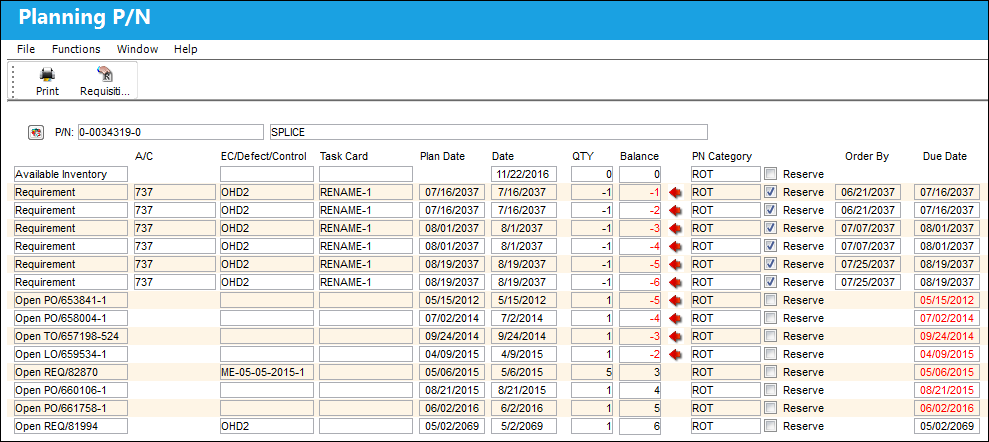
The following information/options are available in this window:
_____________________________________________________________________________________
P/N
The Part Number reference for the aircraft part. The Part Number required as part of the pre-load.
Description
The description of the Part Number.
Available Inventory
The quantity of inventory that is currently available (including items awaiting receiving inspection).
Open Order/REQ etc.
If there are open Orders or Requisitions for the part (and the applicable quantity). The system will show any open Requisitions and Orders for the P/N and the date expected delivery date. If the requirement is overdue, the date will be in RED. The quantity will be shown along with a sub-total of the quantity of parts that are/would be available if the Reqs/Orders arrived.
Requirement
The Detail of the pre-load requirement.
A/C
The individual aircraft tail number. The Aircraft requiring the pre-load item.
E/C/Defect/Control
The Engineering Control/Defect/Part Control relating to the pre-load item.
Date
The Due date of the E/C, Defect, Control, Order or Requisition.
Note: This field will appear red if the maintenance event is overdue.
QTY
The Quantity of the Requirement, Order, or Requisition. The quantity will show negative when more are required than are available, requisitioned or on order.
Balance
The remaining Stock Balance after taking everything into consideration. RED arrow will show items that require attention.
PN Category
The category of the required part number.
Reserve checkbox
This checkbox indicates whether or not a part is reserved. The Reserve status is set in the Task Card P/N window. For additional information, refer to the P/N Button via the Task Card Buttons, of the Engineering - T/C Training Manual.
Order By
Order By is the Due Date + Average Lead Days. For additional information, refer to the Cost Button, General Tab via the P/N Master via the Settings Training manual.
Due Date
The Due Date of the planning element.
_____________________________________________________________________________________
Share
Print
|
©1997-2026 Trax USA Corp. All rights reserved. This manual may not be copied, photocopied, reproduced, translated, or converted to any electronic or machine-readable form, in whole or in part, without prior written approval from Trax USA Corp. |
 |