
 Share
Share
 Print
Print
|
|
|
|
|



The HyperText  button allows the user to use the cursor to hover over desired Work Orders and view a hypertext pop up. This window contains detailed information about the selected Work Order.
Select the HyperText button and hover the cursor over a selected Work Order. The Work Order Detail Pop-up Window appears:
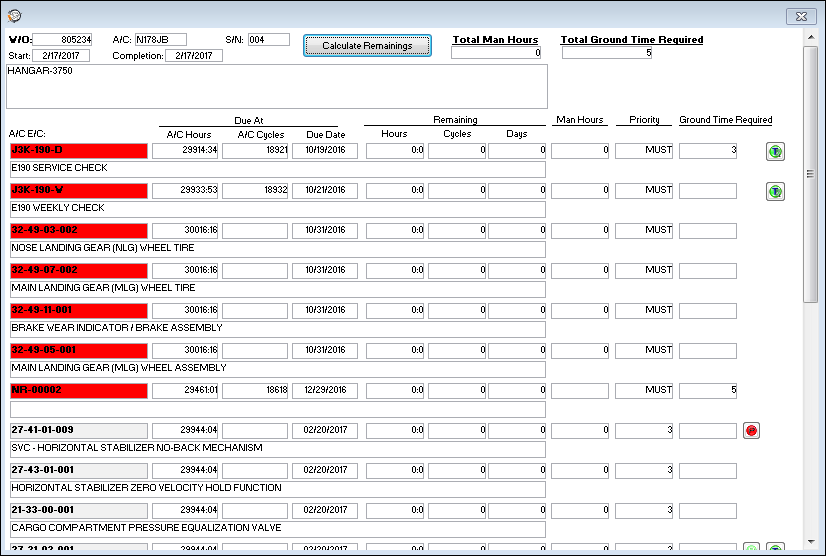
The following information/options are available in this window:
_____________________________________________________________________________________
W/O
The Work Order used to categorize, manage, and schedule work requirements for aircraft maintenance.
A/C
The individual aircraft tail number.
S/N
The Aircraft's Serial Number which is provided by the manufacturer. This serial number is like a registration number, but it is not dependent on a country code and therefore never changes.
Calculate Remainings  button
Select this button to update the Due Date calculation for each maintenance event. This will update the Due At and Remaining values for each maintenance event depending on the W/O Schedule Start Date. The Task Priority for for each event will be updated as well. Task Priorities that have been manually overridden via the Task Priority button via the Selected Work Order Area will be excluded when the Calculate Remainings button has been selected.
Total Man Hours
The total number of Man Hours for all of the maintenance events for the A/C.
Total Ground Time Required
The total amount of time needed for all maintenance events for an aircraft to be grounded in order to comply with the Engineering Control. The Ground Time Required for each E/C is pulled from the Ground Time field via the Engineering Control, Other tab, of the Engineering - E/C Training Manual.
A/C E/C
The Engineering Control for the aircraft.
Due At
The Due At gives the user information about when the planning element item(s) become due.
A/C Hours
The Aircraft Hours that the item is due at.
A/C Cycles
The Aircraft Cycles that the item is due at.
Due Date
The calculated due date of the item (rounded to the nearest date).
TRAX will calculate the due date based on the number of remaining hours and/or cycles factored by the mean hours set-up for each aircraft
Remaining Hours/Cycles/Days
The time remaining against the schedule in hours, cycles or days.
Man Hours
The number of Man Hours needed to complete the maintenance event.
Priority
The priority level of the maintenance event which is determined by the number of days left before the Scheduled Start Date of the Work Order. This information is pulled from the Auto Priority Setup Button.
Ground Time Required
The amount of time needed for an aircraft to be grounded in order to comply with the Engineering Control. This information is pulled from the Ground Time field via the Engineering Control, Other tab, of the Engineering - E/C Training Manual.
Part Status Indicator  button
The green status button displays that all spares required are available in inventory.
Part Status Indicator  button
The yellow status button displays that some, but not all spares are available in inventory.
Part Status Indicator  button
The red status button displays that no spares are available in inventory
Tool Status Indicator  button
The green status button displays that all tools required are available in inventory.
Tool Status Indicator  button
The yellow status button displays that some, but not all tools are available in inventory.
Tool Status Indicator  button
The red status button displays that no tools are available in inventory.
_____________________________________________________________________________________
Share
Print
|
©1997-2026 Trax USA Corp. All rights reserved. This manual may not be copied, photocopied, reproduced, translated, or converted to any electronic or machine-readable form, in whole or in part, without prior written approval from Trax USA Corp. |
 |