
 Share
Share
 Print
Print
|
|
|
|
|



The Task Priority window allows the user to prioritize tasks for a Work Order. The user may override the Task Priority from this window. Once a Task Priority is manually overridden and saved, red text that states 'Manually Overridden' will appear directly under the newly updated Task Priority. Task Priorities that have been manually overridden will not be updated when the Calculate Remainings button is selected via the Hypertext window. For additional information, refer to the HyperText Button, via the Interactive Planner Buttons.
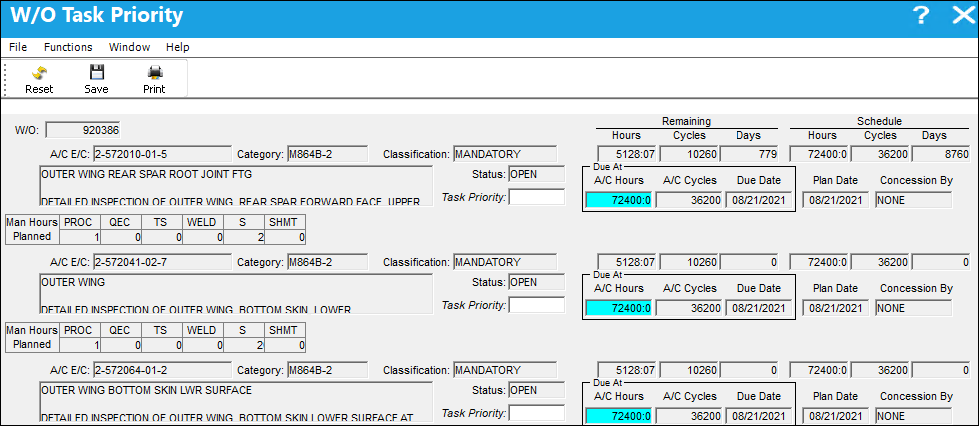
The following information/options are available in this window:
_____________________________________________________________________________________
W/O
The Work Order used to categorize, manage, and schedule work requirements for aircraft maintenance.
Reset Manually Overridden Flag  button
Select this button to remove the 'Manually Overridden' red text that appears directly under the Task Priority field. By selecting this button, the overridden status of the Task Priority is also removed and the Task Priority can be updated when the Calculate Remainings button is selected via the HyperText window.
 This button is security controlled via Planning/ Query/ Interactive Planner/ Reset Manually Overridden Flag button. For additional information, refer to the Security Explorer via the System Administration Training Manual.
For additional information, refer to the Reset Manually Overridden Flag via Task Priority Button.
A/C E/C
Aircraft Engineering Control
Category
The category of the E/C (e.g., AD, SB, CHECK).
Classification
The classification of the E/C (i.e. Mandatory, Optional, etc.).
Status
The status of the E/C.
Task Priority
The priority level determines if the task can be busted, or if the task will require authorization. This information will also appear in blue text to the right of the Task Priority field (i.e. Allowed To Be Busted).
Task Priority 1 - Allowed to be busted and canceled automatically.
Task Priority 2 - Allowed to be busted but requires authorization.
Task Priority 3 - Not allowed to be busted.
Remaining Hours/Cycles/Days
Planning will calculate the W/O Remaining Hours/Cycles and Days based on the time between the Planning Date and the W/O Schedule Start Date.
Schedule Hours/Cycles/Days
The Schedule Hours/Cycles/Days for the item.
Due At A/C Hours
The Aircraft Hours/Cycles that the item is due at.
Due At A/C Cycles
The Aircraft Cycles that the item is due at.
Due Date
The calculated due date of the item (rounded to the nearest date). Planning will calculate the due date based on the number of remaining hours and/or cycles factored by the mean hours set-up for each aircraft.
W/O Sch (Schedule) Date
The start date/time. The Start Date does not affect whether the W/O may be deleted or not. However, if the work has been started, the W/O may not be deleted.
Concession By
Name of person or group allowed to grant concession.
Man Hours Planned
The number of Man Hours that have been reserved/planned for the scheduled task.
 Note: The skills displayed can be controlled by ranking skills in the Skill Master. For more information, refer to the Skill Master, General Tab,via the Settings Training Manual.
_____________________________________________________________________________________
Share
Print
|
©1997-2026 Trax USA Corp. All rights reserved. This manual may not be copied, photocopied, reproduced, translated, or converted to any electronic or machine-readable form, in whole or in part, without prior written approval from Trax USA Corp. |
 |