
 Share
Share
 Print
Print
|
|
|
|
|



The Auto Priority Setup  button allows the user to define a priority level for each maintenance event depending on it's calculated remaining time. Each priority level is designated with a specified number of days for each utilization. The priority levels defined in this window are used to determine the priority level for maintenance events in the detail of Work Order from the Display By Area. These Priorities are created via the Task Priority Transaction Code, via the Production Transaction Codes.
Note: Some operators use this window to prevent the overflying of aircraft.
 This button is security controlled via Planning/ Query/ Interactive Planner/ Auto Priority Setup. For additional information, refer to the Security Explorer via the System Administration Training manual.
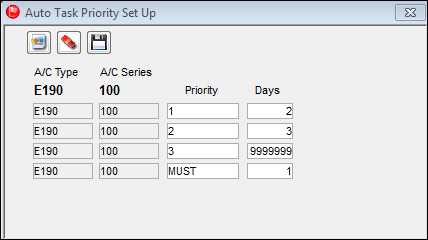
The following information/options are available in this window:
_____________________________________________________________________________________
A/C Type
The individual aircraft tail number.
A/C Series
The Aircraft Series.
Priority
The priority level defined for maintenance events associated to the A/C Type/Series. In the above example, the priorities are set up as follows:
Priority 1 - High level priority.
Priority 2 - Mid level priority.
Priority 3 - Low level priority.
MUST - The maintenance event MUST be complied with.
Days
The number of days that determine the priority level of the maintenance event.
9999 Days - Any maintenance event that will coming due in 9999 days or after the Scheduled Start Date of the Work Order.
3 Days - Any maintenance event that will be coming due in the next 2-3 days of the Scheduled Start Date of the Work Order
2 Days - Any maintenance event that will be coming due in the next 1-2 days of the Scheduled Start Date of the Work Order.
1 Day - Any maintenance event that will be coming due in the in the next 0-1 days of the Scheduled Start Date of the Work Order.
0 Days - Any maintenance event that is currently due or past due of the Scheduled Start Date of the Work Order.
_____________________________________________________________________________________
Share
Print
|
©1997-2026 Trax USA Corp. All rights reserved. This manual may not be copied, photocopied, reproduced, translated, or converted to any electronic or machine-readable form, in whole or in part, without prior written approval from Trax USA Corp. |
 |