
 Share
Share
 Print
Print
|
|
|
|
|



The Locations  button allows the user to track the From-To RON hours (Remaining Overnight hours) that maintenance can be done at a specific location for an aircraft.
This window is informational only. The only fields the user can edit from this window are the Intl Location checkbox and the Time Zone drop down.
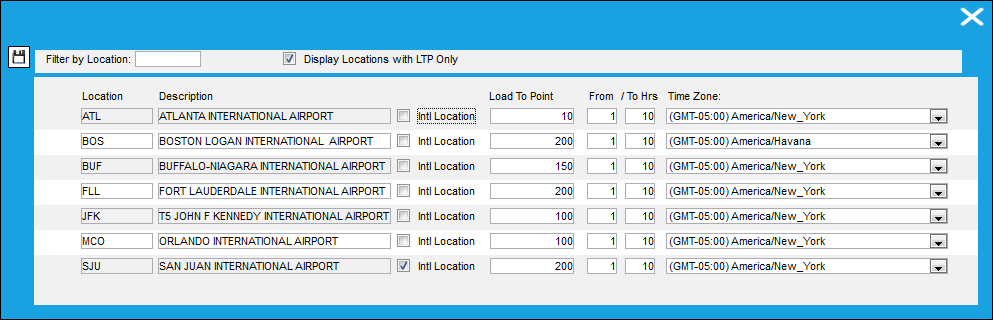
For example, if the Time Zone for location FLL is set in Zulu, the user can see that there are 200 Man Hours available for that location and all work will be scheduled between 9pm and 4am FLL time/Zulu time.
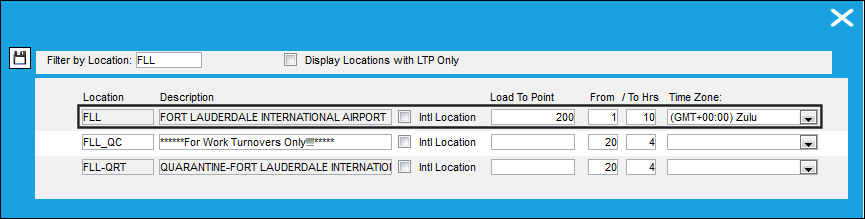
The following information/options are available in this window:
_____________________________________________________________________________________
Filter by Location
Enter a specific location to filter by
Display Locations with LTP Only checkbox
Select this checkbox to display only locations that have a Load To Point defined.
Location
The Location for maintenance events, inventory stores, orders, transactions, or training events.
Description
The description of the Location
Intl Location checkbox
Select this checkbox to indicate that the location is an international location.
Load To Point
The number of Man Hours that are available at this location during the time frame specified in the Locations Load to Point button, via Interactive Planner.The Load To Point is set up in the Location Master, Optional Tab, but can be manually overridden in the above window.
From/To Hrs
The time frame in which the Load To Point contractual Man Hours will be available for maintenance.
Time Zone drop down
Select any time zone on the world.
_____________________________________________________________________________________
Share
Print
|
©1997-2026 Trax USA Corp. All rights reserved. This manual may not be copied, photocopied, reproduced, translated, or converted to any electronic or machine-readable form, in whole or in part, without prior written approval from Trax USA Corp. |
 |