Download Online Help Print

Previous Topic

Next Topic

Book Contents

Book Index

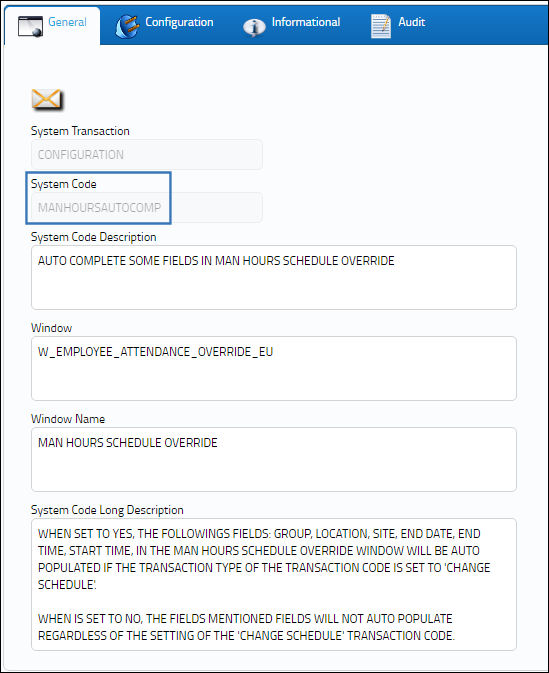
MANHOURSAUTOCOMP - Auto Complete Certain Fields in Man Hours Schedule Override

Auto complete certain fields in Man Hours Schedule Override

Affected Window: w_employee_attendance_override_eu

MANHOURSAUTOCOMP1

Set Up:

The following Transaction Code is associated to the Change Schedule Transaction Type:


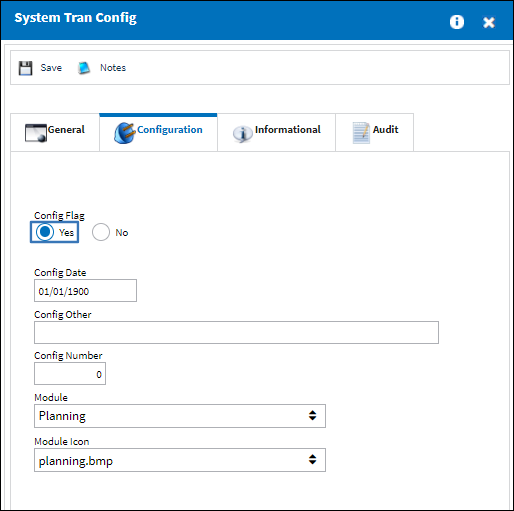
Switch Set to Yes:

When set to Yes, the followings fields: Group, Location, Site, End Date, End Time, Start Time, in the Man Hours Schedule Override window will be auto populated if the transaction type of the Transaction Code is set to "Change Schedule."

eMRO_Planning_Yes

Go to Man Hours Schedule Override and select the New but_new_small button. Populate the name of the Employee and the Transaction Type.

Populate the Start Date:

All of the below fields are populated from the Employee Schedule Self-Management window:

Populate the Daily Pattern and save the record.

The Employee Schedule Self Management window correctly displays the override information:


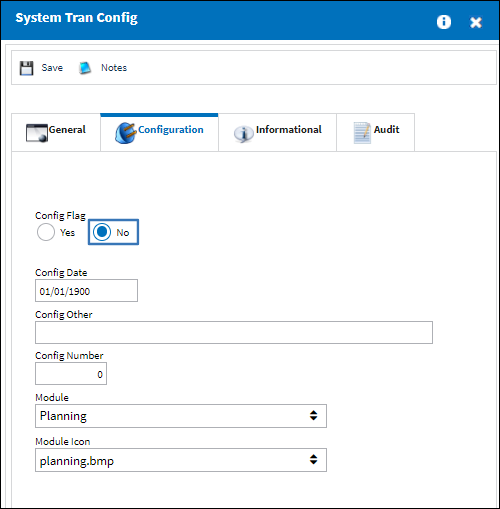
Switch Set to No:

When is set to No, the fields mentioned fields will not auto populate regardless of the setting of the "Change Schedule" Transaction Code.

eMRO_Planning_No

When the Start Date is populated, the remaining fields do not auto populate:

See Also

Planning Switches

ACROLAVG - Use A/C Rolling Average for Mean Hours and Cycles

ALWMULTTSK - Prevent Element From Being Added to a Work Order

APUMEAN - Mean APU Calculation

CPYSCHFROMTRANS - Use Planning Transaction Schedule for T/Cs on Work Orders with a Line Status

DUEATPRJCT - Project the Due At Hours and Cycles Using the Mean Hours and Cycles

EMPATTSEQ - Employee Attendance Sign-On / Sign-Off Next Sequence

INTERACTPLANMANHOURS - Interactive Planner Displays Man Hours per Location/Site

LBRBYHCNT - System Labor by Head Count

LivePlan - Enables the Live Planning Functionality

MANPLNFLF - Default Man Hour Schedule Planner to Location/Site of the Employee

MELDEFLOC - Deferred Defect Convert Reported/Deferred Day to Local Time Zone

OVNDATADAYS - Define Number of Days to Display in Overnight Station Report Tab

OVNTACMS - Overnight Station Default

PASTASCH - Create Past Absence Record

PLANBY - Allows You to Set Planning to Weekly or Monthly

PLANDEPT - Planning Department and Planning Sub Department Fields Mandatory

PLANDUE% - Planning Warning When Percent Due

PLANPNSEQ - Planning P/N Next Sequence Number

PLNAUTO7D - Activate Seven Day Forecast Automatically at Set Interval

PLNHISTML - Determine Planning History Time Limit

PLNJOBACNO - Activate Planning Job

PLNTRNNO - Planning Transactions Sequence Number Can Only Be Changed By The Application

PN_EC_INSTDAYS - Count P/N E/Cs by E/C's Calendar Days or Part's Installed Days

SCHEDULEWORKG - Allow Work Group Selection Filter

SELFSCHLM - Self Assignment Schedule Date Range Limit

SHOPCAPNOT - Do Not Validate Against Shop Capability in the Shop Resource/Tasks Planner

SHPPLNDLF - Default Shops Resource/Tasks Planner to the Location/Site in Employee Master

TOEXITMS - Turn Off Exit Pop Up Message in Planning Query

TOOLWARN - Issues Warning If Tool Expires During W/O Scheduled Date Range

Top of Page Download Online Help Print