
 Share
Share
 Print
Print
|
|
|
|
|


The A/C Units  button, via the Non-Routine Task Card window takes the user to the A/C Units window, displayed below. The A/C Unit option is used to keep a record of additional data that is measured in units for each flight log entry, such as fuel uplift or Auxiliary Power Unit (APU) engine oil burned. The A/C Units window via the Non-Routine Express offers additional information such as the Work Order and Task Card the flight log entry is associated to.
 The A/C Units button is security controlled via Production/ Update/ W/O/ W/O Non Routine Express A/C Units Button. For additional information, refer to the Security Explorer, via the System Administration Training Manual.
For additional information refer to the A/C Units section via the Technical Records Training Manual.
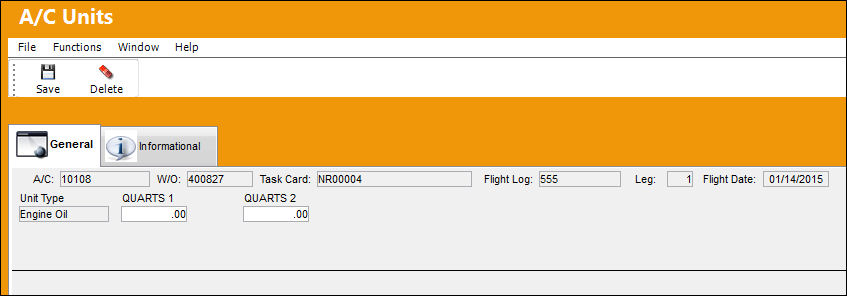
The following information/options are available in this window:
_____________________________________________________________________________________
A/C
The individual aircraft tail number.
W/O
The Work Order used to categorize, manage, and schedule work requirements for aircraft maintenance.
Task Card
The Task Card / Job Card that details the scheduled maintenance work.
Flight Log
The unique Flight Log number for the Flight.
This number is not re-used by an airline.
Leg
The Flight Leg number for the flight.
Flight Date
The Flight date.
Unit Type
The A/C Unit Type Transaction Code. The A/C Unit Type Transaction Codes can be set up via Settings/ Explorer/ System Transaction Code/ Settings/ A/C Unit Type.
APU OIL
The APU Oil consumption.
Engine OIL
The Engine Oil consumption.
_____________________________________________________________________________________
Share
Print
|
©1997-2026 Trax USA Corp. All rights reserved. This manual may not be copied, photocopied, reproduced, translated, or converted to any electronic or machine-readable form, in whole or in part, without prior written approval from Trax USA Corp. |
 |