
 Share
Share
 Print
Print
|
|
|
|
|


W/O Non-Routine Task Cards that are created through Non-Routine Express and are held to be completed later may be deferred.
Go to Production/ Update/ W/O and select the Non-Routine Express  button from the header of a Work Order. After creating and saving a W/O Non-Routine Task Card, select the Defer
  button to create a deferral for the N/R T/C. Upon selection, the following window appears with the Status automatically set to Defer along with other information carrying over from the N/R T/C:
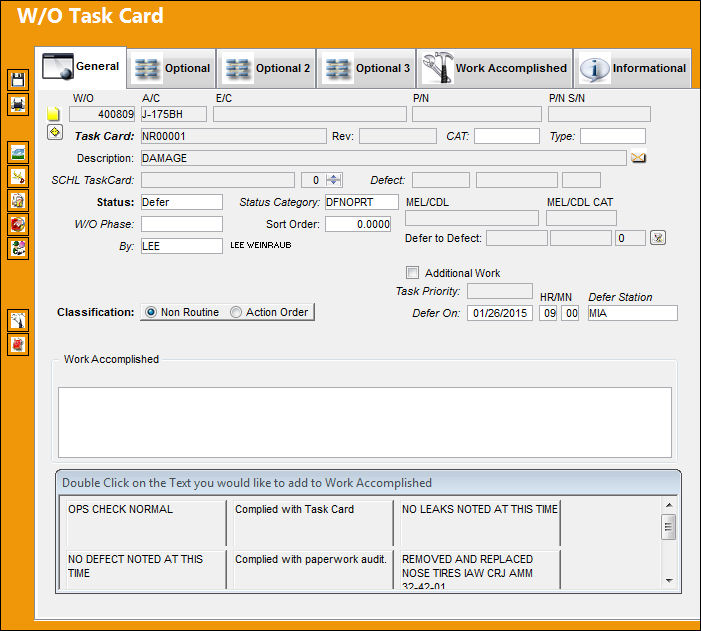
The following information/options are available in this window:
_____________________________________________________________________________________
W/O
The Work Order used to categorize, manage, and schedule work requirements for aircraft maintenance.
A/C
The individual aircraft tail number.
E/C
The Engineering Control that specifies aircraft or component scheduled maintenance intervals.
P/N
The Part Number reference for the aircraft part.
P/N S/N
The Serial Number for the specific serialized part.
Task Card
The Task Card / Job Card that details the scheduled maintenance work.
Rev
The revision number of the Non-Routine Task Card.
CAT
The Non-Routine Task Card category.
Type
The Non-Routine Task Card Type.
Description
A description of the W/O Non-Routine Task Card.
SCHL Task Card
Allows users to associate a scheduled or non-scheduled Task Card created via Engineering/ Update/ Task Card to the Non-Routine Task Card. This can also be used to specify a Task Card that triggered the Non-Routine Task Card.
When a FUR E/C is created via the Follow Up Requirement button (below), the Scheduled Task Card automatically becomes the E/C Document for the FUR E/C. For detailed information refer to the Document Button, via Engineering Control in the Engineering - E/C Training Manual.
Defect
The defect number (or log book number). The three fields correspond to the Defect Type, Defect, and Item of the Defect Report. This field is only informational.
 This field is security-controlled via Production/ Update/ W/O/ W/O Non Routine Express Defect Type, Defect Number, Defect Item fields. For more information refer to the Security Explorer via the System Administration Training Manual.
Status
Through the Defer button, this is automatically set to Defer. The current state of the Non-Routine Task Card. The status of the Task Card is helpful in determining the stage the N/R T/C is at with regard to its completion. Ultimately, the completion of the N/R T/Cs will result in the closing of the Work Order.
Status Category
Status category of the Non-Routine Task Card.
W/O Phase
The particular phase of the work flow that this particular card pertains to.
Sort Order
The sort order of this Non-Routine Task Card.
MEL/CDL
Allows the user to review the MEL or CDL reference related to the deferral. MEL/CDL may be defined, entered, or digitally imported in the MEL Master. For additional information, refer to the MEL Master via the Settings Training Manual.
MEL/CDL CAT
Minimum Equipment List category.
By
The employee performing the Non-Routine Task Card.
Defer to Defect
Select the Defect  button to associate the deferral to a specific Defect that exists.
Additional Work checkbox
This informational checkbox is selected when the invoiced Task Card (Routine or Non-Routine) was designated as additional work. For this to appear, the Task Card must have the Additional Work checkbox selected. For more information refer to the W/O Task Card, Optional 2 Tab via the Task Card Button of the Production Training Manual.
Task Priority
The priority level of the Non-Routine Task Card.
Classification radio buttons
Non-Routine - Select if the deferral is for a Non-Routine Task Cards.
Action Order - Select if the deferral is for an Action Order.
Defer On
Date of the deferral.
HR/MN
Time of the deferral.
Defer Station
The station at which the Non-Routine Task Card was deferred.
Work Accomplished
Enter the actual work that was accomplished here. Use the lower portion of the window to select any of the pre-defined text to appear in this field. The text is pre-defined in Settings/ Explorer/ System Transaction Code. For additional information regarding setting up Special System Transaction Codes, refer to the Settings manual.
_____________________________________________________________________________________
Share
Print
|
©1997-2026 Trax USA Corp. All rights reserved. This manual may not be copied, photocopied, reproduced, translated, or converted to any electronic or machine-readable form, in whole or in part, without prior written approval from Trax USA Corp. |
 |