
 Share
Share
 Print
Print
|
|
|
|
|


TRAX SMS Text Messaging is used for sending instant notification messages from the TRAX Application/Interface Services to mobile/cell phones around the world through an intermediate SMS Text Messaging Service provider:
http://www.csoft.co.uk
Before using TRAX SMS Text Messaging, accounts with the SMS Text Messaging Service provider http://www.csoft.co.uk must be created.
The above account information needs to be uploaded to the TRAX Application. This can be done through TRAX/Settings/Company Profile/SMS Text Message Configuration:
From the Company Profile window, select the SMS Text Messages  button:
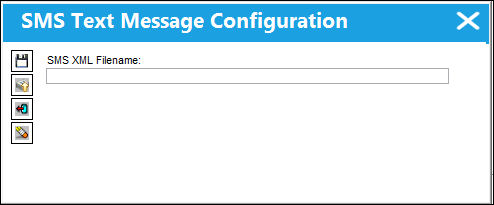
The account information is a text file that looks as follows:
<?xml version='1.0' encoding='UTF-8' ?>
<AccountInfo>
<restUrl>http://weblogs.trax.aero:9000/WebModuleTraxInterface/rest</restUrl>
<url>http://www.csoft.co.uk/sendsms</url>
<Username>username</Username>
<Password>password</Password>
<PIN>pinnumber</PIN>
<ResponseFormat>1</ResponseFormat>
<DeliveryServiceOption>Premier</DeliveryServiceOption>
<SendTo>447700912345<SendTo>
<ReplyTo>447700912346</ReplyTo>
<proxyHost>proxy.traxusers.com</proxyHost>
<proxyPort>8080</proxyPort>
</AccountInfo>
restUrl/url/Username/PIN/ResponseFormat/DeliverServiceOption fields are compulsory.
restUrl is the TRAX Interface "rest" Service.
The restUrl looks as follows:
http://(your TRAX Interface Server IP address)//WebModuleTraxInterface/rest
This is where a default SendTo number is set up. This allows the system to send SMS message to a test number if a phone number has been turned down. This is for testing purposes only. Currently phone numbers from 4477009 00000 to 4477009 99999 are allowed for use.
The user can change the account information in TRAX by exporting it to a text file, modify it, and re-upload it back to TRAX.
Trax Interface Server "rest" Service:
The TRAX Interface "rest" Service should be set up first. It is wrapped up in WebModuleTraxInterface. Please refer to "Interface Setup and Configuration" in TRAX_Interface API documentation.
Notification:
This could be set up through System Notification:
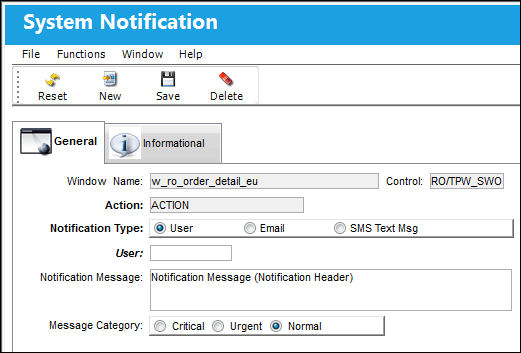
or System Tran Code:
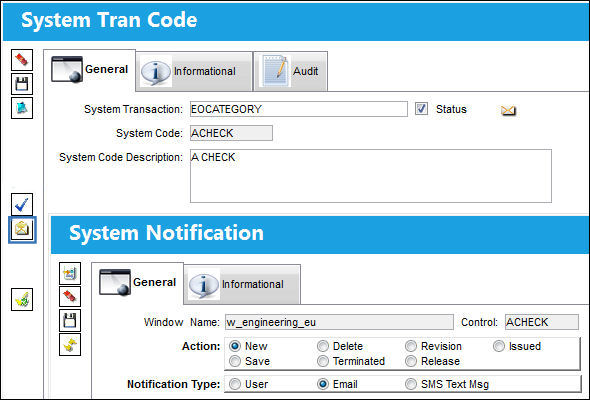
After configuration is set up, the user can start sending SMS messages within TRAX Application.
Share
Print
|
©1997-2026 Trax USA Corp. All rights reserved. This manual may not be copied, photocopied, reproduced, translated, or converted to any electronic or machine-readable form, in whole or in part, without prior written approval from Trax USA Corp. |
 |