
 Share
Share
 Print
Print
|
|
|
|
|


The Non-Routine Express authorization process is structured by varying levels of mechanics, leads, and supervisors which are organized through Production Transaction Code: W/O Category. From this transaction code, each W/O Category can be linked to a different employee level which determines the levels of authorization each W/O Non-Routine Task Card must pass through. The options are 'AMT,' 'Lead,' and 'Supervisor.' To bypass the authorization process, select 'None.' Each radio button determines the authorization process for Non-Routine Task Cards via the N/R Express window. Depending on the selected radio button, users will need to authorize N/R T/Cs from specific authorization windows.
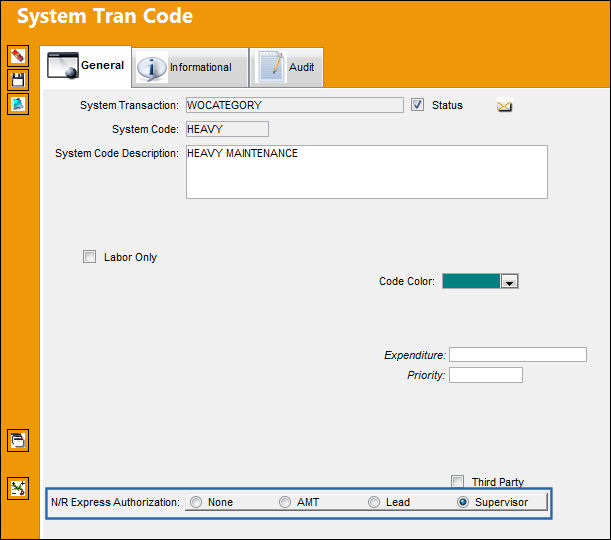
 This functionality was designed as specified by a TRAX customer. The procedures intended through this functionality are part of their customized program and therefore cannot be modified by any other TRAX customer.
The following N/R Express Authorization options are available:
_____________________________________________________________________________________
None
No authorization process is required for W/Os with this authorization requirement. Once created, N/R T/Cs go straight into Open status.
AMT
For W/Os with this requirement, the AMT is required to release the N/R T/C for authorization by accepting it via the Accept  button. The AMT can also use the W/O Non-Routine Release for Authorization window to review and accept the N/R T/Cs. After accepting, the N/R T/C goes to Open status. This authorization process is similar to a one step authorization. Only users with the appropriate security access to the N/R Express window buttons and the W/O Non-Routine Creator Release for Authorization window will be allowed to authorize N/R T/C through the 'AMT' setting.
Lead
When selected, a Lead mechanic is required to accept a N/R T/C after its creator releases it for authorization. The Lead then authorizes the N/R T/C by accepting it in the W/O Non-Routine Lead Authorization window. After accepting, the N/R T/C goes to Open status. Only users with the appropriate security access to the N/R Express window buttons and the W/O Non-Routine Lead Authorization window will be allowed to authorize N/R T/C through the W/O Category 'Lead' setting.
Supervisor
When selected, a Supervisor is required to review the N/R T/C then accept or reject it after the Lead mechanic accepts it. After accepting, the N/R T/C goes to Open status. If rejected, the N/R T/C goes back to 'Creator Authorized' status. The Lead mechanic must then update the N/R T/C and accept it again. Only users with the appropriate security access to the N/R Express window buttons and the W/O Non-Routine Supervisor Authorization window will be allowed to authorize N/R T/Cs through the 'Supervisor' setting.
_____________________________________________________________________________________
For detailed information regarding the N/R T/C Authorization process, refer to each of the Authorization windows:
- W/O Non-Routine Release for Authorization
- W/O Non-Routine Lead Authorization
- W/O Non-Routine Supervisor Authorization
Share
Print
|
©1997-2026 Trax USA Corp. All rights reserved. This manual may not be copied, photocopied, reproduced, translated, or converted to any electronic or machine-readable form, in whole or in part, without prior written approval from Trax USA Corp. |
 |